Turn on suggestions
Auto-suggest helps you quickly narrow down your search results by suggesting possible matches as you type.
Cancel
- Home
- :
- All Communities
- :
- Products
- :
- ArcGIS Online
- :
- ArcGIS Online Questions
- :
- Re: Why does a custom html table offset in field m...
Options
- Subscribe to RSS Feed
- Mark Topic as New
- Mark Topic as Read
- Float this Topic for Current User
- Bookmark
- Printer Friendly Page
Why does a custom html table offset in field maps?
881
2
10-12-2022 09:23 AM

10-12-2022
09:23 AM
- Mark as New
- Bookmark
- Subscribe to RSS Feed
- Permalink
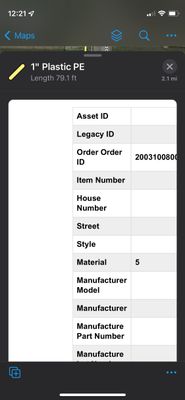
Why does a custom html table offset in field maps but looks perfectly centered on the Map Viewer? It seems that the offset and wrap doesn't work.
<figure>
    <figure>
        <figure class="table" style="width:80%;">
            <table style="border-collapse:collapse;font-family:arial, sans-serif;margin-left:0px;text-align:left;">
                <tbody>

				<tr>
                        <th style="border:1px solid #ddd;padding:8px;">
                            <strong>School District</strong>
                        </th>
                        <th style="border:1px solid #ddd;padding:8px;">
                            {SCHOOLDIST}
                        </th>
                    </tr>

				 <tr style="background-color:#eee;">
                        <th style="border:1px solid #ddd;padding:8px;">
                            <strong>Notes</strong>
                        </th>
                        <th style="border:1px solid #ddd;padding:8px;">
                            {COMMENTS}
                        </th>
					</tr>
                </tbody>
            </table>
        </figure>
    </figure>
</figure>
2 Replies

07-03-2024
07:59 AM
- Mark as New
- Bookmark
- Subscribe to RSS Feed
- Permalink
Did you ever find a solution to this? I'm having the same issue!

4 weeks ago
- Mark as New
- Bookmark
- Subscribe to RSS Feed
- Permalink
July 26, 2026 and Field Maps 26.2.0 still shows that awful offset although on the Map Viewer looks good. Anybody has an idea why Field Maps is offsetting the custom HTML tables?
Thanks!
