- Home
- :
- All Communities
- :
- Products
- :
- ArcGIS Online
- :
- ArcGIS Online Questions
- :
- Update coordinate system of hosted feature layer?
- Subscribe to RSS Feed
- Mark Topic as New
- Mark Topic as Read
- Float this Topic for Current User
- Bookmark
- Printer Friendly Page

- Mark as New
- Bookmark
- Subscribe to RSS Feed
- Permalink
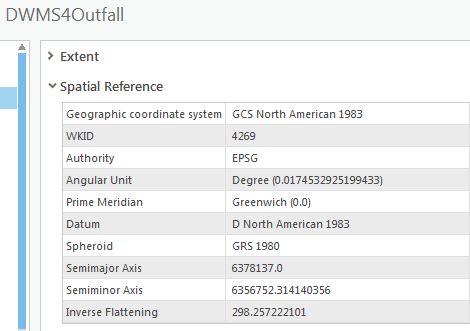
Is it possible to update the coordinate system of a hosted feature layer in ArcGIS Pro without overwriting it? I published a hosted feature layer (DWMS4Outfall) and it looks like I forgot to set the projected coordinate system to NAD 1983 StatePlane California VI FIPS 0406 Feet. Other layers I published show both PCS and GCS under Spatial Reference (e.g., RWStation). If I need to republish/overwrite, how can it be done without losing the attachments?
Thanks for the help.

Solved! Go to Solution.

- Mark as New
- Bookmark
- Subscribe to RSS Feed
- Permalink
@SierraNevada, I cannot speak to the LSL Solution specifically, but I was able to modify the Spatial Reference (SR) of an AGOL hosted feature layer (HFL) following the guidance from @BrittanyBurson. Setting the SR on the map itself is what seems to impact the SR used by the HFL. This does seem to affect the service as a whole, even for end users that do not use Pro. Although what you may be experiencing might be related to re-projection on-the-fly within web maps, which I believe is standard behavior for AGOL web maps?
Here are the steps I followed to overwrite the SR of a HFL without publishing a new item:
- Add new Map to an ArcGIS Pro Project, re-name it according to the HFL. Remove the default basemaps.
- Open the properties of this new map.
- Enable "Allow assignment of unique numeric IDs..." in General.
- Set the desired SR in the Coordinate Systems section.
- Add the desired data to this map, already projected to my desired SR, which is the same as what I just set this map to use.
- In the properties of the added dataset(s), set the desired Layer ID to match the existing HFL structure.
- In the Share tab, click the dropdown under Web Layer, then select Overwrite Web Layer. Select my desired Web Layer to overwrite.
- Compare and Analyze, then Publish once everything looks good. Once complete, navigate to the REST page from the AGOL Item Overview page and confirm the SR was modified.

- Mark as New
- Bookmark
- Subscribe to RSS Feed
- Permalink
Hello! Does this still work? I tried the steps: duplicated the layer by saving a local file, reprojected to the desired coordinates, and overwrote the existing web layer, but when I checked the layer after it was published, the coordinates did not change.

- « Previous
-
- 1
- 2
- Next »
- « Previous
-
- 1
- 2
- Next »