- Home
- :
- All Communities
- :
- Products
- :
- ArcGIS Online
- :
- ArcGIS Online Questions
- :
- Arcade expression with nested intersect
- Subscribe to RSS Feed
- Mark Topic as New
- Mark Topic as Read
- Float this Topic for Current User
- Bookmark
- Subscribe
- Mute
- Printer Friendly Page
Arcade expression with nested intersect

- Mark as New
- Bookmark
- Subscribe
- Mute
- Subscribe to RSS Feed
- Permalink
I'm trying to create a popup in a webmap that shows the number of species that intersect within a boundary within the selected feature. For example, I select the state of California (from US. State Boundaries layer) and this searches the Endangered Species Ranges layer so that it counts the number of species that are within the Roadless Rule boundaries (another layer) within the state of California. It then also lists out these species.
I've tried with intersect but get hung up on the second intersect as you can't intersect two featuresets. I've attached what I've got so far with the caveat that I'm looking for a way to do that second intersect.
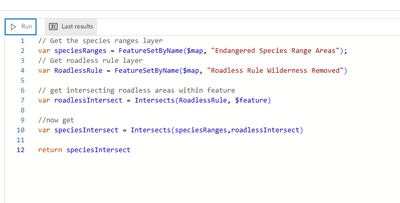
Is this possible in arcade? Or do I need to do some pre-processing in ArcPro by creating these intersected layers and then adding them to the map?
-Becca


- Mark as New
- Bookmark
- Subscribe
- Mute
- Subscribe to RSS Feed
- Permalink
When posting code, please use the "Insert/edit code sample" button. This makes it easier to read or copy your code.
You can create a single feature from the roadlessIntersect FeatureSet and using that in the intersection with the speciesRanges FeatureSet. To do this, loop through the FeatureSet and add the features to an array. Use the Union function to create the single feature from that array.
var roadlessIntersect = Intersects(RoadlessRule, $feature)
var features = []
for (var f in roadlessIntersect) {
  Push(features, f)
}
var roadlessFeature = Union(features)
var speciesIntersect = Intersects(speciesRanges, roadlessFeature)