- Home
- :
- All Communities
- :
- Developers
- :
- JavaScript Maps SDK
- :
- JavaScript Maps SDK Questions
- :
- export featuretable to csv exports only one field ...
- Subscribe to RSS Feed
- Mark Topic as New
- Mark Topic as Read
- Float this Topic for Current User
- Bookmark
- Printer Friendly Page
export featuretable to csv exports only one field and objectid

- Mark as New
- Bookmark
- Subscribe to RSS Feed
- Permalink
I use Rene's example posted at: https://codepen.io/odoe/pen/rqXqVw?editors=0010
to export featuretable to csv but it produces a csv file with 2 fields including the objectid.
I first selected the features by the geometry.
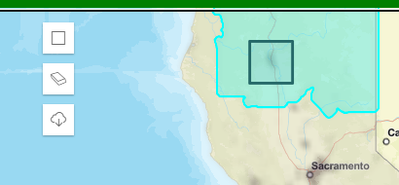
Then the feature table is updated to show selected features.

Then clicked on the export button to create the csv file but only one field but records span across multiple fields!
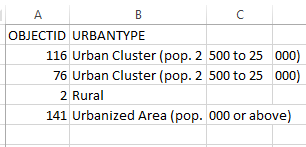
As Rene's example shows, first declare the variable
let resultFeatures
get the selected features.
 featureLayerView
            .queryFeatures(query)
            .then((results) => {
              const graphics = results.features;
              resultFeatures = graphics;
THen, attach code to the export button:
view.ui.add("btn-export", "top-left");
      const btn = document.getElementById("btn-export");
      btn.addEventListener("click", () => {

        if (resultFeatures.length) {
          // export to csv
          const attrs = resultFeatures.map(a => a.attributes);
          console.log(attrs)
          const headers = {};
          const entry = attrs[0];
          for (let key in entry) {
            if (entry.hasOwnProperty(key)) {
              headers[key] = key;
            }
          }
          exportCSVFile(headers, attrs, "export");
        }
      });
The issue by now is exposed because one field is passed on to the CSV. Why?
Solved! Go to Solution.
Accepted Solutions


- Mark as New
- Bookmark
- Subscribe to RSS Feed
- Permalink
That's an old sample. I would try a couple of things.
- Set outFields of layer to ["*"]
- Or set outFields of query to ["*"]
I suspect the fields are not in the query results, so you need to ask for them all.
- Mark as New
- Bookmark
- Subscribe to RSS Feed
- Permalink
That's an old sample. I would try a couple of things.
- Set outFields of layer to ["*"]
- Or set outFields of query to ["*"]
I suspect the fields are not in the query results, so you need to ask for them all.
- Mark as New
- Bookmark
- Subscribe to RSS Feed
- Permalink
Thank you. I already had the query to outFields=["*"] but not the layer. Apparently, by not using the same for the layer it does not by default use all fields even though the featuretable displays all fields.
