- Home
- :
- All Communities
- :
- Products
- :
- ArcGIS Instant Apps
- :
- ArcGIS Instant Apps Questions
- :
- Citizen Problem Reporter: Citizen Problem Manager ...
- Subscribe to RSS Feed
- Mark Topic as New
- Mark Topic as Read
- Float this Topic for Current User
- Bookmark
- Subscribe
- Mute
- Printer Friendly Page
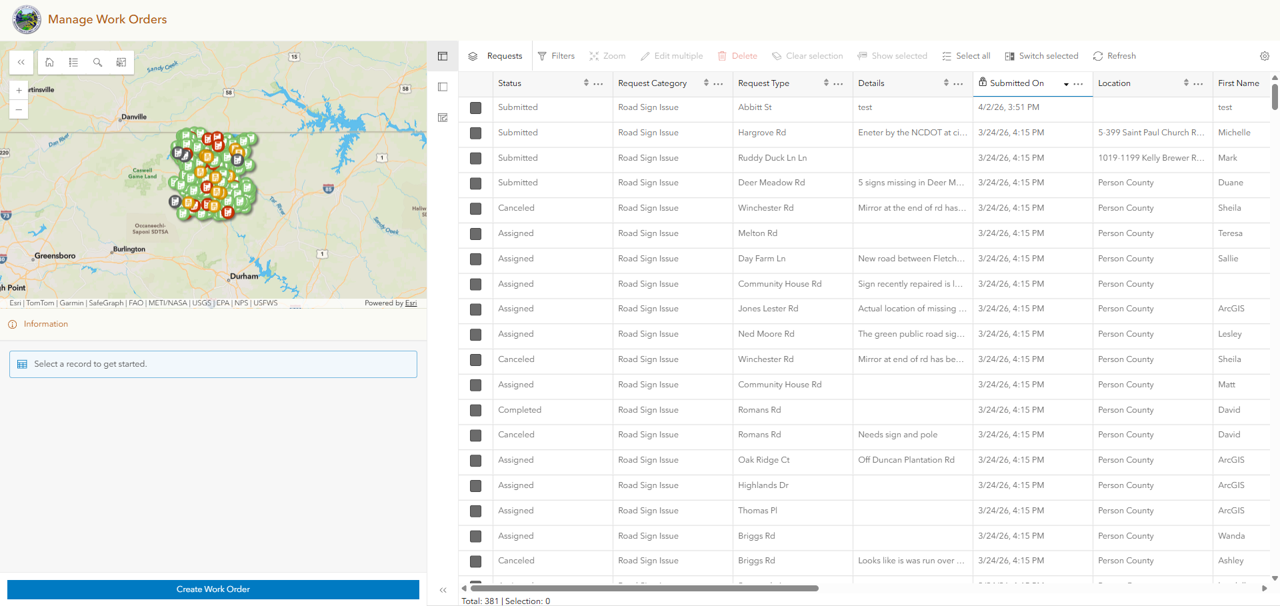
Citizen Problem Reporter: Citizen Problem Manager -- option to create work order

- Mark as New
- Bookmark
- Subscribe
- Mute
- Subscribe to RSS Feed
- Permalink
In the Citizen Problem Manager Instant app of the Citizen Problem Reporter v3, there is an option for the internal user to Create Work Order. Clicking that link opens a panel allowing the user to choose one of the pre-defined Status types to being entering a new work order. The problem is that we have modified those Status types: In Progress and Received have been omitted, and we've added Assigned. I'm able to remove In Progress and Received and add in Assigned from every other place within the CPR ecosystem EXCEPT this location. The ability to refine this data entry form, and/or turn off/modify the Create Work Order button would be helpful.
Does anyone have ideas for workarounds?
Solved! Go to Solution.
Accepted Solutions



- Mark as New
- Bookmark
- Subscribe
- Mute
- Subscribe to RSS Feed
- Permalink
hi @SallieVaughn ,
Where did you modify the status type, ArcGIS Online or Pro?
Also, In the Map viewer if you try to create a new feature do you see the updated template?
- Mark as New
- Bookmark
- Subscribe
- Mute
- Subscribe to RSS Feed
- Permalink
hi @SallieVaughn ,
Where did you modify the status type, ArcGIS Online or Pro?
Also, In the Map viewer if you try to create a new feature do you see the updated template?
- Mark as New
- Bookmark
- Subscribe
- Mute
- Subscribe to RSS Feed
- Permalink
I modified that through ArcGIS Online. And I did not think to modify/update the template in Map Viewer. Updating the template there fixed my issue. Thanks!
- Mark as New
- Bookmark
- Subscribe
- Mute
- Subscribe to RSS Feed
- Permalink
Awesome, very glad to hear that @SallieVaughn
