Turn on suggestions
Auto-suggest helps you quickly narrow down your search results by suggesting possible matches as you type.
Cancel
- Home
- :
- All Communities
- :
- Developers
- :
- ArcGIS Windows Mobile (Retired)
- :
- ArcGIS Windows Mobile Questions
- :
- Re: Image tiles displaying with an offset on table...
Options
- Subscribe to RSS Feed
- Mark Topic as New
- Mark Topic as Read
- Float this Topic for Current User
- Bookmark
- Subscribe
- Mute
- Printer Friendly Page
Image tiles displaying with an offset on tablet but not on PC
Subscribe

07-11-2013
06:31 PM
- Mark as New
- Bookmark
- Subscribe
- Mute
- Subscribe to RSS Feed
- Permalink
Greetings All
So I created an aerial tpk file for my mobile project. Extracted it to the AGM project folder and it all looks correct on my desktop (see desktop.jpg)
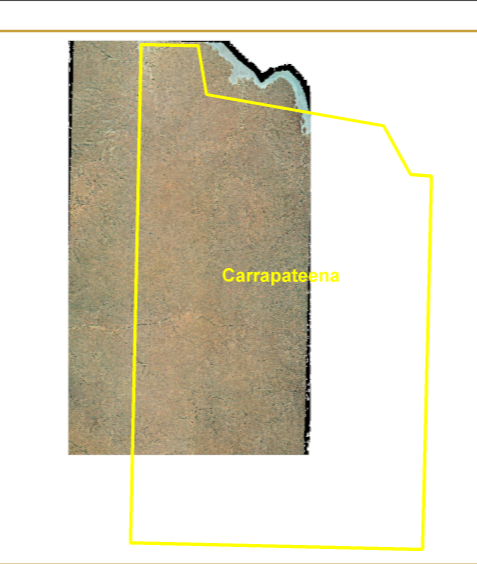
However, when I try doing the same thing on the field tablet (Samsung Slate), the image shows up offset from its actual location (see tablet.png). Only when I zoom right down, does the image align itself properly.
I have tried multiple ways of creating the tpk as well as unpacking it, but its always the same result.
I did notice that the default DPI is 96 when I generate the tile cache tiling scheme and while it says that this parameter is optional, the help text mentions that you need to consider the resolution of the device or you might get errors.
I've only recently started with AGM 10.1.1 and noticed this error a few times already for projects with large aerials.
Coordinates are the same and I made sure I specified enough scale levels for the aerial
Any suggestions?
Thanks in advance
So I created an aerial tpk file for my mobile project. Extracted it to the AGM project folder and it all looks correct on my desktop (see desktop.jpg)
However, when I try doing the same thing on the field tablet (Samsung Slate), the image shows up offset from its actual location (see tablet.png). Only when I zoom right down, does the image align itself properly.
I have tried multiple ways of creating the tpk as well as unpacking it, but its always the same result.
I did notice that the default DPI is 96 when I generate the tile cache tiling scheme and while it says that this parameter is optional, the help text mentions that you need to consider the resolution of the device or you might get errors.
I've only recently started with AGM 10.1.1 and noticed this error a few times already for projects with large aerials.
Coordinates are the same and I made sure I specified enough scale levels for the aerial
Any suggestions?
Thanks in advance
Solved! Go to Solution.

1 Solution
Accepted Solutions
07-25-2013
08:13 PM
- Mark as New
- Bookmark
- Subscribe
- Mute
- Subscribe to RSS Feed
- Permalink
Woohoo!!
found the problem....and totally by chance.
The issue is the dpi settings for the device. It needs to be 100%, not 125%.
See here:
http://forums.arcgis.com/threads/88771-Mobile-Tiles-Windows-8-projection-issues.?p=316313#post316313
I can sleep soundly again 🙂
found the problem....and totally by chance.
The issue is the dpi settings for the device. It needs to be 100%, not 125%.
See here:
http://forums.arcgis.com/threads/88771-Mobile-Tiles-Windows-8-projection-issues.?p=316313#post316313
I can sleep soundly again 🙂
2 Replies

by
Anonymous User
Not applicable
07-15-2013
11:07 AM
- Mark as New
- Bookmark
- Subscribe
- Mute
- Subscribe to RSS Feed
- Permalink
Original User: AkhilP
Interesting issue, can you go on your desktop and get an X,Y coordinates of the tile. For example the top right corner.
Then on your tablet get the top right corner coordinates and see if they match.
If they do not match, then you got an issue.
Another thing it could be that your tablet has a smaller screen than your desktop, thus it may appear to be shifted or smaller than you are normally used to?
Interesting issue, can you go on your desktop and get an X,Y coordinates of the tile. For example the top right corner.
Then on your tablet get the top right corner coordinates and see if they match.
If they do not match, then you got an issue.
Another thing it could be that your tablet has a smaller screen than your desktop, thus it may appear to be shifted or smaller than you are normally used to?
07-25-2013
08:13 PM
- Mark as New
- Bookmark
- Subscribe
- Mute
- Subscribe to RSS Feed
- Permalink
Woohoo!!
found the problem....and totally by chance.
The issue is the dpi settings for the device. It needs to be 100%, not 125%.
See here:
http://forums.arcgis.com/threads/88771-Mobile-Tiles-Windows-8-projection-issues.?p=316313#post316313
I can sleep soundly again 🙂
found the problem....and totally by chance.
The issue is the dpi settings for the device. It needs to be 100%, not 125%.
See here:
http://forums.arcgis.com/threads/88771-Mobile-Tiles-Windows-8-projection-issues.?p=316313#post316313
I can sleep soundly again 🙂