- Home
- :
- All Communities
- :
- Products
- :
- ArcGIS Field Maps
- :
- ArcGIS Field Maps Questions
- :
- "Client Certificate Requested" Error, When Opening...
- Subscribe to RSS Feed
- Mark Topic as New
- Mark Topic as Read
- Float this Topic for Current User
- Bookmark
- Printer Friendly Page
"Client Certificate Requested" Error, When Opening Field Maps and Collector

- Mark as New
- Bookmark
- Subscribe to RSS Feed
- Permalink
Yesterday, I started to get this error on my Android phone. I have the latest Field Maps and Collector app and my Android is fully updated. Not sure why I got this error today, after never receiving it... I have attached the screenshot from my phone.
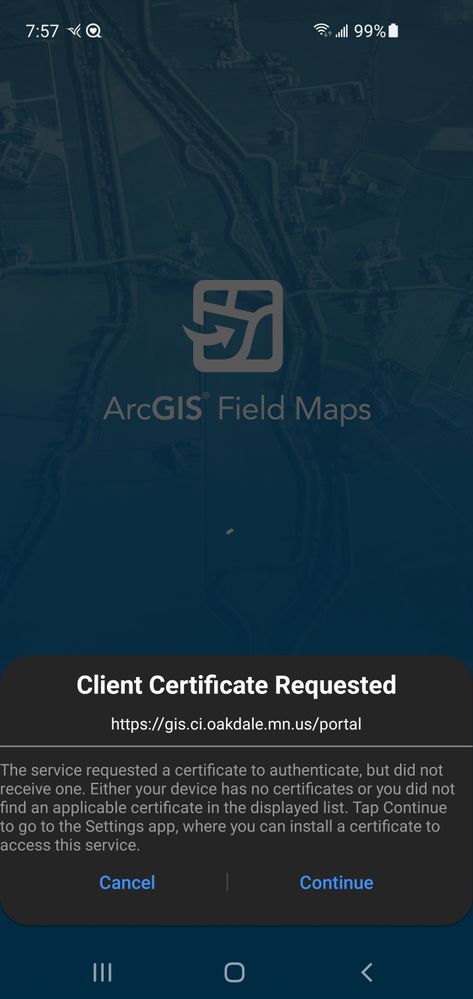
Solved! Go to Solution.
Accepted Solutions

- Mark as New
- Bookmark
- Subscribe to RSS Feed
- Permalink
I spent all morning dealing with this with Esri, an Esri partner we've contracted in the past who services Esri clients, a 3rd party vendor (who is also an Esri partner), and our IT department.
If you want the background to this here's an article describing what is happening: https://techcrunch.com/2021/09/21/lets-encrypt-root-expiry/
For an Android phone’s built-in browser, the list of trusted root certificates comes from the operating system — which is out of date on these older phones,” Let’s Encrypt explains. “However, Firefox is currently unique among browsers — it ships with its own list of trusted root certificates. This was a clue for us. Note the Sept 30th expiration.
Steps taken:
- This was only impacting our Android devices; all other access to Enterprise is fine. Esri verified the health of the system, certs etc. Determined was IT issue.
- Conferred with an Esri Partner that supports Esri client infrastructure & development and indicated several clients facing odd cert issues starting last night as well.
- Within the Android device, only mobile apps faced this cert issue: 3rd party app, Field Maps, Collector. See attached error messages.
- Using Chrome on the mobile device you could access the Portal site and authenticate just fine.
- Using the ‘default’ browser (in my case ‘Samsung Internet’) you could NOT access the site and a similar certificate error displayed.
- Tried installing Firefox app and making default in hopes that the apps would ‘look’ at the new Root certs but the behavior persisted.
- iOS devices are not impacted.
Current workaround (your experience will vary a bit depending on your android version(s) and what browser you use on your desktop; Firefox used here did not try with other browsers):
Manually install R3 cert to device
- From desktop: navigate to your portal URL and view, cert info click on padlock icon next to the portal URL
ZacharyHart_0-1633027719727.png
Click More Information
ZacharyHart_1-1633027795706.png
View Certificate
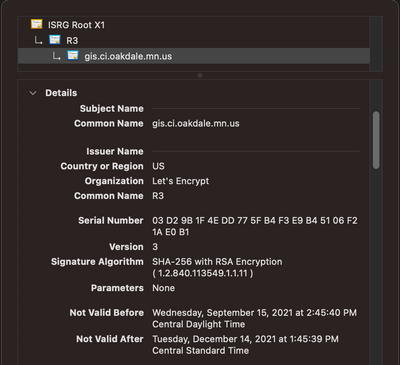
- Click the R3 tab and scroll down to 'Miscellaneous' and download PEM(cert)
- Get this to your Android device by your favorite means (email, file share, Drive, etc.)
- Back on Android device: Settings>Biometrics & security > Other security settings> Credential Storage Install from phone storage> (on my device i select CA certificate, on other tablets it didn't have an option but import worked as expected; I didn't need to supply a name but they did and named it something appropriate)> maybe a warning > install the thing >reboot > open app and see if error clears.
This fixed Collector and Field Maps but so far not the 3rd party Esri app. I expect this may have far reaching impacts for Esri Partner devs.


- Mark as New
- Bookmark
- Subscribe to RSS Feed
- Permalink
@oakmn are you the IT admin responsible for your domains certificates? Possibly need to renew? Or has a group policy update been applied to your organisations domain server?
David
..Maps with no limits..
- Mark as New
- Bookmark
- Subscribe to RSS Feed
- Permalink
@Brooks_SummitGeo Thanks for the reply!
The certificate is valid, so I guess I will have to speak with our network services group to see if there was group policy changes.
- Mark as New
- Bookmark
- Subscribe to RSS Feed
- Permalink
@Brooks_SummitGeo I have found out that everybody in our organization is having the same issue, it isn't just related to my device. Our IT/Server groups said there was no group policy changes....
- Mark as New
- Bookmark
- Subscribe to RSS Feed
- Permalink
I spent all morning dealing with this with Esri, an Esri partner we've contracted in the past who services Esri clients, a 3rd party vendor (who is also an Esri partner), and our IT department.
If you want the background to this here's an article describing what is happening: https://techcrunch.com/2021/09/21/lets-encrypt-root-expiry/
For an Android phone’s built-in browser, the list of trusted root certificates comes from the operating system — which is out of date on these older phones,” Let’s Encrypt explains. “However, Firefox is currently unique among browsers — it ships with its own list of trusted root certificates. This was a clue for us. Note the Sept 30th expiration.
Steps taken:
- This was only impacting our Android devices; all other access to Enterprise is fine. Esri verified the health of the system, certs etc. Determined was IT issue.
- Conferred with an Esri Partner that supports Esri client infrastructure & development and indicated several clients facing odd cert issues starting last night as well.
- Within the Android device, only mobile apps faced this cert issue: 3rd party app, Field Maps, Collector. See attached error messages.
- Using Chrome on the mobile device you could access the Portal site and authenticate just fine.
- Using the ‘default’ browser (in my case ‘Samsung Internet’) you could NOT access the site and a similar certificate error displayed.
- Tried installing Firefox app and making default in hopes that the apps would ‘look’ at the new Root certs but the behavior persisted.
- iOS devices are not impacted.
Current workaround (your experience will vary a bit depending on your android version(s) and what browser you use on your desktop; Firefox used here did not try with other browsers):
Manually install R3 cert to device
- From desktop: navigate to your portal URL and view, cert info click on padlock icon next to the portal URL
Click More Information
View Certificate
- Click the R3 tab and scroll down to 'Miscellaneous' and download PEM(cert)
- Get this to your Android device by your favorite means (email, file share, Drive, etc.)
- Back on Android device: Settings>Biometrics & security > Other security settings> Credential Storage Install from phone storage> (on my device i select CA certificate, on other tablets it didn't have an option but import worked as expected; I didn't need to supply a name but they did and named it something appropriate)> maybe a warning > install the thing >reboot > open app and see if error clears.
This fixed Collector and Field Maps but so far not the 3rd party Esri app. I expect this may have far reaching impacts for Esri Partner devs.
- Mark as New
- Bookmark
- Subscribe to RSS Feed
- Permalink
@ZacharyHart Thanks a million! I followed your steps and Field Maps now works on my Android phone. I will have the other Android users download the cert and install it on their devices.
UPDATE: I have found that iPad and iPhone users within our organization are having the same problem.
Can't thank you enough!

- Mark as New
- Bookmark
- Subscribe to RSS Feed
- Permalink
This message is displayed when your Portal and/or Server web adapters are configured with client certificate authentication (PKI). You do not appear to have any client certificates installed on your device which allow you to authenticate.
So you could check if anything changed related to the web-adapters.
If you try to access your organization in a web browser in incognito/private mode do you also get prompted for a certificate? If so, then this further points to a server configuration issue.
- Mark as New
- Bookmark
- Subscribe to RSS Feed
- Permalink
I don't believe this is the case at all.

- Mark as New
- Bookmark
- Subscribe to RSS Feed
- Permalink
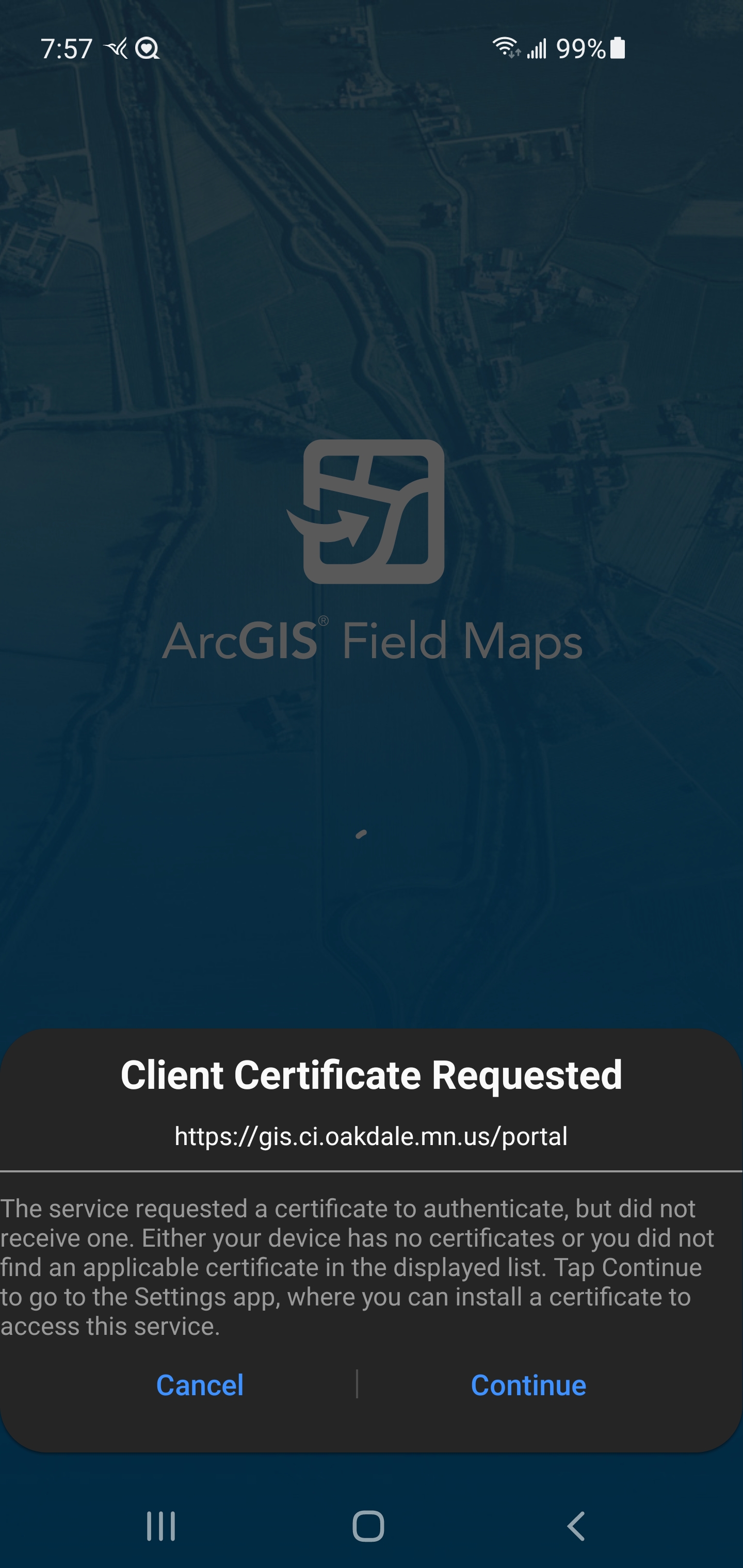
I am using Enterprise 10.9.1 and field map app and getting same error even installing pfx certificate on android device.
how to resolve this issue

- Mark as New
- Bookmark
- Subscribe to RSS Feed
- Permalink
@MuhammadWaqar_ul_islam same for me....🤔