Turn on suggestions
Auto-suggest helps you quickly narrow down your search results by suggesting possible matches as you type.
Cancel
- Home
- :
- All Communities
- :
- Products
- :
- ArcGIS Explorer Desktop (Retired)
- :
- ArcGIS Explorer Desktop Questions
- :
- UNC vs. Absolute file paths for image popups
Options
- Subscribe to RSS Feed
- Mark Topic as New
- Mark Topic as Read
- Float this Topic for Current User
- Bookmark
- Printer Friendly Page
UNC vs. Absolute file paths for image popups
3742
4
01-27-2011 11:58 AM

01-27-2011
11:58 AM
- Mark as New
- Bookmark
- Subscribe to RSS Feed
- Permalink
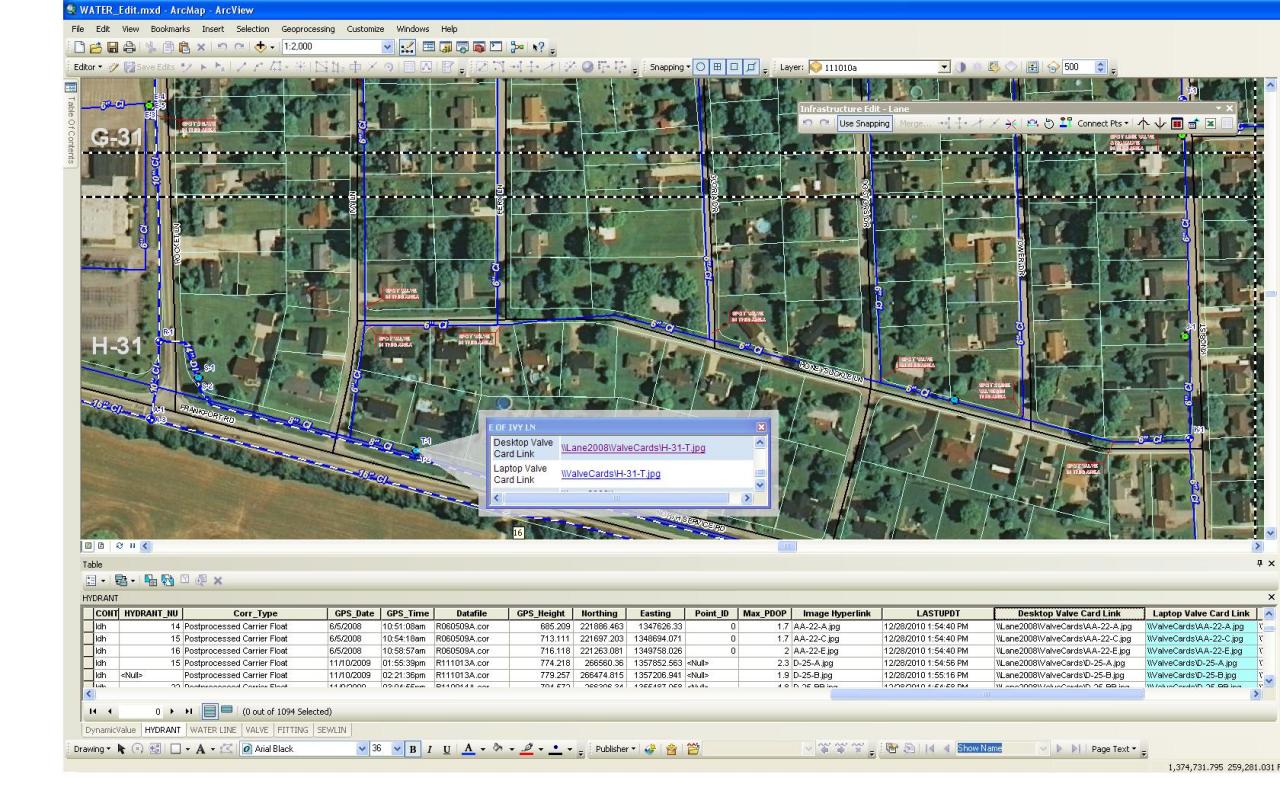
I've got an ArcView license so I don't have the attachment capability that is in the ArcEditor license. By trial and error I've been able to put the UNC path of an image in a field for my features and that works fine unless the local drive is not shared on a network. We have ArcExplorer on some laptops and we would like to have the popups work away from the network. All of the laptops have the images loaded on them. I've tried to use absolute paths, but those don't come up as hyperlinks in the popups like a UNC path does. Does anyone have any suggestions for using relative or absolute paths? or any other ideas? Thanks.
4 Replies


01-27-2011
11:49 PM
- Mark as New
- Bookmark
- Subscribe to RSS Feed
- Permalink
Lane,
You could try sharing the folder with the images on the laptop. Easiest way to do this is probably:
1. Create a text file and add something like the following:
net share ShareName=C:\FolderYouWantToShare
(for more info see http://technet.microsoft.com/en-us/library/bb490712.aspx)
3. Then rename the text file to <something>.cmd
4. Add the .cmd file to the startup folder on the laptop
Then the image paths will be \\ShareName\WhereverYourImagesAre\Blah.jpg
Regards
Mike
You could try sharing the folder with the images on the laptop. Easiest way to do this is probably:
1. Create a text file and add something like the following:
net share ShareName=C:\FolderYouWantToShare
(for more info see http://technet.microsoft.com/en-us/library/bb490712.aspx)
3. Then rename the text file to <something>.cmd
4. Add the .cmd file to the startup folder on the laptop
Then the image paths will be \\ShareName\WhereverYourImagesAre\Blah.jpg
Regards
Mike
01-28-2011
07:20 AM
- Mark as New
- Bookmark
- Subscribe to RSS Feed
- Permalink
Mike,
I must be missing something still. I'm still not getting anything. Here are some screenshots to show how I've set it up. ArcView.jpg shows ArcView with the feature attributes showing the image field and the popup with the image link. The link with my Computer Name in it works of course, but the other one doesn't. The WinExplorer.jpg shows my directory layout and the .cmd file that I created in the Startup folder.
I must be missing something still. I'm still not getting anything. Here are some screenshots to show how I've set it up. ArcView.jpg shows ArcView with the feature attributes showing the image field and the popup with the image link. The link with my Computer Name in it works of course, but the other one doesn't. The WinExplorer.jpg shows my directory layout and the .cmd file that I created in the Startup folder.

01-28-2011
11:27 AM
- Mark as New
- Bookmark
- Subscribe to RSS Feed
- Permalink
Maybe the best way to do this is through html formatting tags.
<img alt="File" src="C:/ImageFolder/file.jpg" />
It works good for small images. Just have to figure out a good way to populate 1000 fields with that string and the correct image name (which I have in another field).
<img alt="File" src="C:/ImageFolder/file.jpg" />
It works good for small images. Just have to figure out a good way to populate 1000 fields with that string and the correct image name (which I have in another field).
01-31-2011
08:49 AM
- Mark as New
- Bookmark
- Subscribe to RSS Feed
- Permalink
Is there a way to modify the following portion of an xsl stylesheet for the popups to have it open a new window when a link to a pdf doc is clicked?
<xsl:when test="FieldValue[starts-with(., '\\')]">
<a target="_blank">
<xsl:attribute name="href">
<xsl:value-of select="FieldValue"/>
</xsl:attribute>
<xsl:value-of select="FieldValue"/>
</a>
</xsl:when>
<xsl:when test="FieldValue[starts-with(., '<img ')]">
<xsl:value-of select="FieldValue" disable-output-escaping="yes" />
</xsl:when>
<xsl:when test="FieldValue[starts-with(., '\\')]">
<a target="_blank">
<xsl:attribute name="href">
<xsl:value-of select="FieldValue"/>
</xsl:attribute>
<xsl:value-of select="FieldValue"/>
</a>
</xsl:when>
<xsl:when test="FieldValue[starts-with(., '<img ')]">
<xsl:value-of select="FieldValue" disable-output-escaping="yes" />
</xsl:when>
