- Home
- :
- All Communities
- :
- Products
- :
- ArcGIS Explorer Desktop (Retired)
- :
- ArcGIS Explorer Desktop Questions
- :
- Searching data with ArcGIS Explorer
- Subscribe to RSS Feed
- Mark Topic as New
- Mark Topic as Read
- Float this Topic for Current User
- Bookmark
- Subscribe
- Mute
- Printer Friendly Page

- Mark as New
- Bookmark
- Subscribe
- Mute
- Subscribe to RSS Feed
- Permalink
I have ArcGIS Explorer and use an NMF file to then view data from DBF, SHP and other files. The end result map shows me property lines from my county and when I click on a property I get details about it such as the owner, address, etc. I am wanting to search this data but am unable to determine how. How can I search and quickly locate data on this map. Thanks.
Solved! Go to Solution.
Accepted Solutions


- Mark as New
- Bookmark
- Subscribe
- Mute
- Subscribe to RSS Feed
- Permalink
The ribbon tabs and buttons are driven by context. You need to click on your feature layer in the table of contents. The commands applicable to that layer type will then display.
- Mark as New
- Bookmark
- Subscribe
- Mute
- Subscribe to RSS Feed
- Permalink
For feature layers you can use the Query Builder in ArcGIS Explorer Desktop.
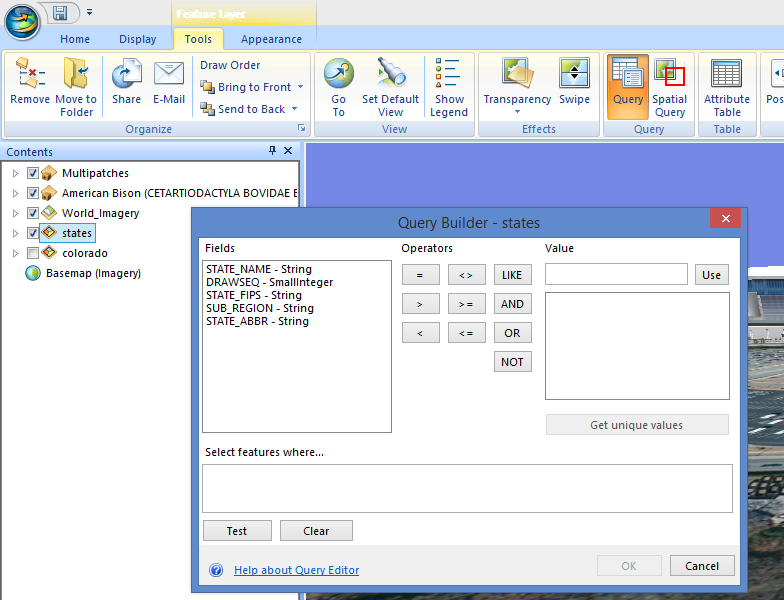
mark
- Mark as New
- Bookmark
- Subscribe
- Mute
- Subscribe to RSS Feed
- Permalink
My version does not have a Tools tab. ? I only have Home and Display tabs.
- Mark as New
- Bookmark
- Subscribe
- Mute
- Subscribe to RSS Feed
- Permalink
The ribbon tabs and buttons are driven by context. You need to click on your feature layer in the table of contents. The commands applicable to that layer type will then display.
- Mark as New
- Bookmark
- Subscribe
- Mute
- Subscribe to RSS Feed
- Permalink
Got it. Thanks, it is working now.
