We have just released a new Beta of Explorer for ArcGIS for iOS devices (iPhones and iPads) through Apple’s TestFlight app. If you would like to participate in testing the latest beta version of Explorer please send a request to [email protected] .
The 17.2 Beta 2 release includes additional functionality based on user feedback as well as important fixes.
Added Functionality:
-
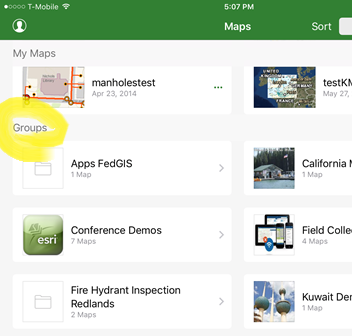 Groups are available in Browse view (BUG-000106841) to provide quick and easy access to the maps organized within Groups in the ArcGIS Organization. You can now search for, browse to, and open the Groups from the browse map experience.
 - Support for zoom to layer. Tap on a layer name in the map layer list to zoom to the full extent of that layer
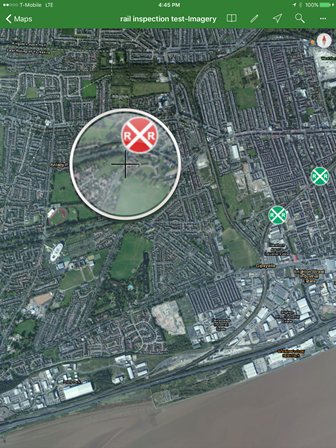 Addition of magnifier tool BUG-000106840. Access a magnifier window view by a long press and hold on a map display, and then release your finger to drop a pin at that location.
Bug fixes and usability enhancements
- Updated Measure Tool readability
- Date filter now being honored
- Now showing description in Custom Attribute Display instead of domain code
- Optimized viewing details by auto-selecting features on search and identify if only one result
- Fixed cases where symbology is not shown in panel
- Improved identify performance
- Fixed bug with identifying on layers with in-memory joins
Thank you for your continued support of Explorer for ArcGIS. We value your feedback. If you are looking for the Android version of Explorer please sign up by visiting this link. Contact us at [email protected]
-Explorer Team