- Home
- :
- All Communities
- :
- Products
- :
- ArcGIS Experience Builder
- :
- ArcGIS Experience Builder Questions
- :
- Re: Pop ups dont show on ArcGIS Experience Builder...
- Subscribe to RSS Feed
- Mark Topic as New
- Mark Topic as Read
- Float this Topic for Current User
- Bookmark
- Printer Friendly Page
Pop ups dont show on ArcGIS Experience Builder ArcGIS Online

- Mark as New
- Bookmark
- Subscribe to RSS Feed
- Permalink
Hi, I have enabled, and configured pop-ups in my web map, but the web app I built with the builder does not show them. Any ideas how this can be fixed?
Web Map: VNSI_Datos (arcgis.com)
Experience: https://experience.arcgis.com/experience/ba24e44e146049518f8b6e788c3a4628/page/P%C3%A1gina/
Thank´s a lot!


- Mark as New
- Bookmark
- Subscribe to RSS Feed
- Permalink
There should be an option in the Map Widget to allow popups.
https://doc.arcgis.com/en/experience-builder/latest/configure-widgets/map-widget.htm
Have a great day!
Johannes


- Mark as New
- Bookmark
- Subscribe to RSS Feed
- Permalink
@apmasmelar_UDFJC - thanks for bringing this up. I checked your MV and ExB settings, and all configurations should be fine. It appears that the problem may have something to do with the second Coordinates widget here:
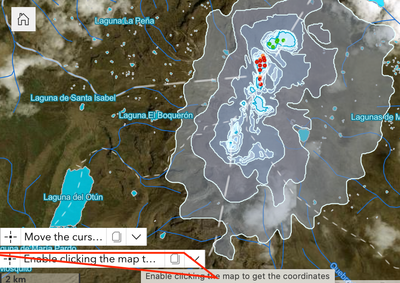
In this widget, the added special SR does not support the mouse-hover-to-obtain-coordinate action, which might cause the popup not to show up.
If you remove the second widget or add a new one with SR supporting mouse hover, e.g. 4326, it works fine:
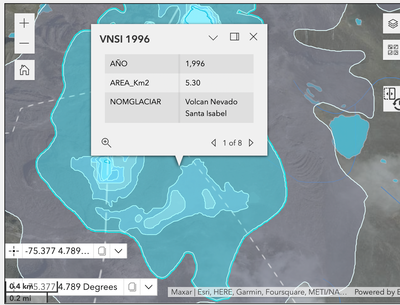
We will take a look at this special case. Thanks for the sample app.
- Mark as New
- Bookmark
- Subscribe to RSS Feed
- Permalink
@apmasmelar_UDFJC The issue mentioned in the original post has be resolved in the recent AGOL 2023 June release.

- Mark as New
- Bookmark
- Subscribe to RSS Feed
- Permalink
I am also curious if this plans to be addressed with the Enterprise Experience Builder? As of now if you make any changes to the underlying map driving the experience builder, pop-up attachments are lost and do not show. To be honest, Enterprise ExB pales in comparison to AGOL ExB and is barely useable at times.
- Mark as New
- Bookmark
- Subscribe to RSS Feed
- Permalink
@chill_gis_dude @zkovacs That would be picked up by Enterprise v11.2 and later.

- Mark as New
- Bookmark
- Subscribe to RSS Feed
- Permalink
I just ran into this issue as well. All settings appear to be as expected and all enabled popups *should* come up with no issue. The popups work fine in the map, and while I'm editing the app using Live View, but one of the popups doesn't work at all while simply viewing the app.
