- Home
- :
- All Communities
- :
- Products
- :
- ArcGIS Experience Builder
- :
- ArcGIS Experience Builder Questions
- :
- Re: How to remove comma separator in Experience Bu...
- Subscribe to RSS Feed
- Mark Topic as New
- Mark Topic as Read
- Float this Topic for Current User
- Bookmark
- Subscribe
- Mute
- Printer Friendly Page
How to remove comma separator in Experience Builder table

- Mark as New
- Bookmark
- Subscribe
- Mute
- Subscribe to RSS Feed
- Permalink
Hello! I'd like to remove the thousands comma separator in the table I have in an experience:
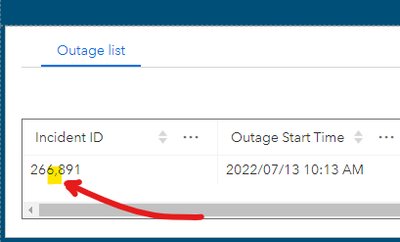
I tried going to the visualization for the feature and unchecking the thousands separator. Also tried pulling the data from a web map where I did the same with no luck:


- Mark as New
- Bookmark
- Subscribe
- Mute
- Subscribe to RSS Feed
- Permalink
The only "solution" I've found about this from Esri is this: https://support.esri.com/en-us/knowledge-base/how-to-remove-comma-separators-in-arcgis-experience-bu...
They basically just say to create a brand new field in your data that is a text field and populate it with your numeric values from your numerical field. Not sure about others but this is certainly not a viable solution from my organization's end. This is a poor excuse for a technical solution/workaround for an issue where all you need is a setting in a widget or a dataset to turn off comma separators. By default these should be off anyways. We are experiencing this problem with our Civic Addresses in our applications where users pushing data to a table widget will see fields like "Street Number" displayed with a column so 1234 Fake Street would show up as 1,234.
A REAL solution needs to be implemented that does not involve poor data design.


- Mark as New
- Bookmark
- Subscribe
- Mute
- Subscribe to RSS Feed
- Permalink
Also experiencing this issue in Experience Builder on Enterprise, e.g showing as;
2,023
2,024
2,025
Similar to this poster the experience builder is not honouring the fields settings

- Mark as New
- Bookmark
- Subscribe
- Mute
- Subscribe to RSS Feed
- Permalink
3 years on, and still no fix. Really could do with this fixed and I can't change ours to a text field as it's being used in a dashboard for filtering years.
Is there any update on this @jcarlson?

- Mark as New
- Bookmark
- Subscribe
- Mute
- Subscribe to RSS Feed
- Permalink
@TianWen mentioned several years ago that esri was working on this. I wonder where that stands now?


- Mark as New
- Bookmark
- Subscribe
- Mute
- Subscribe to RSS Feed
- Permalink
For JSAPI v4.32, you can:
1. Following the official link to install the JSAPI offline (don't need to install calcite offline) and update the variables arcgisJsApiUrl
https://developers.arcgis.com/experience-builder/guide/install-guide/#install-the-offline-node-cache
2. On your web server that hosts JSAPI, navigate to 4.32 --> Esri --> widgets --> FeatureTable --> FieldColumn.js file
3. Modify
const A = { useGrouping: !0, maximumFractionDigits: 20 };
to
const A = { useGrouping: false, maximumFractionDigits: 20 };
4. After update, clear browser cache or use private mode to test the application.


- Mark as New
- Bookmark
- Subscribe
- Mute
- Subscribe to RSS Feed
- Permalink
how do i fix this issue in the search widget's result? The map service was added via URL, so it's only part of the Experience, it's not part of a web map so I can't change the settings in the web map.


- Mark as New
- Bookmark
- Subscribe
- Mute
- Subscribe to RSS Feed
- Permalink
This is pretty unbelievable... I held off on WAB migration to ExB for long as possible because of these type amongst many other app update issues and we still can't perform the most simple of formatting adjustments and have them persist. ESRI has completely lost the plot here. Soon as I complete my open source mapping toolset I'll be slowly getting every client possible off ESRI. I simply can't endorse these products anymore as ExB and Pro have moved GIS backwards instead of forwards.

- « Previous
- Next »
- « Previous
- Next »