- Home
- :
- All Communities
- :
- Products
- :
- ArcGIS Experience Builder
- :
- ArcGIS Experience Builder Questions
- :
- Experience Builder Query Widget Spatial Filter
- Subscribe to RSS Feed
- Mark Topic as New
- Mark Topic as Read
- Float this Topic for Current User
- Bookmark
- Subscribe
- Mute
- Printer Friendly Page
Experience Builder Query Widget Spatial Filter

- Mark as New
- Bookmark
- Subscribe
- Mute
- Subscribe to RSS Feed
- Permalink
Working on an App with EB using the Query Widget (Spatial filter>Filter by> Selected features from data source>Add filter layer>Data Added) but it doesn't work. It selects more than the boundary but when I try the same in WebApp builder it returns the correct number. Also noticed that if I use the draw tool, it also gives the correct result.
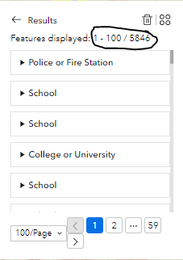
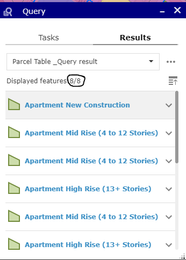
Does anyone know how to solve this issue?


- Mark as New
- Bookmark
- Subscribe
- Mute
- Subscribe to RSS Feed
- Permalink
@AdejumoBidemi Unfortunately I am not able to reproduce your issue. In my following test case, I chose to do a query on USA cities with filters based on USA states. Once Iowa was selected, the cities within this state has been queried successfully (34):
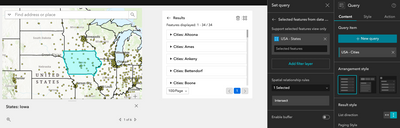
What was your selection method - point-click or map selection tools? Screenshots or a video demonstrating your workflow could be helpful to provide more details.

- Mark as New
- Bookmark
- Subscribe
- Mute
- Subscribe to RSS Feed
- Permalink
This is not working in ArcGIS Enterprise 11.5. Please see screenshot. It selects all features.

- Mark as New
- Bookmark
- Subscribe
- Mute
- Subscribe to RSS Feed
- Permalink
Also, telling from your screenshot above - the one with 5846 records, was it possible that you run the Query before selecting any specific features? If you haven't selected anything, the entire layer will be used to get your results.
- Mark as New
- Bookmark
- Subscribe
- Mute
- Subscribe to RSS Feed
- Permalink
I had the selecting polygon (spatial filter) pre-defined but it does not use the it
- Mark as New
- Bookmark
- Subscribe
- Mute
- Subscribe to RSS Feed
- Permalink
Please contact Esri Support so they will work with you on the issue identifications, detailed reproducible steps, or any screenshots/videos to demonstrate your workflow. Thanks.

- Mark as New
- Bookmark
- Subscribe
- Mute
- Subscribe to RSS Feed
- Permalink
Did you find a solution? I am experiencing the a similar issue.
- Mark as New
- Bookmark
- Subscribe
- Mute
- Subscribe to RSS Feed
- Permalink
No I did... I'd to use a different tool in Web AppBuilder
- Mark as New
- Bookmark
- Subscribe
- Mute
- Subscribe to RSS Feed
- Permalink
Same here. Really wanted to use EB but couldn't get the Query Widget to return consistent results.

- Mark as New
- Bookmark
- Subscribe
- Mute
- Subscribe to RSS Feed
- Permalink
Is it possible to provide a sample app so we can investigate your case?
