- Home
- :
- All Communities
- :
- Products
- :
- ArcGIS Experience Builder
- :
- ArcGIS Experience Builder Questions
- :
- Ability to duplicate/copy an element?
- Subscribe to RSS Feed
- Mark Topic as New
- Mark Topic as Read
- Float this Topic for Current User
- Bookmark
- Subscribe
- Mute
- Printer Friendly Page


- Mark as New
- Bookmark
- Subscribe
- Mute
- Subscribe to RSS Feed
- Permalink
So far, Experience Builder has been great - but there is one enhancement that would help a lot.
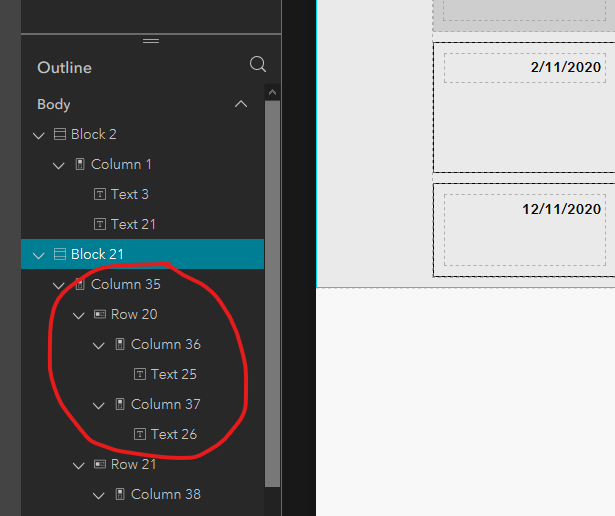
Could we get the ability to duplicate elements?
In the example below I have configured the heights, spacing, backgrounds, etc. for the Column and child rows and I want to have the same settings for a column element below it. It would be a great feature if a user could simply 'select' a group of elements and then duplicate or copy it.
-----------------------------------
Brian Baldwin, Esri Inc., Lead Solution Engineerhttps://www.linkedin.com/in/baldwinbrian
Solved! Go to Solution.

- Mark as New
- Bookmark
- Subscribe
- Mute
- Subscribe to RSS Feed
- Permalink
I think OP was asking about being able to copy from one experience to another, not just within pages of one experience?

- Mark as New
- Bookmark
- Subscribe
- Mute
- Subscribe to RSS Feed
- Permalink
Copying from one app to another is not doable in the OOTB features.
- Mark as New
- Bookmark
- Subscribe
- Mute
- Subscribe to RSS Feed
- Permalink
Is it something that can be requested via the ideas page or is it simply not possible? It would be a very useful functionality to be able to copy premade widgets from one experience to another. Can't imagine how much time it would save. I have some menu widgets with 30 different filters. Having to remake these as part of the workflow in creating new experiences almost renders it useless.
- Mark as New
- Bookmark
- Subscribe
- Mute
- Subscribe to RSS Feed
- Permalink
@chill_gis_dude Currently, we do not have a clear plan to support this.
However, in your case, maybe you could try to save the original app after configuring these filters as a new app ( the 'Save as' feature in the builder), and then create the second one upon that. The difference is copying an entire app versus the individual widgets.
- Mark as New
- Bookmark
- Subscribe
- Mute
- Subscribe to RSS Feed
- Permalink
Thank you, I will give that a shot!

- « Previous
-
- 1
- 2
- Next »
- « Previous
-
- 1
- 2
- Next »