- Home
- :
- All Communities
- :
- Products
- :
- ArcGIS Experience Builder
- :
- ArcGIS Experience Builder Ideas
- :
- Query Widget Press Enter Key to Apply Query/Search
- Subscribe to RSS Feed
- Mark as New
- Mark as Read
- Bookmark
- Follow this Idea
- Printer Friendly Page
Query Widget Press Enter Key to Apply Query/Search

- Mark as New
- Bookmark
- Subscribe
- Mute
- Subscribe to RSS Feed
- Permalink
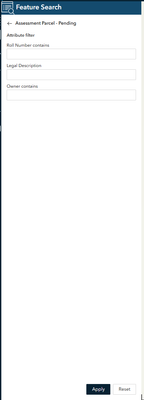
The Query Widget in Experience Builder is great to allow our end users to search and query features in the applications we build them based on different attributes. One minor setback is the fact you have to physically click "Apply" at the bottom of the query to conduct the search/query. Most modern applications you can fill in your desired search or query and press "Enter" on your keyboard to see the results.
Something that should be implemented into Experience Builder because it can be somewhat tedious without this ability and some of our end users who are not extremely "tech-savvy" may think there is something wrong with the application when they press enter to apply their search and nothing happens.

I just ran into this issue building out my first big application in Experience Builder. This feels like a fundamental UX which everyone has learned to expect. Bumping to hopefully get this implemented.

I'm currently scrambling to replace all of our old WAB applications with new Experience Builder ones, and I'm having to rely heavily on the Query widget to re-create a lot of the existing functionality. As these applications are frequently used by the general public, not having the Query widget activate with the "Enter" key is likely going to be a fairly major hiccup, especially for some of our more technically challenged members of the public.
Why this has never been a standard feature is beyond me, as almost any web "search" function triggers when you hit "Enter".
You must be a registered user to add a comment. If you've already registered, sign in. Otherwise, register and sign in.