- Home
- :
- All Communities
- :
- Products
- :
- ArcGIS Experience Builder
- :
- ArcGIS Experience Builder Ideas
- :
- Provide ability to track ArcGIS Experience Builder...
- Subscribe to RSS Feed
- Mark as New
- Mark as Read
- Bookmark
- Follow this Idea
- Printer Friendly Page
Provide ability to track ArcGIS Experience Builder interactions with Google Analytics


- Mark as New
- Bookmark
- Subscribe
- Mute
- Subscribe to RSS Feed
- Permalink
Add support for Google Analytics to Experience Builder. Keep it simple, as was done in StoryMaps and Hub, where you have a setting or property for each Experience into which you can paste your Google Analytics Tracking ID.
[Original GeoNet thread: Google Analytics with Experience Builder?]
- « Previous
-
- 1
- …
- 4
- 5
- 6
- Next »

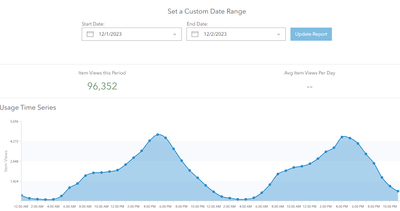
We used Experience Builder for a public application for December Nights (optimized for mobile).
It had huge engagement. 96,352 item views over a two-day period. It would be great to be able to get a finer level of detail knowing which experience builder pages were being used, and for how long.


According to the 2024 roadmap, it looks to be coming in Q2 this year: https://community.esri.com/t5/arcgis-experience-builder-blog/arcgis-experience-builder-2024-roadmap/...


@ShengdiZhang I see you say this was implemented in June 2024 of AGOL. I need to track the individual page views and via https://www.esri.com/arcgis-blog/products/experience-builder/announcements/whats-new-in-arcgis-exper... it says it can track which pages are being viewed. Does this apply to Experience Builder Developer edition or is this on the Roadmap to be applied to Enterprise?

@LindseyStone this has always been a weak area for ESRI and I too was in need of tracking page views among other web traffic information. Fortunately this can be done relatively easily with Experience Builder Developer Edition assuming two things:
1. Your app is hosted on web server with IIS logging enabled and,
2. You have access to FME or some other automation software
I read IIS log files on a schedule, use FME to parse, clean, etc. the file into a readable format, filter the records specific to my ExB web app then write them to both an SDE Table and an MS Access DB. This is an extremely high level overview of the process but ultimately I'm left with a table of records that can be queried to display a host of user and traffic information.
Specifically for tracking web app page views, I query the [cs-uri-query] field of the IIS log to get page view counts and then report the most viewed app page over different time periods.
Happy to to provide greater detail upon request. Good luck.
You must be a registered user to add a comment. If you've already registered, sign in. Otherwise, register and sign in.