- Home
- :
- All Communities
- :
- Products
- :
- ArcGIS Experience Builder
- :
- ArcGIS Experience Builder Ideas
- :
- Auto-fit items in the List Widget
- Subscribe to RSS Feed
- Mark as New
- Mark as Read
- Bookmark
- Follow this Idea
- Printer Friendly Page

- Mark as New
- Bookmark
- Subscribe
- Mute
- Subscribe to RSS Feed
- Permalink
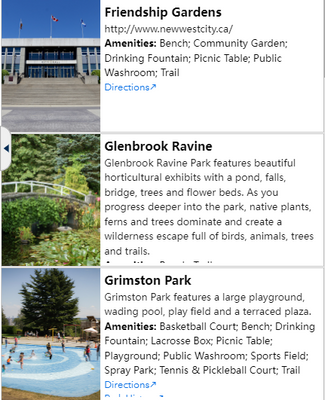
In the image above, I have a list widget with items arranged by rows and a set height but I'm seeing unused text spaces for short descriptions and texts cut off for longer descriptions. These descriptions are configured from attributes in the dynamic content. A user would have to hover over to the longer description and scroll down to see more info. I can set the height higher but it would not show as many item results on the screen and would leave more empty spaces for items with shorter descriptions. An auto-fit feature for items similar that allows for word wrapping from dynamic content would help make the list easier to view and use.
- « Previous
-
- 1
- 2
- Next »

Totally agree with this Idea. As someone new to Experience Builder I find it very frustrating that the height of List items has to be hard coded to a specific pixel value. It's really limiting and makes it an accessibility issue as it's difficult to make the List item big enough to cope with users who want or need to increase the text size in their browser.
This has been addressed in the June 2026 update under ENH-000134127:
'Description: Provide the ability to automatically adjust the size of the items in List widget based on the selected feature attributes, in ArcGIS Experience Builder.'
In the What's New Experience Builder documentation for the June 2026 update it says:
'List widget—For a row list that uses one of the Flow templates, you can set the list item's height to Auto. If you do, the list item's height matches the height of the tallest Image, Text, or Button widget in the row.'
Having given it a quick test, it does indeed seem to work as expected. Shame it's limited to using one of the 'flow' templates but they can be customised as required so perhaps it's not a problem.
You must be a registered user to add a comment. If you've already registered, sign in. Otherwise, register and sign in.