- Home
- :
- All Communities
- :
- Products
- :
- ArcGIS Experience Builder
- :
- ArcGIS Experience Builder Ideas
- :
- Add Close or Toggle Option to All Sidebar Controll...
- Subscribe to RSS Feed
- Mark as New
- Mark as Read
- Bookmark
- Printer Friendly Page
Add Close or Toggle Option to All Sidebar Controlling Widgets

- Mark as New
- Bookmark
- Subscribe to RSS Feed
- Permalink
In my experience configuring Experience Builder apps, the Sidebar widget is crucial for building logic and delivering a user-friendly interface. However, interaction with it is limited, most widgets can only open the sidebar, apart from buttons which can toggle it. Expanding this to include toggle, open, and close options for all widgets which can already interact with the sidebar would significantly enhance flexibility. In particular, being able to close the sidebar through an action would allow more dynamic, context-sensitive user experiences where relevant content appears or disappears based on user actions.
Please let me know if you would like anymore information.

Absolutely agree 1000%!

I totally agree. For example I have mobile version of app, where is sidebar column with information and map in second part. When I select a feature in map, pop-up open, but there is not so much space for it. So I want to close sidebar (the info part) by select a feature in map, but only can open this sidebar.
I do not understand why, when there is this functionality (close, toggle sidebar as action) in system.


I agree! I have a list inside a sidebar. When I choose an item on the list I would like to close the sidebar to see the widgets that are updating based on the selection. A list's record selection changes trigger only supports the "Open sidebar" action. Why would ESRI tie the hands of its users this way? In this case I would want to choose a "Close sidebar" action, but I agree that all three should be available as choices for all widgets that interact with sidebars.

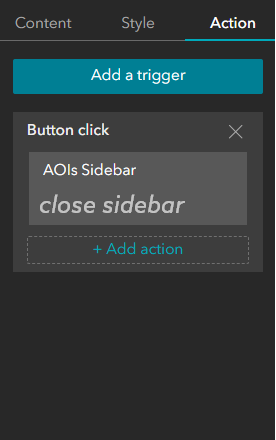
I cannot wrap my head around the fact that Esri recently added the "Open sidebar" option in buttons and maps but did not think about adding the "Close sidebar" option at the same time. Why!? I'm probably missing something here, but it could not have been that much more developpment to do so.
You must be a registered user to add a comment. If you've already registered, sign in. Otherwise, register and sign in.