Hi,
We are going to deploy an ArcGIS Enterprise v11.4 in high availability with a total of eight machines:-
1. Two portal machines
2. Two hosting server machines
3. Two datastores (relational + object) machines
4. Two webadaptor machines
I have doubts about deploying an object datastore in a high availability configuration, which consists of two machines. Which mode do I need to select, SingleInstance or cluster? As per the documentation, I am pretty clear that the mode can't be the SingleInstance for cluster mode; the documentation says that -
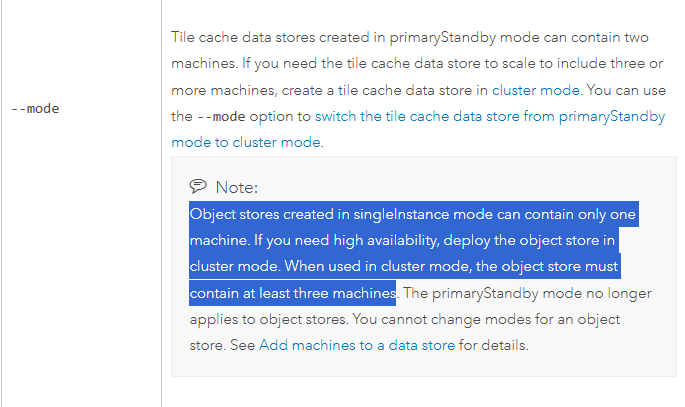
For SingleInstance mode only one machine is required and for cluster mode at least three machines are required but if we have only two machines for object datastore then which mode I need to select.
Or
It is not possible to configure an object datastore with two machines.
Any response will be highly appreciated!
Thanks
Ayush
Solved! Go to Solution.
It's not possible to configure the Object Store on just two machines. You will need cluster mode and three machines for a proper HA configuration. While you could do a single instance mode and install on one of the Data Store servers I would not suggest it, as it would not be HA and the mode cannot be changed after the initial configuration.
Object Store lessons learned:
- On Linux, Object Store cannot be installed/configured on the same machine in addition to an existing Data Store. (makes in place upgrades with adding the new Object Store difficult, see Solved: Migrating from Tile Cache to Object Data Store wit... - Esri Community)
This is only possible on Windows. It is possible from a technical point of view to install multiple roles including Object Store on the same machine, but this is not generally recommended for performance reasons.
- There is only singleInstance and Cluster mode.
-- For High Availability, Cluster mode is required
-- Cluster Mode requires 3* machines at minimum (*odd numbers only)! (opposed to the Tile Cache which only required 2 machines for HA)
-- make sure the port configuration is correct is important
- When choosing Cluster mode, do not run configuredatastore simultaneously on all 3* machines. This will result in an undesired state.
All 3* Object Stores will be listed individually in the Server Manager->Site->Data Stores and when accessing the Data Store :2443/arcgis/datastore endpoint, it will show "You have successfully configured 1 of the 3 minimum required machines...". describedatastore will return Is cluster finalized........false. If you did this by accident, the steps outlined below are required.
- If you configured the Object Store by accident as SingleInstance or configured multiple machines at once as described before, there are a few things to consider.
-- Scale the ArcGIS Data Store Object Store for procedures where you need to migrate data or want to change to cluster
Danger Area: here may be dragons🔥 🐉
Before doing anything read everything described below carefully, best do a machine snapshot and backups using ArcGIS tools.
-- If you configured the object store by cluster accidentally for 3 machines at once on machines where no other data stores are installed and configured, it is easy to fix. (If that is not the case, stop here and go to the next paragraph.) Unregister the Object stores as outlined here or using the server/admin endpoint: go to /server/admin/data/items/cloudStores and copy the folder names (something like /cloudStores/AGSDataStore_objectstore_oz_1a2b3n4m) and deregister the item using the server/admin/data/unregisterItem Endpoint. Repeat. Stop the ArcGIS Data Store Service. Warning! The following step should only be done if you did a backup of all of your data and no other Data Stores are installed/configured on the same machine! -> 🔥Delete the ArcGIS Data Store data(content)-directory (not the installation directory!). Start the ArcGIS Data Store Service. Now use configuredatastore utility to configure the first object store machine. Follow up with the 2nd, then the 3rd machine. There should now be only one entry under /server/admin/data/items/cloudStores, when you look into that, check that your machines are listed. The describedatastore tool should now show that the cluster was successfully built.
--If you did install the Object Store on machines with other Data Store Roles (or installed and configured multiple Datastores on same machines in the initial installation), the process described before will work, however there are important things to consider: 🐉you will also need to unregister your other Data Store roles (Relational Data Stores for example are to be found here /server/admin/data/items/enterpriseDatabases). You need to do a backup of all your Data Stores affected (example here)! 🔥Deleting the ArcGIS Data Store data(content)-directory will delete the data of all your Data Stores on this machine!
Side note for the technically curious::
- The "Error: Cannot invoke "com.esri.arcgis.discovery.json.JSONArray.length()" because "" is null. will be shown at the :2443/arcgis/datastore endpoint, if you unregister a data store role using the REST.
- if your Data Store was in an unintended state as described above, it will not help to just run the registerdatastore utility. It will just add the data store again with the same state. To "reset" the Data Store, the data(content)-directory needs to be cleared (read above). This will also generate new Data Store "IDs" (at the end of: AGSDataStore_objectstore_oz_1a2b3n4m for example).
🔥Important: beware of the issues listed here: 11.5 - webgisdr - replication of objectStore broke... - Esri Community
To use a cloud store read: Solved: Amazon S3 bucket as Object Store in ArcGIS Enterpr... - Esri Community
It's not possible to configure the Object Store on just two machines. You will need cluster mode and three machines for a proper HA configuration. While you could do a single instance mode and install on one of the Data Store servers I would not suggest it, as it would not be HA and the mode cannot be changed after the initial configuration.
@DavidCrosby Thank you! This information should be highlighted (like in bold) in all relevant places in the documentation.
For example it is not mentioned here: Deprecation: ArcGIS Data Store Tile Cache Data Store Deprecation Notice I left some feedback on related documentation pages. Object Stores are also not represented in the HA diagrams shared here for example: Highly available ArcGIS Enterprise deployment scenarios—Portal for ArcGIS | Documentation for ArcGIS...
@SimonSchütte_ct You're welcome! I don't know if it is helpful, but for reference this is documented in the Architecture Center.
I am setting up the Object Stores on 3 machines now, but the documentation is somewhat meagre on the topic.
I installed and configured three object stores from cli at the same time:
configuredatastore gisserver.example.com admin %password% /datastore/object --stores object --mode cluster
The cluster is not finalized and when accessing :2443/arcgis/datastore I get "You have successfully configured 1 of the 3 minimum required machines..."
This is the describedatastore output:
Data store release 11.5.0.56755
Information for object store w1tiknx ============================================================== Deployment mode.............cluster
Threshold for READONLY mode..........5120MB
Data store mode......................READWRITE Registered machines.........MACHINE1.EXAMPLE.COM (Comment: Store2: MACHINE2.EXAMPLE.COM, Store3: MACHINE3.EXAMPLE.COM) Owning system URL...........https://gisserver.example.com:6443/server/admin (Comment: same for all 3) Portal for ArcGIS URL.......""
Is cluster finalized........false
All three Object Stores show up as registered in the Server Manager and the Admin endpoint (same for all 3 Data Stores: Role:CLUSTER_MEMBER, isDataNodeEnabled:true, managerNumber:1).
"If you script the creation of multiple spatiotemporal big data store machines, one spatiotemporal big data store machine must be manually configured with the GIS Server site before you can script the creation of additional spatiotemporal big data store machines. Include wait times in your script to be sure the additional spatiotemporal big data store machines are not added at the same time."
Does this also apply for Object Stores?
Should I have installed them one after the other?
How do I get the cluster up and running?
Should I unregister 2 of the three and register them one after the other again?
@SimonSchütte_ct It should be ok to install the software all at the same time. However you would want to configure them sequentially. I think what the message is saying is that you've created an Object Data Store in cluster mode successfully, but as 3 machines are required, it is saying you have only successfully configured 1. I think you are safe to unregister machines 2 and 3, and then run the command to configure them using the same one on each machine.
configuredatastore myserver.example.com siteadmin T1n@sp c:\ftcacheds --stores object --mode cluster
Thank you! But how do I identify the one that is configured? All parameters look the same for all Object Stores I checked - or is it not important which one I unregister? (Because all three each think they are "the one")
You can unregister the object store from ArcGIS Server Admin API via https://gisserver.example.com:6443/arcgis/admin
Goto Home > data > items > cloudStores , copy the Child Items name, then go back to Home > data, unregisterItem, paste the item name and unregister item.
Once you have unregistered the object store from your ArcGIS Server site, you can stop all data store services, then delete or rename your data store content folder, start data store services again, this time configure cluster object store one machine at a time. When you finish the 3rd machine, you shall see the following from describedatastore command.
Is cluster finalized........true
Thanks, I assume all three Object Stores think they are the first. I would have preferred if they figured out that they are clustered by themselves.
I will try unregistering two of them first, then registering them again in sequence in the hopes that's it.
Don´t want to delete the data store content folder.