- Home
- :
- All Communities
- :
- Products
- :
- ArcGIS Dashboards
- :
- ArcGIS Dashboards Questions
- :
- Table Widget (Wrap Text)
- Subscribe to RSS Feed
- Mark Topic as New
- Mark Topic as Read
- Float this Topic for Current User
- Bookmark
- Subscribe
- Mute
- Printer Friendly Page
Table Widget (Wrap Text)

- Mark as New
- Bookmark
- Subscribe
- Mute
- Subscribe to RSS Feed
- Permalink
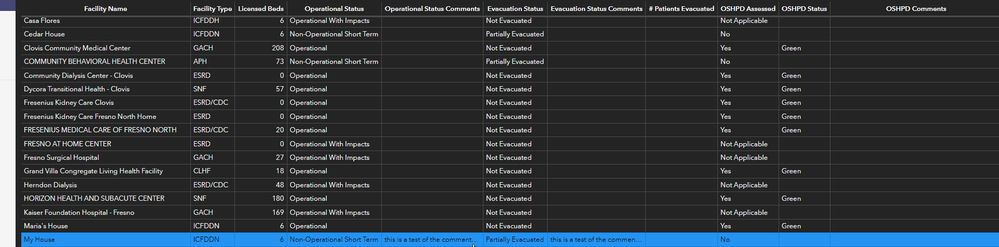
Ops Dashboard now has the Table Widget which is great. Is there a way to use Arcade to allow the table to "Wrap Text". It seems like the table is designed to display a set amount of characters and not a field for longer comments.

- Mark as New
- Bookmark
- Subscribe
- Mute
- Subscribe to RSS Feed
- Permalink
@apgis16 Did you have any success? I'm doing the same thing and trying to apply the above expression, but no luck.

- Mark as New
- Bookmark
- Subscribe
- Mute
- Subscribe to RSS Feed
- Permalink
It is a little late, but in case someone else is reading this.
You have to insert the code from GFernando above the configuration of your cells.--> Bevore the return.
Exchange the long string with $datapoint.YOUR_VALUE
The wraped Text is then stored in the variable "wrapText" and you can use it in the definition of your cells.
var longText =$datapoint.uniqueid
// Split longText into individual words
var longTextarray = Split(longText, ' ')
// Characters per line before line break
var lineLength = 50
var wrapText = ""
var words = 0
var characters = 0
while(words < Count(longTextarray)){
// Count number of characters per line
characters += Count(longTextarray[words] + " ")
// When number of characters exceed lineLength add a line break, otherwise add a SPACE
wrapText += longTextarray[words] + When(characters >= lineLength, "<br>", " ")
// When number of characters exceed lineLength, reset characters variable back to 0
characters = When(characters >= lineLength, 0, characters)
words += 1
}
return {
cells: {
uniqueid: {
displayText: wrapText,
hoverText: $datapoint.uniqueid,
textColor: '',
backgroundColor: '',
textAlign: 'left',
iconName: '',
iconAlign: '',
iconColor: '',
iconOutlineColor: ''
},
...

- Mark as New
- Bookmark
- Subscribe
- Mute
- Subscribe to RSS Feed
- Permalink
Nice one Gee!
I just used this in a link chart coming off an ArcGIS Knowledge.
For some reason the <br> didn't work... so subbed in textFormatting.newLine. Worked a treat.

- Mark as New
- Bookmark
- Subscribe
- Mute
- Subscribe to RSS Feed
- Permalink
I was just working on this a few days ago. Great code. Thank you!

- Mark as New
- Bookmark
- Subscribe
- Mute
- Subscribe to RSS Feed
- Permalink
'<div style="white-space: normal; word-wrap: break-word; overflow: visible; line-height: 1.2em;">' + DefaultValue($datapoint.add_your_field_name_here, "") + '</div>',

- « Previous
-
- 1
- 2
- Next »
- « Previous
-
- 1
- 2
- Next »