- Home
- :
- All Communities
- :
- Products
- :
- ArcGIS Dashboards
- :
- ArcGIS Dashboards Questions
- :
- Re: Configure a default zoom level in web map insi...
- Subscribe to RSS Feed
- Mark Topic as New
- Mark Topic as Read
- Float this Topic for Current User
- Bookmark
- Subscribe
- Mute
- Printer Friendly Page
Configure a default zoom level in web map inside dashboard

- Mark as New
- Bookmark
- Subscribe
- Mute
- Subscribe to RSS Feed
- Permalink
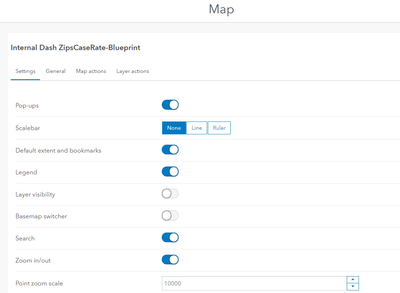
I'm trying to configure a default zoom level for a web map inside dashboard. Say I'm searching an address using the search bar on the web map and it is able to return a point, but I need to zoom in further and make that zoom level as default. The only place I see on the dashboard configuration is under Map > Point zoom scale. But simply changing that value didn't do what I need and it did not zoom in closer. Any solutions?
Thanks,
Chen

- Mark as New
- Bookmark
- Subscribe
- Mute
- Subscribe to RSS Feed
- Permalink
Hi. Having the same issue/question. Search bar zoom is too far out and the map has to load more data than is necessary, affecting map performance and requiring the user to have to manually zoom in again. Need a way to configure this behavior. Just created an Idea for this: "Customize search bar zoom scale". Please support this idea with a Kudos. Thanks!

- Mark as New
- Bookmark
- Subscribe
- Mute
- Subscribe to RSS Feed
- Permalink
Actually you can set the scale in your web map by scroll in-and-out to the ideal zoom level and
preserved the zoom level in map properties.
https://doc.arcgis.com/en/arcgis-online/create-maps/set-map-properties-mv.htm
