- Home
- :
- All Communities
- :
- Products
- :
- ArcGIS Dashboards
- :
- ArcGIS Dashboards Ideas
- :
- Allow manual reordering of Defined Values in Dashb...
- Subscribe to RSS Feed
- Mark as New
- Mark as Read
- Bookmark
- Follow this Idea
- Printer Friendly Page
Allow manual reordering of Defined Values in Dashboard Category Selector

- Mark as New
- Bookmark
- Subscribe
- Mute
- Subscribe to RSS Feed
- Permalink
Currently, users must define custom values to customize the order of the displayed selector options. While this is simple for values with only a few options, a drop down menu with >10 defined values becomes time consuming. I propose adding an up/down button to re-order the Defined Values instead of having to add them manually using the Custom Values option.

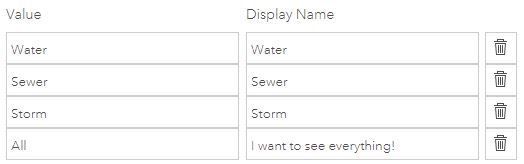


Yes! This seems like a fairly simple feature but it would make things so much easier. I recently made a drop-down with 50 defined values, and I wanted them displayed in alphabetical order in the drop-down. Had to be very careful I didn't make a mistake when entering them or I'd have to go back and repeat a lot of work!
I guess in the long run this isn't a "game changer" feature but it really would make for a better user interface. Pretty please, Esri? 


Would also be handy when your defined values refer to dates. I like to have recent items at the top, but I don't want to add 2021 or 2022 until the values exist. Using defined options, I have to go with ascending dates or else my list is unordered.

This is a really big need for our organization. We're utilizing more dashboards that present metrics on yearly date ranges that will need updating, and having to rebuild the Defined Options every time to maintain a sensible order of options is extremely frustrating.
You must be a registered user to add a comment. If you've already registered, sign in. Otherwise, register and sign in.