- Home
- :
- All Communities
- :
- Products
- :
- ArcGIS Business Analyst
- :
- ArcGIS Business Analyst Questions
- :
- Editing "Description" field for geographies I have...
- Subscribe to RSS Feed
- Mark Topic as New
- Mark Topic as Read
- Float this Topic for Current User
- Bookmark
- Subscribe
- Mute
- Printer Friendly Page
Editing "Description" field for geographies I have created

- Mark as New
- Bookmark
- Subscribe
- Mute
- Subscribe to RSS Feed
- Permalink
Hey folks, I am a relatively green user of Business Analyist. I have been creating custom geographies that represent areas where our company is active. To create these geographies I take the following steps:
define area -> select geography -> from map -> zip codes; then I click the zip codes where our company is offering services and combine these into a single geography. However, this geography has "description" field that shows up just under the site name which only includes the first couple of zip codes in that geography. Does anyone know if I can edit that "description" field to actually contain some useful info? This description field then shows up when I export the geographies to an instant app and I would love to have the app show some finer details. see attached screen shots. Thanks
Solved! Go to Solution.
Accepted Solutions


- Mark as New
- Bookmark
- Subscribe
- Mute
- Subscribe to RSS Feed
- Permalink
Hello @ForrestBarker,
My suggestions it to edit the description field after sharing the geographies to ArcGIS.
1. Enable this option when sharing.

2. Click this to open the shared map

3. Click the geography layer here to open it.

4. Click the Data tab
5. You might see the field is locked for editing

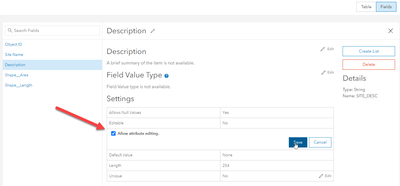
6. Click on the fields button > click on the description field > Allow editing and save
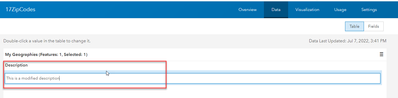
7. Double click on the description field value and you should be able edit it.


I hope this helps,
Fasil T.
- Mark as New
- Bookmark
- Subscribe
- Mute
- Subscribe to RSS Feed
- Permalink
Hello @ForrestBarker,
My suggestions it to edit the description field after sharing the geographies to ArcGIS.
1. Enable this option when sharing.
2. Click this to open the shared map
3. Click the geography layer here to open it.
4. Click the Data tab
5. You might see the field is locked for editing
6. Click on the fields button > click on the description field > Allow editing and save
7. Double click on the description field value and you should be able edit it.
I hope this helps,
Fasil T.
