Turn on suggestions
Auto-suggest helps you quickly narrow down your search results by suggesting possible matches as you type.
Cancel
- Home
- :
- All Communities
- :
- Developers
- :
- ArcGIS API Silverlight (Retired)
- :
- ArcGIS API Silverlight Questions
- :
- Symbol Brush Clipped
Options
- Subscribe to RSS Feed
- Mark Topic as New
- Mark Topic as Read
- Float this Topic for Current User
- Bookmark
- Printer Friendly Page
Symbol Brush Clipped
2792
3
11-02-2011 02:43 AM

by
Anonymous User
Not applicable
11-02-2011
02:43 AM
- Mark as New
- Bookmark
- Subscribe to RSS Feed
- Permalink
Original User: MattPil29
Hi,
We have an issue where the user has increased a SimpleLine symbol width to say 40 and the brush appears to be clipped off around the edges.
This can be demonstrated by changing the code here: http://www.arcgis.com/home/item.html?id=1e432da7e74f4402bd43a5863167022d
to include these two symbols:
[HTML]new SymbolInfo
{
Label = "Simple thin Line",
Symbol = new LineSymbol
{
Color = lineColor,
Width = 8
}
},
new SymbolInfo
{
Label = "Simple thick Line",
Symbol = new LineSymbol
{
Color = lineColor,
Width = 40
}
},[/HTML]
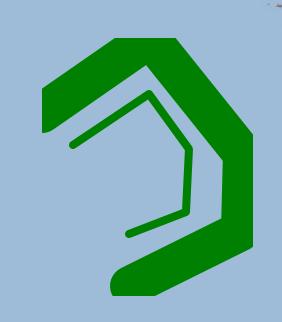
In this picture I have drawn two similar lines with the different symbols:

Notice the clipping on the thick one. However when I zoom in, for just a second, it appears correct and then gets clipped as the zoom completes:

Can anyone suggest how this might be resolved?
BTW I have played with some settings in Blend:

The pictures show:
It looks like number 2 represents the problem and number 3 is what I'm after. I am already using a custom control template for this symbol so I tried setting the width/height to auto. No luck!
Suggestions please!
Thanks Matthew
Hi,
We have an issue where the user has increased a SimpleLine symbol width to say 40 and the brush appears to be clipped off around the edges.
This can be demonstrated by changing the code here: http://www.arcgis.com/home/item.html?id=1e432da7e74f4402bd43a5863167022d
to include these two symbols:
[HTML]new SymbolInfo
{
Label = "Simple thin Line",
Symbol = new LineSymbol
{
Color = lineColor,
Width = 8
}
},
new SymbolInfo
{
Label = "Simple thick Line",
Symbol = new LineSymbol
{
Color = lineColor,
Width = 40
}
},[/HTML]
In this picture I have drawn two similar lines with the different symbols:
Notice the clipping on the thick one. However when I zoom in, for just a second, it appears correct and then gets clipped as the zoom completes:
Can anyone suggest how this might be resolved?
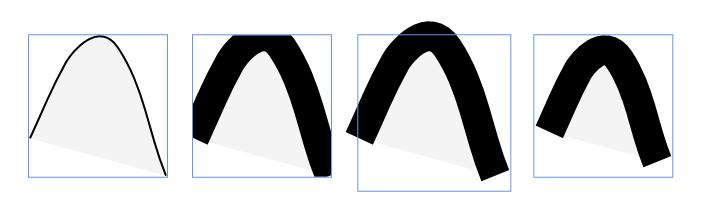
BTW I have played with some settings in Blend:
The pictures show:
- Thin line
- Thick line
- Thick line with width and height set to auto
- Thick line with Stretch set to fill
It looks like number 2 represents the problem and number 3 is what I'm after. I am already using a custom control template for this symbol so I tried setting the width/height to auto. No luck!
Suggestions please!
Thanks Matthew
3 Replies



11-03-2011
03:13 AM
- Mark as New
- Bookmark
- Subscribe to RSS Feed
- Permalink
A (weird!) workaround may be to redefine the symbol controltemplate and to surround the path element with a canvas.
Example in XAML:
Example in XAML:
<esri:LineSymbol x:Key="RedLineSymbol" Color="Red" Width="40" >
  <esri:LineSymbol.ControlTemplate>
    <ControlTemplate>
      <Canvas>
        <Path x:Name="Element"
          Stroke="{Binding Symbol.Color}"
          StrokeThickness="{Binding Symbol.Width}"
          StrokeDashCap="Round"
          StrokeStartLineCap="Round"
          StrokeLineJoin="Round"
          StrokeEndLineCap="Round"/>
     </Canvas>
    </ControlTemplate>
  </esri:LineSymbol.ControlTemplate>
</esri:LineSymbol>
by
Anonymous User
Not applicable
11-03-2011
04:18 AM
- Mark as New
- Bookmark
- Subscribe to RSS Feed
- Permalink
Original User: MattPil29
That did the trick, thanks.
Interestingly the clipping now appears during the zoom (which is more acceptable).
Is this something ESRI might address with the next release?
Matt
That did the trick, thanks.
Interestingly the clipping now appears during the zoom (which is more acceptable).
Is this something ESRI might address with the next release?
Matt
11-03-2011
08:32 AM
- Mark as New
- Bookmark
- Subscribe to RSS Feed
- Permalink
Is this something ESRI might address with the next release?
Likely not in the next release, but we'll consider that for a future release.
Thanks.