- Home
- :
- All Communities
- :
- Developers
- :
- ArcGIS API for Flex (Retired)
- :
- ArcGIS API for Flex Questions
- :
- Re: TypeError: Error #1034: Type Coercion failed: ...
- Subscribe to RSS Feed
- Mark Topic as New
- Mark Topic as Read
- Float this Topic for Current User
- Bookmark
- Subscribe
- Mute
- Printer Friendly Page
TypeError: Error #1034: Type Coercion failed: cannot convert views::AGISHomeView@6396ae1 to spark.components.View.

- Mark as New
- Bookmark
- Subscribe
- Mute
- Subscribe to RSS Feed
- Permalink
Hello all,
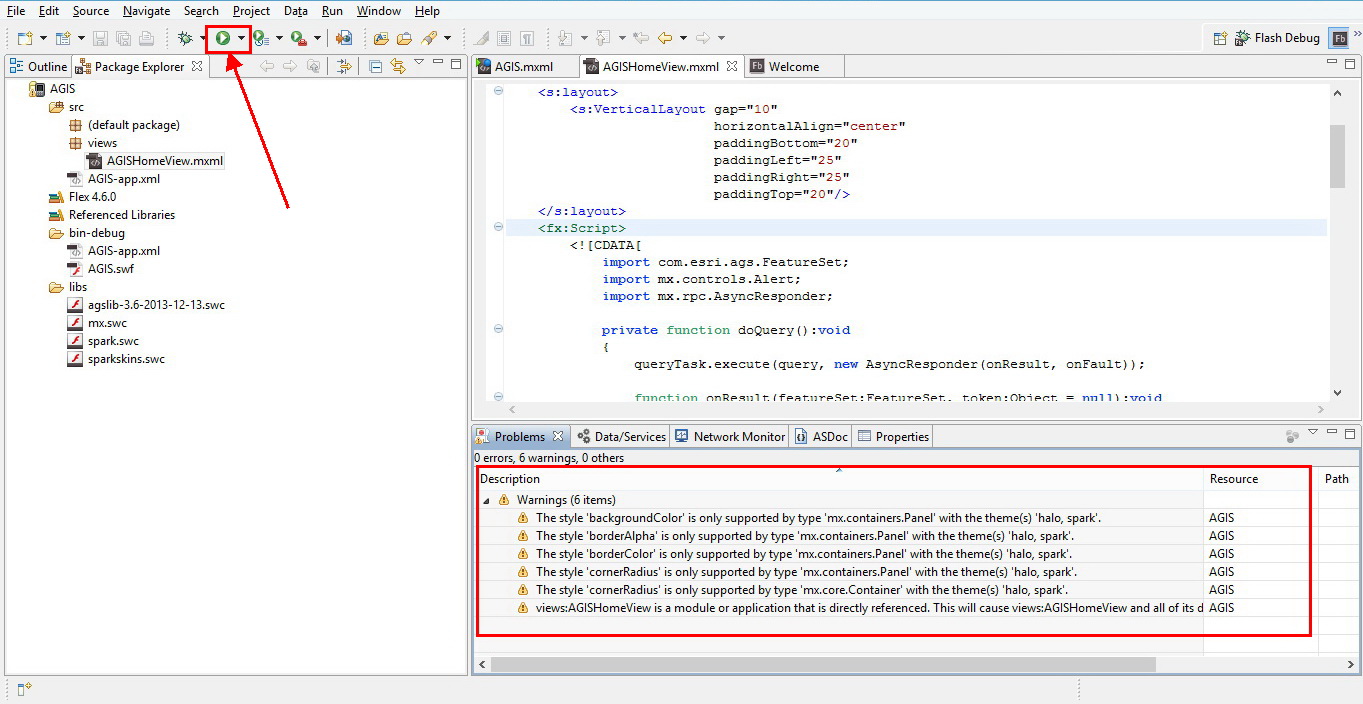
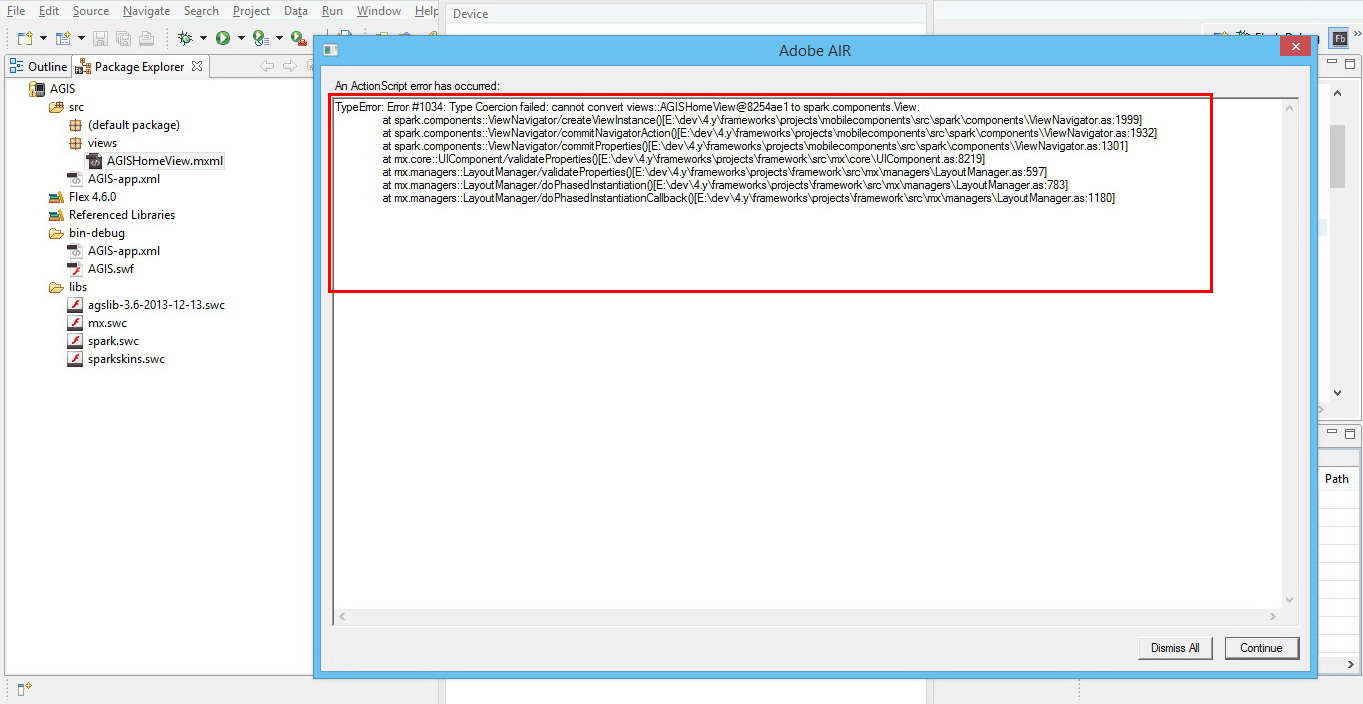
I am new to flex, and Flash builder, I followed the tutorial in this link: https://developers.arcgis.com/flex/guide/tutorial-query-your-data.htm to write a mobile mapping application that includes a query task, after writing the code, no errors appeared in the problems tab but there was 6 warnings, and when running the app the following error appears (Also shown in screenshots):
An ActionScript error has occurred:
TypeError: Error #1034: Type Coercion failed: cannot convert views::AGISHomeView@6396ae1 to spark.components.View.
at spark.components::ViewNavigator/createViewInstance()
at spark.components::ViewNavigator/commitNavigatorAction()
at spark.components::ViewNavigator/commitProperties()
at mx.core::UIComponent/validateProperties()
at mx.managers::LayoutManager/validateProperties()
at mx.managers::LayoutManager/doPhasedInstantiation()
at mx.managers::LayoutManager/doPhasedInstantiationCallback()
Any kind of help is appreciated.
Hani,
___________________________________________________________________________________________________________
Screenshots:
1- Warnings:
2- Error:
__________________________________________________________________________________________________________
Here is the code I used:
<?xml version="1.0" encoding="utf-8"?>
<s:Application xmlns:fx="http://ns.adobe.com/mxml/2009"
xmlns:s="library://ns.adobe.com/flex/spark"
xmlns:mx="library://ns.adobe.com/flex/mx"
xmlns="http://ns.adobe.com/air/application/4.6"
xmlns:esri="http://www.esri.com/2008/ags">
<s:layout>
<s:VerticalLayout gap="10"
horizontalAlign="center"
paddingBottom="20"
paddingLeft="25"
paddingRight="25"
paddingTop="20"/>
</s:layout>
<fx:Script>
<![CDATA[
import com.esri.ags.FeatureSet;
import mx.controls.Alert;
import mx.rpc.AsyncResponder;
private function doQuery():void
{
queryTask.execute(query, new AsyncResponder(onResult, onFault));
function onResult(featureSet:FeatureSet, token:Object = null😞void
{
// No code needed in this simple sample, since the
// graphics layer is bound to the query result using
// graphicProvider="{queryTask.executeLastResult.features}"
}
function onFault(info:Object, token:Object = null😞void
{
Alert.show(info.toString(), "Query Problem");
}
}
]]>
</fx:Script>
<fx:Declarations>
<!-- Layer with US States -->
<esri:QueryTask id="queryTask"
showBusyCursor="true"
url="http://sampleserver1.arcgisonline.com/ArcGIS/rest/services/Demographics/ESRI_Census_USA/MapServer/5"
useAMF="false"/>
<esri:Query id="query"
outSpatialReference="{myMap.spatialReference}"
returnGeometry="true"
text="{qText.text}">
<esri:outFields>
<fx:String>MED_AGE</fx:String>
<fx:String>POP2007</fx:String>
</esri:outFields>
</esri:Query>
</fx:Declarations>
<s:Panel height="60"
backgroundColor="0xB2BFC6"
title="Query a layer (search for a state)">
<s:layout>
<s:HorizontalLayout/>
</s:layout>
<s:TextInput id="qText"
width="100%"
enter="doQuery()"
text="California"/>
<s:Button click="doQuery()" label="Do Query"/>
</s:Panel>
<esri:Map id="myMap">
<esri:extent>
<esri:Extent xmin="-14298000" ymin="2748000" xmax="-6815000" ymax="7117000">
<esri:SpatialReference wkid="102100"/>
</esri:Extent>
</esri:extent>
<esri:ArcGISTiledMapServiceLayer
url="http://server.arcgisonline.com/ArcGIS/rest/services/World_Physical_Map/MapServer"/>
</esri:Map>
</s:Application>
_______________________________________________________________
Solved! Go to Solution.
- Mark as New
- Bookmark
- Subscribe
- Mute
- Subscribe to RSS Feed
- Permalink
Dear Bjorn,
Thank you very much for the attention and the links, they seem to be very helpful to me as a beginner.
Thank you again!

- « Previous
-
- 1
- 2
- Next »
- « Previous
-
- 1
- 2
- Next »