Turn on suggestions
Auto-suggest helps you quickly narrow down your search results by suggesting possible matches as you type.
Cancel
- Home
- :
- All Communities
- :
- Developers
- :
- ArcGIS API for Flex (Retired)
- :
- ArcGIS API for Flex Questions
- :
- Re: Pass Search Parameters via URL
Options
- Subscribe to RSS Feed
- Mark Topic as New
- Mark Topic as Read
- Float this Topic for Current User
- Bookmark
- Subscribe
- Mute
- Printer Friendly Page
Pass Search Parameters via URL
Subscribe
7534
30
06-23-2010 08:40 AM

06-23-2010
08:40 AM
- Mark as New
- Bookmark
- Subscribe
- Mute
- Subscribe to RSS Feed
- Permalink
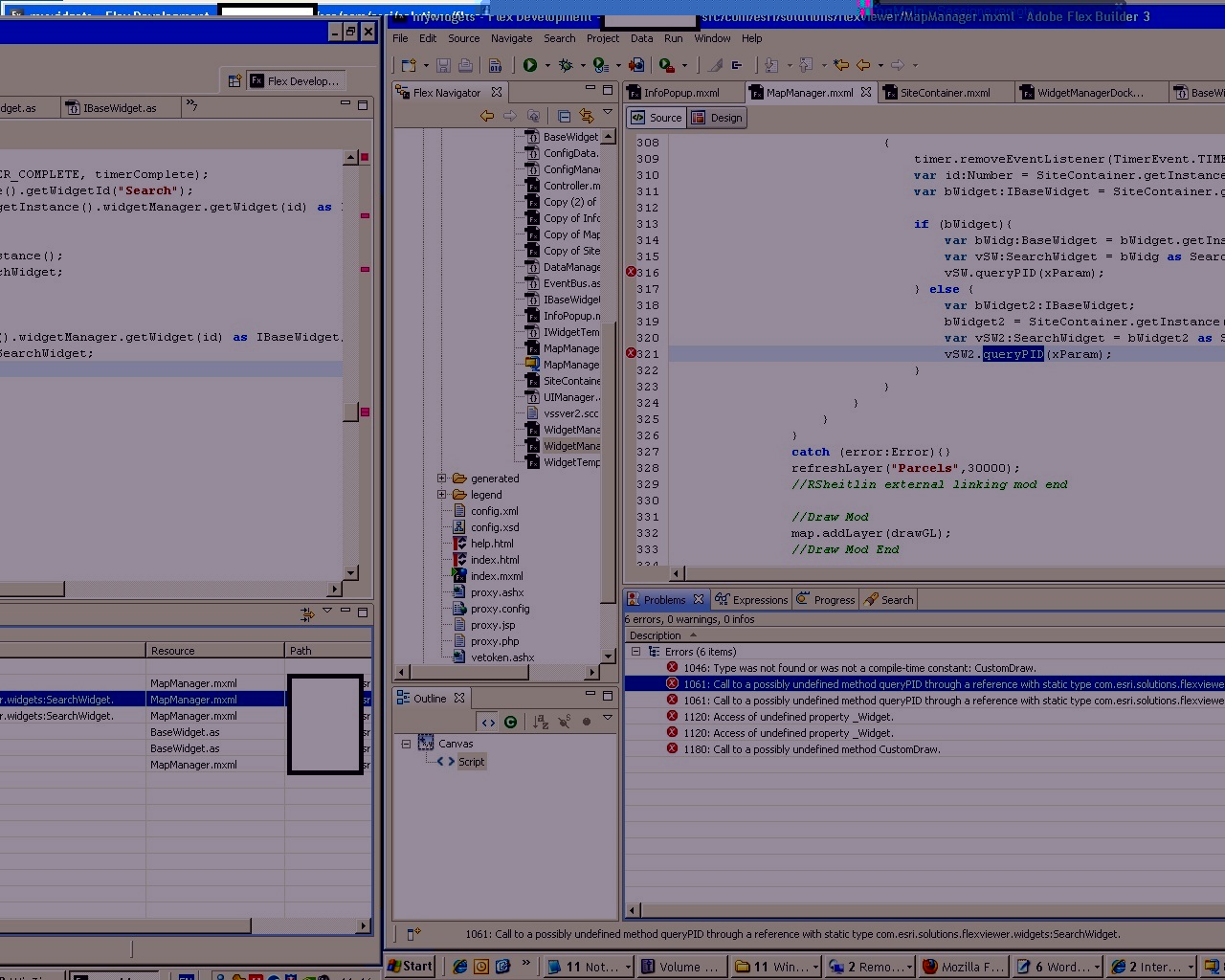
I've been trying to work my way through the http://forums.esri.com/Thread.asp?c=158&f=2421&t=294907&mc=104 thread but am still getting the following error. I've been through this thread numerous times and don't seem to be able to see my problem. I'm fairly new at Flex and would greatly appreciate any help or suggestions.
TypeError: Error #1009: Cannot access a property or method of a null object reference.
at com.esri.solutions.flexviewer.widgets::SearchWidget/querybmpid()
at com.esri.solutions.flexviewer:MapManager/private:mapLoadComplete/com.esri.solutions.flexviewer:timerComplete()
at flash.events::EventDispatcher/dispatchEventFunction()
at flash.events::EventDispatcher/dispatchEvent()
at flash.utils::Timer/tick()
TypeError: Error #1009: Cannot access a property or method of a null object reference.
at com.esri.solutions.flexviewer.widgets::SearchWidget/querybmpid()
at com.esri.solutions.flexviewer:MapManager/private:mapLoadComplete/com.esri.solutions.flexviewer:timerComplete()
at flash.events::EventDispatcher/dispatchEventFunction()
at flash.events::EventDispatcher/dispatchEvent()
at flash.utils::Timer/tick()
30 Replies



07-11-2010
03:15 AM
- Mark as New
- Bookmark
- Subscribe
- Mute
- Subscribe to RSS Feed
- Permalink
Naty,
So you are missing more code that was discussed in the original tread then.
The QueryPID error means that you need to look in your SearchWidget for a public function called QueryPID. In the original thread I called it "public function queryPPIN(sParam:String):void".
The CustomDraw error means that your MapManager code is now looking for my EnhancedDraw widget instead of the standard draw tool of ESRI's. That code was not in Sandra's MapManger code so If you are not using my custom draw widget than I would say look back up at the beginning of this thread and grab Sandra's MapManager code she posted.
So you are missing more code that was discussed in the original tread then.
//In BaseWidget.as add

        private static var _Widget:BaseWidget;

//Then in the initWidgetTemplate function add

   _Widget = this;
The QueryPID error means that you need to look in your SearchWidget for a public function called QueryPID. In the original thread I called it "public function queryPPIN(sParam:String):void".
The CustomDraw error means that your MapManager code is now looking for my EnhancedDraw widget instead of the standard draw tool of ESRI's. That code was not in Sandra's MapManger code so If you are not using my custom draw widget than I would say look back up at the beginning of this thread and grab Sandra's MapManager code she posted.
07-11-2010
04:42 AM
- Mark as New
- Bookmark
- Subscribe
- Mute
- Subscribe to RSS Feed
- Permalink
Naty,
So you are missing more code that was discussed in the original tread then.//In BaseWidget.as add private static var _Widget:BaseWidget; //Then in the initWidgetTemplate function add _Widget = this;
The QueryPID error means that you need to look in your SearchWidget for a public function called QueryPID. In the original thread I called it "public function queryPPIN(sParam:String):void".
The CustomDraw error means that your MapManager code is now looking for my EnhancedDraw widget instead of the standard draw tool of ESRI's. That code was not in Sandra's MapManger code so If you are not using my custom draw widget than I would say look back up at the beginning of this thread and grab Sandra's MapManager code she posted.
Thank u so much Robert, I m newbie with flex..
now I just cant find the original thread I called it "public function queryPPIN(sParam:String):void 😞
Thanks
Robert
07-11-2010
09:49 AM
- Mark as New
- Bookmark
- Subscribe
- Mute
- Subscribe to RSS Feed
- Permalink
Naty,
I am not sure what you have the function in your SearchWidget called...
Try adding this function to your SearchWidget.mxml if you don't have it.
If you call it querybmpid like above it should match the MapManger.mxml of Sandra's that I told you to switch to.
This is definitely not an easy piece of code to implement as there are many vital steps to the code that need to be in place and it helps if you try to understand the path that the code is taking.
Basically the application loads and check is there is a URL Parameter for the search and if there is once the map is loaded then programatically launch the SearchWidget and pass that parameter to it and run the query. So the MapManager needs to check for the paramter, find the search widget and launch it and then when you have the reference to the searchwidget call the (what ever function i.e. queryPPIN) and execute the search. So the MapManager has to call a valid function in the SearchWidget.
I am not sure what you have the function in your SearchWidget called...
Try adding this function to your SearchWidget.mxml if you don't have it.
//Add to your SearchWiget.mxml

   //query parameter
   public function querybmpid(sParam:String):void
   {

    var i:Number = cboLayerText.selectedIndex;
    queryLayer = configSearchText.url;
    if(queryExpr){
    }else{
     queryExpr = configSearchText.expr;
    }
    queryFields = configSearchText.fields;
    queryTitleField = configSearchText.titlefield;
    queryLinkField = configSearchText.linkfield;

    if (queryLayer)
    {
     var queryTask:QueryTask = new QueryTask(queryLayer);
     var query:Query = new Query();
     var pExpr:String = sParam.toUpperCase();
     var expr:String = queryExpr.replace("[value]", pExpr);
     query.where = expr;
     query.outFields = queryFields.split(",");
     query.returnGeometry = true;
     query.outSpatialReference = map.spatialReference;
     queryTask.execute(query, new AsyncResponder(onResult, onFault));
     showMessage(loadingLabel, true);
     showStateResults(null);

             // on result
     function onResult(featureSet:FeatureSet, token:Object = null):void
     {
      try
      {
       var recAC:ArrayCollection = createRecordData(featureSet);
       addSharedData(widgetTitle, recAC);
       wRepeater.dataProvider = recAC;
       showMessage(selectionLabel + " " + featureSet.features.length, false);
       onLoadDone(null);
       map.cursorManager.removeAllCursors();
      }
      catch (error:Error)
      {
       showMessage(error.message, false);
       onLoadDone(null);
      }

       }

     //on fault
     function onFault(info:Object, token:Object = null) : void
     {
      onLoadDone(null);
      showMessage(info.toString(), false);
     }
    }
   }
If you call it querybmpid like above it should match the MapManger.mxml of Sandra's that I told you to switch to.
This is definitely not an easy piece of code to implement as there are many vital steps to the code that need to be in place and it helps if you try to understand the path that the code is taking.
Basically the application loads and check is there is a URL Parameter for the search and if there is once the map is loaded then programatically launch the SearchWidget and pass that parameter to it and run the query. So the MapManager needs to check for the paramter, find the search widget and launch it and then when you have the reference to the searchwidget call the (what ever function i.e. queryPPIN) and execute the search. So the MapManager has to call a valid function in the SearchWidget.
07-12-2010
01:54 AM
- Mark as New
- Bookmark
- Subscribe
- Mute
- Subscribe to RSS Feed
- Permalink
Naty,
I am not sure what you have the function in your SearchWidget called...
Try adding this function to your SearchWidget.mxml if you don't have it.//Add to your SearchWiget.mxml //query parameter public function querybmpid(sParam:String):void { var i:Number = cboLayerText.selectedIndex; queryLayer = configSearchText.url; if(queryExpr){ }else{ queryExpr = configSearchText.expr; } queryFields = configSearchText.fields; queryTitleField = configSearchText.titlefield; queryLinkField = configSearchText.linkfield; if (queryLayer) { var queryTask:QueryTask = new QueryTask(queryLayer); var query:Query = new Query(); var pExpr:String = sParam.toUpperCase(); var expr:String = queryExpr.replace("[value]", pExpr); query.where = expr; query.outFields = queryFields.split(","); query.returnGeometry = true; query.outSpatialReference = map.spatialReference; queryTask.execute(query, new AsyncResponder(onResult, onFault)); showMessage(loadingLabel, true); showStateResults(null); // on result function onResult(featureSet:FeatureSet, token:Object = null):void { try { var recAC:ArrayCollection = createRecordData(featureSet); addSharedData(widgetTitle, recAC); wRepeater.dataProvider = recAC; showMessage(selectionLabel + " " + featureSet.features.length, false); onLoadDone(null); map.cursorManager.removeAllCursors(); } catch (error:Error) { showMessage(error.message, false); onLoadDone(null); } } //on fault function onFault(info:Object, token:Object = null) : void { onLoadDone(null); showMessage(info.toString(), false); } } }
If you call it querybmpid like above it should match the MapManger.mxml of Sandra's that I told you to switch to.
This is definitely not an easy piece of code to implement as there are many vital steps to the code that need to be in place and it helps if you try to understand the path that the code is taking.
Basically the application loads and check is there is a URL Parameter for the search and if there is once the map is loaded then programatically launch the SearchWidget and pass that parameter to it and run the query. So the MapManager needs to check for the paramter, find the search widget and launch it and then when you have the reference to the searchwidget call the (what ever function i.e. queryPPIN) and execute the search. So the MapManager has to call a valid function in the SearchWidget.
Thank U so much Robert, I compiled and I built all my project....but nothing happen... 😞
I know it's really hard to understand why it doesnt work...but if u have time please help me ... in attachment I send u my MapManager, SiteContainer and SearchWidget.
Many thanks.
Naty
07-12-2010
06:14 AM
- Mark as New
- Bookmark
- Subscribe
- Mute
- Subscribe to RSS Feed
- Permalink
Thank U so much Robert, I compiled and I built all my project....but nothing happen... 😞
I know it's really hard to understand why it doesnt work...but if u have time please help me ... in attachment I send u my MapManager, SiteContainer and SearchWidget.
Many thanks.
Naty
Many Many Thanks....after a lot of concentration it perfectly works!!!! Thank u sooooooo much Robert!!
Naty

07-12-2010
12:09 PM
- Mark as New
- Bookmark
- Subscribe
- Mute
- Subscribe to RSS Feed
- Permalink
Robert,
I hope this doesn't get old, but could you take a look at http://forums.arcgis.com/threads/4018-SFV-1.3-Pass-URL-to-Search-parcels and check out my issue if you get time? I think I'm really close, just missing something.
Lee
I hope this doesn't get old, but could you take a look at http://forums.arcgis.com/threads/4018-SFV-1.3-Pass-URL-to-Search-parcels and check out my issue if you get time? I think I'm really close, just missing something.
Lee

11-17-2010
06:10 AM
- Mark as New
- Bookmark
- Subscribe
- Mute
- Subscribe to RSS Feed
- Permalink
Hello,
First at all, sorry for my English.
Robert I need help on your code...
I modified all the files:
BaseWidget.as
IBaseWidget.as
SiteContainer.mxml
MapManager.mxml
WidgetManagerDocked.mxml
...
But I allways obtain the same error... (null reference) in the MapManager.mxml
bWidget and bWidget2 are "null", and debugging into the code,...WidgetManagerDocked.mxml and function getWidget() the widgetTable and moduleTable vars are always lenght 0.
The widget ID is correct.
Can you help me?
Thanks in advance
First at all, sorry for my English.
Robert I need help on your code...
I modified all the files:
BaseWidget.as
IBaseWidget.as
SiteContainer.mxml
MapManager.mxml
WidgetManagerDocked.mxml
...
But I allways obtain the same error... (null reference) in the MapManager.mxml
function timerComplete( event:TimerEvent ):void
        {
         timer.removeEventListener(TimerEvent.TIMER_COMPLETE, timerComplete);
         var id:Number = SiteContainer.getInstance().getWidgetId("My Widget Label");
         var bWidget:IBaseWidget = SiteContainer.getInstance().widgetManager.getWidget(id) as IBaseWidget;

         if (bWidget){
          var bWidg:BaseWidget = bWidget.getInstance();
          var vSW:myWidget= bWidg as myWidget;
          vSW.myQueryFunction(id);
         } else {
          var bWidget2:IBaseWidget;
          bWidget2 = SiteContainer.getInstance().widgetManager.getWidget(id) as IBaseWidget;
          var vSW2:BuscarDerechoMinero = bWidget2 as BuscarDerechoMinero;
          vSW2.buscarDerecho(id_Derecho);
         }
        }
bWidget and bWidget2 are "null", and debugging into the code,...WidgetManagerDocked.mxml and function getWidget() the widgetTable and moduleTable vars are always lenght 0.
The widget ID is correct.
Can you help me?
Thanks in advance
11-17-2010
09:35 AM
- Mark as New
- Bookmark
- Subscribe
- Mute
- Subscribe to RSS Feed
- Permalink
Linoxmg,
Are you sure that
Are you sure that
var id:Number = SiteContainer.getInstance().getWidgetId("My Widget Label");
is the name of your search widget as it is defined in your config.xml?...
11-17-2010
09:21 PM
- Mark as New
- Bookmark
- Subscribe
- Mute
- Subscribe to RSS Feed
- Permalink
Hello,
I put it as example.
My code was :
and the config.xml
this lines always returns null
and in this function, moduleTable and widgetTable always has 0 elements.
Help me!! jeje.
Thanks in advance
I put it as example.
My code was :
        function timerComplete( event:TimerEvent ):void
        {
         timer.removeEventListener(TimerEvent.TIMER_COMPLETE, timerComplete);
         var id:Number = SiteContainer.getInstance().getWidgetId("Búsqueda DM");

         var bWidget:IBaseWidget = SiteContainer.getInstance().widgetManager.getWidget(id) as IBaseWidget;

         if (bWidget){
          var bWidg:BaseWidget = bWidget.getInstance();
          var vSW:BuscarDerechoMinero = bWidg as BuscarDerechoMinero;
          vSW.buscarDerecho(id_Derecho);
         } else {
          var bWidget2:IBaseWidget;
          bWidget2 = SiteContainer.getInstance().widgetManager.getWidget(id) as IBaseWidget;
          var vSW2:BuscarDerechoMinero = bWidget2 as BuscarDerechoMinero;
          vSW2.buscarDerecho(id_Derecho);
         }
        }
and the config.xml
<widget label="Búsqueda DM" icon="com/esri/solutions/flexviewer/assets/images/icons/i_derecho.png" menu="menuWidgets" config="com/esri/solutions/flexviewer/xml/BuscarDerechoMinero.xml">com/esri/solutions/flexviewer/widgets/BuscarDerechoMinero.swf</widget>
this lines always returns null
var bWidget:IBaseWidget = SiteContainer.getInstance().widgetManager.getWidget(id) as IBaseWidget;
...
bWidget2 = SiteContainer.getInstance().widgetManager.getWidget(id) as IBaseWidget;
and in this function, moduleTable and widgetTable always has 0 elements.
 public function getWidget(id:Number):IBaseWidget
      {
       var widget:IBaseWidget;
       var label:String = configData.configWidgets[id].label;
       var icon:String = configData.configWidgets[id].icon;
       var config:String = configData.configWidgets[id].config;
       var url:String = configData.configWidgets[id].url;
       var preload:String = configData.configWidgets[id].preload;

       if (widgetTable.containsKey(id))
       {
        widget = widgetTable.find(id) as IBaseWidget;
        widget.setState("maximized");
        var wObj:DisplayObject = widget as DisplayObject;
        scrollToWidget(wObj);
       }
       else
       {
        //module loaded
        if (moduleTable.containsKey(url))
        {
         var modInfo:IModuleInfo = moduleTable.find(url) as IModuleInfo;
         widget = modInfo.factory.create() as IBaseWidget;
         widget.setId(id);
         widget.setTitle(label);
         widget.setIcon(icon);
         widget.setConfig(config);
         widget.setConfigData(configData);
         widget.setMap(map);
         var widgetDO:DisplayObject = widget as DisplayObject;
      widgetBox.addChild(widgetDO);
         widgetTable.add(id, widget);
        }
        else
        {
         return null;
         loadWidget(id, url,preload);
        }
       }
       return widget;
      }
Help me!! jeje.
Thanks in advance
