Good day all,
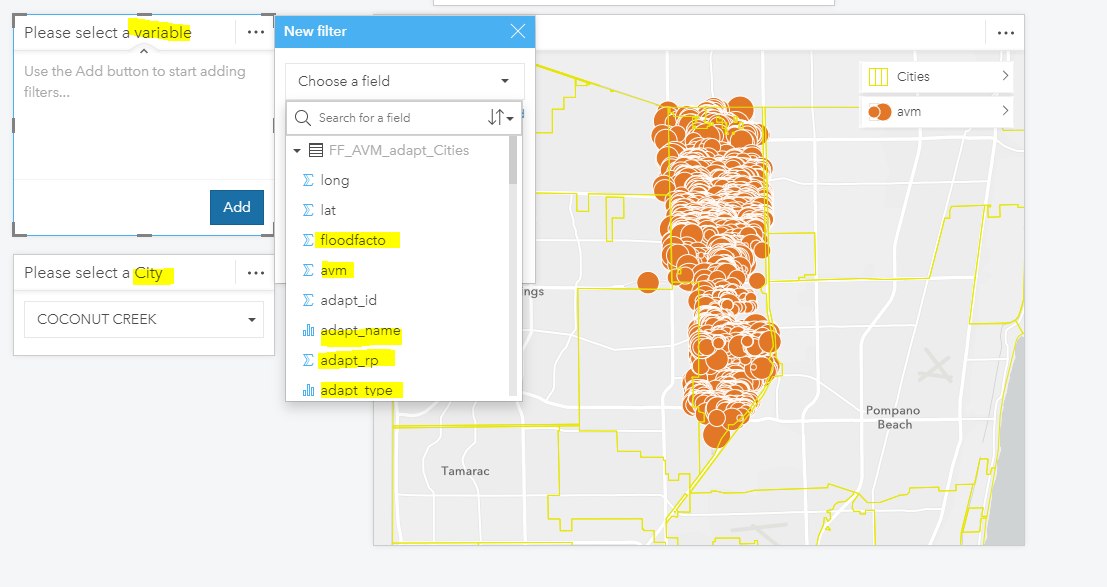
I am trying to create a web app in Insights Desktop such that the app has two drop down menus:
- One for variable of interest
- Second for location
As you can see I can select the location column in the 2nd drop down since it's a single column. However, I am unable to select multiple columns (each column representing a different variable, 5 columns/5 variables in my case).
If it it was possible to select multiple columns from a drop down menu, then for example, the user would first select the variable of interest let's say `avm` that would then show `avm` values for different cities depending on the selection from the 2nd drop down menu. Then if the user selected the variable `flood factor` it would filter location values to `flood factor`.
Is it possible to select multiple columns for a drop down menu in Insights desktop? Such an option will save me from creating separate plots for each variable.
If not can you please have option in the next release?
As such an option will really make the app concise, neat and clean.
Please note that both the drop menus are based on the same dataset.