I recently published a map image layer to my enterprise environment (10.8) and noticed that my label classes are either not appearing or displaying differently than I designed in ArcGIS Pro (2.5.0). I am using Arcade for my label expressions.
I have two label classes on one layer that was published. They are:
- Diameter and Material
The feature class is using coded domains for pipe diameter and material. So code of 6 has a description of 6". The double quote being the notation for inches and is a key component in the label. In addition to pipe diameter I have also added pipe material to the label. I split the description string for material to just use an abbreviation.
For example, I have a pipe diameter code of 6 = 6" and material code of 83 = Cast Iron - CAS.
My Arcade expression is:
DomainName($feature, 'diameter')+" "+Split(DomainName($feature, 'material'),' - ',2 )[1];
In Pro, I see 6" CAS 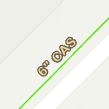
- Length
This label uses the STLength of the feature and a Round function to make it easier to read and adds a single quote to denote length are in feet.
My Arcade expression is:
Round($feature['SHAPE.STLength()'],1)+"'"
In Pro, see 107.6' 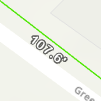
What I end up with after publishing removes the double quote and does not display the second label class at all.
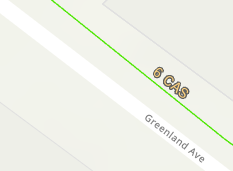
I'm guessing that the double quote has to do with Arcade constants. So if I use the code and not the DomainName function and TextFormatting.DoubleQuote instead, that it might help the Diameter and Length label class. But what about the second label class? I can't seem to find much about multiple label classes and map image layers.
Thanks!

