In things like Dashboards or Popups, it is common to create your own FeatureSet in the Arcade code. These FeatureSets often have date columns, these are defined with the field type "esriFieldTypeDate".
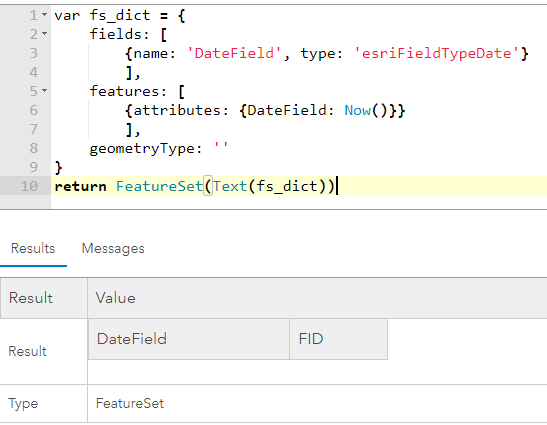
If you input a feature with a Date() attribute, the FeatureSet will be empty:
var fs_dict = {
    fields: [
        {name: 'DateField', type: 'esriFieldTypeDate'}
        ],
    features: [
        {attributes: {DateField: Now()}}
        ],
    geometryType: ''
}
return FeatureSet(Text(fs_dict))
To insert a date, you have to convert to Number() first (line 6):
var fs_dict = {
    fields: [
        {name: 'DateField', type: 'esriFieldTypeDate'}
        ],
    features: [
        {attributes: {DateField: Number(Now())}}
        ],
    geometryType: ''
}
return FeatureSet(Text(fs_dict))
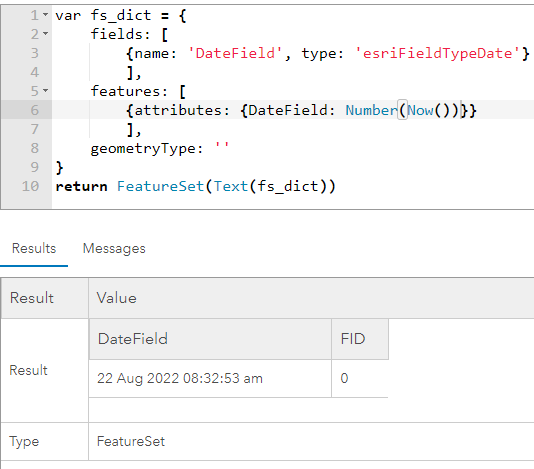
This is absolutely not a behavior users expect and it leads to confusion regularly.
Please change the FeatureSet creation to allow Date() values in esriFieldTypeDate fields.





