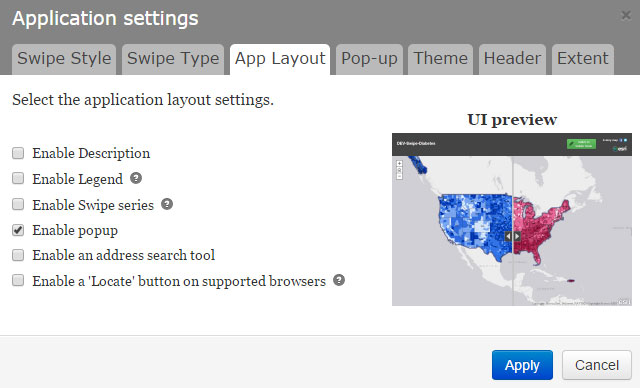
The pop-ups worked previously, but suddenly do not work. The map URL is https://epa.maps.arcgis.com/apps/StorytellingSwipe/index.html?appid=45aea0ec00d44a31826fc3ed51995908 , and pop-ups are enabled in the web maps that power both sides of the swipe and within the Story Map.
I noticed that the White House's Digital Divide swipe map (http://esrifederal.maps.arcgis.com/apps/StorytellingSwipe/index.html?appid=bb31238b494041caa444b4d4a2fe0949 ) is also not displaying pop-ups. Is this an AGOL glitch?
Here's another map that seems like it should have pop-ups: http://senate.maps.arcgis.com/apps/StorytellingSwipe/index.html?appid=390dcc12b37248d9b6f3b5418c31820e
We have identified the problem and have a fix going in on the next build, which you should see in the next few days. Sorry for any inconvenience.
Steven,
Unfortunately, this is the intended behavior of the Swipe Story Map. Though, it looks like you can get map notes to show popups, but not always.
Take a look at this thread:
Popups on Swipe Story Map
This is the designed behavior of the Swipe application. It is designed to compare/contrast two layers/maps and its data, both visually, and through its popups. The swipe bar controls what layers appear on the left/right side, as well as if a feature and its popup is found on that appropriate layer/map. A possible work around is to use two maps that both contain the same points layer, and therefore popups, that will be displayed regardless of which side is swiped
I have been thinking about this more and there appears to be quite a mixture of information out there regarding this functionality (whether it works or not seems inconsistent).
Take a look at this blog post by Bern:
Embedding a Story Map within a Story Map | ArcGIS Blog
It seems that if you embed the swipe app into a map journal story map, then maybe you can get pop ups to work
How to embed a Story Map Swipe
Begin by authoring a Story Map Swipe & Spyglass using the desired maps or layers. Both the Swipe or Spyglass layout options work equally well. For the purposes of embedding, it is best to leave all App Layout settings checked off, except the pop-up (if one is desired).
Though, it seems that some people have issues getting this to work (see the comments section).
Have you downloaded the developer code for this application?
GitHub - Esri/swipe-map-storytelling-template-js: A storytelling template that enables users to reveal a layer of a web …
It looks like there is popup functionality in here:
More customization are accessible through three files :Index.html offers major settings:popup: web map popups can be disabled in the application by setting this property to falsepopupTitles: text that appears in pop-up headerpopupColors: popup header background colorslegend: dictate if the legend panel is displayed in the side paneldescription: dictate if the description panel is displayed in the side panelsidePanelDescription: Text that appears in the description panellocationSearch: dictate if an address location search widget is displayed in applicationgeolocator: dictate if a locate button is displayed (on supported browsers) that displays users locationtitle: if not specified the ArcGIS.com map's title is usedsubtitle: if not specified the ArcGIS.com webmap's summary is used
More customization are accessible through three files :
This may help you get started onto something, but it may or may not work, it seems.
The odd thing is, the pop-ups worked in the past and now they don't. In fact, when I create a new Story Map Swipe with two maps that display the exact same features, I still can't get the pop-ups to display even though I have pop-ups enabled everywhere. So it's not an issue of one map having a feature that another map doesn't have (per the reference to the other thread in your first post).
Probably time to escalate to Esri.
It's possible that you can email your app to bszukalski@esri.com as indicated in that blog post. Also, tagging Owen Evans since he is the author of the GitHub material.
Mark, thanks for the reply. I'll monitor the app over the next few days to verify that it gets resolved.
Mark,
Will this be part of a large batch of updates for several web maps/apps? Or is this just an update to the swipe app?
Angemeldete Mitglieder können Beiträge verfassen, Updates folgen und mehr. Neu hier? Registriere ein kostenloses Konto.
Find useful guides, FAQs, and documents to help you navigate and make the most of Esri Community.