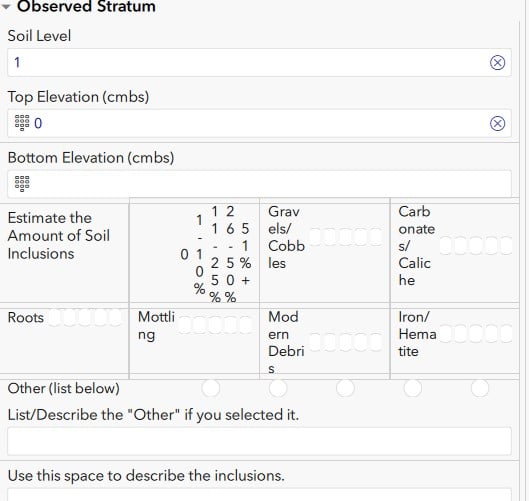
Hello, everyone -
I am new to Survey 123 and am building a soil-recording form for archaeologists to use. I'm working in a sandbox form to test different components out, but am having some trouble with table-list appearance settings not being applied.
Is there a way to set the "w1" value for a "table-list" appearance in a group (e.g. set them both in a group's "appearance" column)? I've set form's "style" in "settings" to "theme-grid" because there's a different group on the form that I want formatted into multiple columns but this group just needs to be one column. Instead the table-list is being broken into individual cells across multiple columns (see attached screen cap).
Can you apply the theme-grid layout to some groups but not all? I've read in the documentation that "The table-list appearance value will not function if placed in a theme-grid group," but I read that to mean that you can set some groups to the theme-grid setting and others to not be theme-grid.
I thought maybe I could set that group to "w1" and it'd work, to no avail. In that same documentation, it says, "...These widths can be set along with most other appearance types." That leads me to think you can set multiple appearance types for a given group. I also read somewhere that it defaults to "w1" unless otherwise specified.
This seems like I'm missing something simple. If anyone has any ideas, I'd appreciate the assistance.
Thank you in advance!