Being the only GIS person at a company, you may be expected to handle everything from complex analysis, data governance, and even IT support all on your own. Fortunately, it doesn’t have to be as intimidating or isolating as it may sound.
After serving as the sole GIS professional at two different companies, I have put together 10 practical tips to help you prioritize, organize, and build meaningful connections with your teammates and your business.
1. Align your GIS goals with the broader company goals
The best way to show the value of GIS to your supervisors is to demonstrate how GIS will help them achieve company-wide goals.
Ask yourself these big questions:
- What is your team and broader company trying to accomplish and where do you fit into that big picture plan?
- Can your maps or apps help them to access new markets, identify where competitors are active, or collect more accurate data?
Not everyone fully understands how much value GIS can bring to the table, so it is your job to help your supervisors understand how to tap its potential and prove that it is worth their investment.
If the value proposition for GIS is not immediately clear, try framing it in terms like time saved, costs reduced, risks mitigated, or opportunities identified.
2. Set a realistic and achievable GIS strategy
To set yourself up for success, make sure your goals are achievable, but ambitious enough to show meaningful progress. You don’t have a team of GIS people to back you if you fall short, so it is best to set reasonable expectations early on.
If you feel unsure about how much work you can handle, start off with modest targets until you can establish a baseline of how much you can get done in a period of time and ramp up from there.
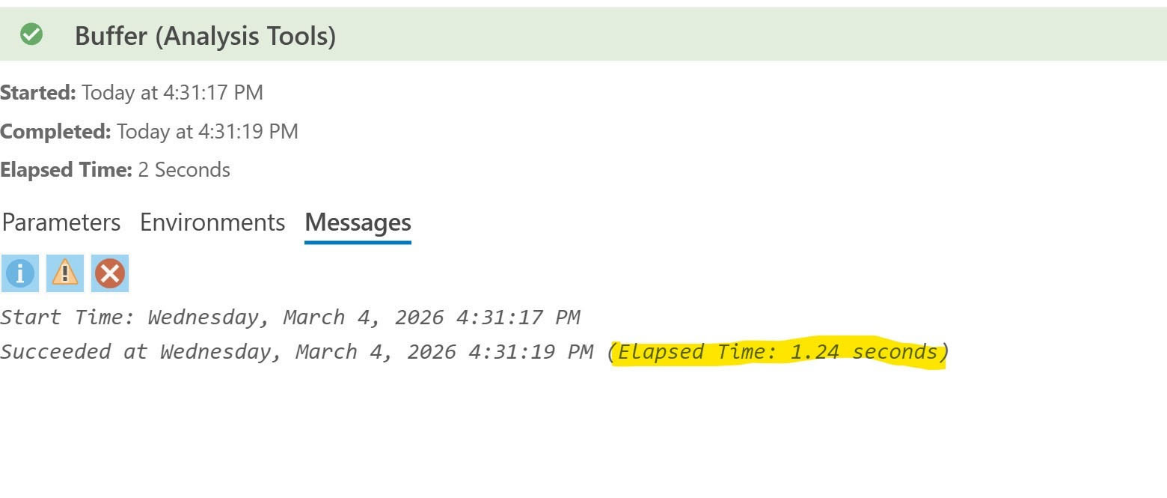
One way to help determine this baseline is by reviewing the timestamps from your geoprocessing actions as shown below.
Source: ArcGIS Pro 3.6.1
3. Celebrate and communicate your strategic milestones, but don’t get too in the weeds
Maps are one of the best ways to tell stories with your data, so don’t let technical jargon get in the way of that!
Always lead with the key takeaway, not your methodology. Instead of saying, “I ran a spatial join with a kernel density overlay,” say, “We identified three high-potential expansion zones based on customer clustering.”
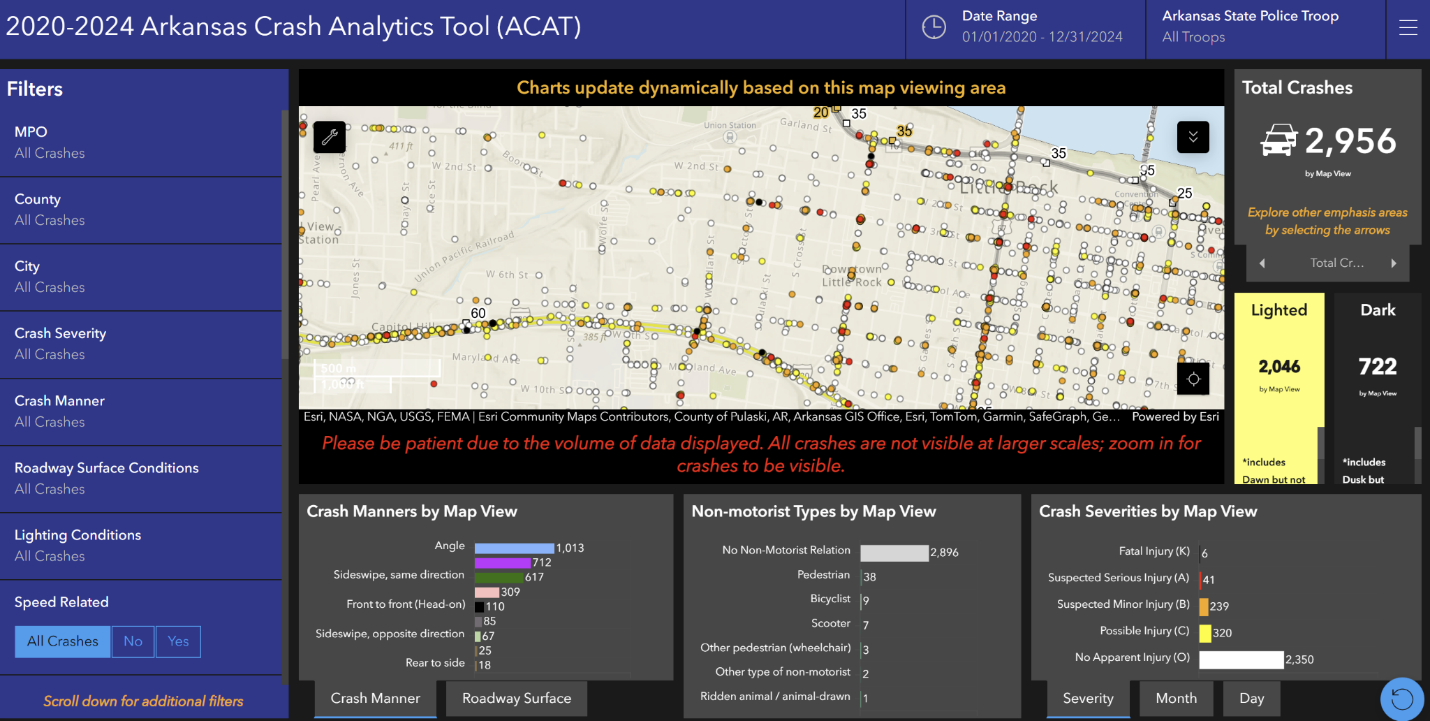
Another great way to tell stories with your data is by creatively displaying key performance indicators (KPIs). See this great example below of how the Arkansas Department of Transportation displays crash analytics using an ArcGIS Dashboard.
Source: Arkansas Crash Analytics Tool (https://gis.ardot.gov/portal/apps/dashboards/3ae35f942fa340888abd27f26d405558)
4. Find efficient ways to refresh your maps and data
Have you ever found yourself spending hours updating each of your ArcGIS Online maps when you make a change to a single layer in ArcGIS Pro? Here is one possible solution:
When you make edits to a layer in ArcGIS Pro that feeds into a feature layer presented in ArcGIS Online, you can simply overwrite the feature layer directly in ArcGIS Pro. This will keep the same symbology you have set up in each of the web maps or apps where that layer is present, but the fields will be updated.
5. Automate repetitive tasks to supercharge your productivity
Over time, you may notice that there are some tasks that you find yourself having to perform every day or every week, with little variation. Often tasks like these are prime candidates for automation.
A simple python script tool or model can string together many geoprocessing steps into just a few clicks.
For example, you can write one that pulls tabular data from a csv, convert it to a point layer, generate buffers for each point, and calculate the areas of each buffer polygon. Then after you click run, you can maximize your time by working on other tasks while your data processes in the background.
6. Leverage AI to make your workflows more efficient and learn new skills
If automating GIS tasks sounds fantastic but you don’t know where to start, try asking an AI application to help you. Tools like ChatGPT, Claude, Gemini, Copilot, etc. can help point you to learning resources, give you advice on how to write your own code, and even help debug your code for you!
However, please keep in mind that while AI tools can be very helpful, they can hallucinate incorrect answers or miss important context that is relevant to your problems.
Always test and check the answers AI gives you before you do anything with them. Also check your company’s policies regarding AI before you feed it any proprietary data.
See this post from fellow YPN contributor @Chris_Lyons_KY Lyons on how to improve workflows with AI.
7. Seek constructive feedback from your supervisor or team members
You may already be a mapmaking pro, but sometimes the definition of what makes an appealing or intuitive map can be subjective. Don’t be afraid to ask your team for their feedback on how to make your maps better for them before publishing.
Their suggestions may be as simple as switching from a dark background theme to a light background or reducing the number of visible layers. Don’t take it personally if their vision differs from yours.
Some companies may even have their own style guides or templates which take a lot of the guesswork out of the equation.
8. Document your workflows and data thoroughly, even if no one asks for it
Your company may not have any strict policy on documentation, but that shouldn’t stop you from doing your best to document your work.
Take notes from your geoprocessing history, where and when you find data, and provide ample descriptions and context in your metadata.
It is also helpful to standardize your file and folder naming conventions so you can more easily retrieve what you need. If you need to recall down the line how you performed a certain task or retrieved data, you will be prepared!
9. Train and recruit enterprising coworkers to help with GIS efforts
Just because you are the only person in your team with “GIS” in their job title doesn’t mean you have to be the only person contributing to GIS work.
You may find that some of your coworkers have always wanted to learn GIS or are curious about how it works. If this is the case, you can try talking with them and their manager if you can help mentor them on the job. Many companies encourage cross-training, and it can be a great opportunity for you to boost your own leadership and teaching skills while also bringing more exposure to the work that you do.
If you need help explaining GIS concepts to your mentees, you can try referring to the “Getting Started” page on Esri Academy. You can teach them how to help you with more basic tasks like digitization, field editing, or georeferencing. This could free up some of your time to seek out a mentor of your own.
10. Don’t let yourself become siloed
Without other GIS people to talk shop with and deadlines keeping you ever so busy, you may be tempted to just keep your head down at your desk and focus solely on your work. Though meeting your own GIS goals should be your top priority, it is also important to learn about the work being done outside your own day-to-day tasks and to apply that knowledge into your own work.
Be proactive about engaging with your coworkers about the work they are doing and try to get outside your comfort zone as much as you can. Attend meetings and talk to your teammates about any pain points or opportunities they may be thinking about.
For example, when I used to work on a solar site acquisition team, I noticed that my coworkers were having a hard time remembering where they saw certain land features from their field notes. I saw this as an opportunity to implement Esri’s mobile Field Maps app so their notes could be georeferenced and easily uploaded to our ArcGIS Online maps.
Conclusion
Being the only GIS professional in a company is not a limitation – it’s an opportunity.
Keep the big picture in mind, plan ahead, communicate effectively, and continuously improve your workflow efficiency. With consistency, you will move from being just the “GIS person” to being your company’s strategic advantage.
I would love to hear your thoughts in the comment section and feel free to connect with me on LinkedIn.