- Home
- :
- Community Resources
- :
- Community Feedback
- :
- Filter ArcGIS Community Content by Blogs, Question...
- Subscribe to RSS Feed
- Mark Topic as New
- Mark Topic as Read
- Float this Topic for Current User
- Bookmark
- Subscribe
- Mute
- Printer Friendly Page
Filter ArcGIS Community Content by Blogs, Questions, Documents, and Ideas

- Mark as New
- Bookmark
- Subscribe
- Mute
- Subscribe to RSS Feed
- Permalink
The ArcGIS Community is rich with content—blogs, questions, documents, and ideas—but discovering the right type of information quickly is still harder than it should be. Today, users must rely on keywords or navigate multiple community areas, which slows down problem-solving and content discovery, especially for new users and busy practitioners.
I propose adding a simple, global content-type filter across the ArcGIS Community that allows users to filter posts by Blogs, Questions, Documents, and Ideas directly from search results and activity feeds. This lightweight enhancement would significantly improve usability, reduce noise, and help users immediately focus on the content format they need—whether they’re looking for an answer, thought leadership, official documentation, or innovation ideas—making the Community faster, more intuitive, and more productive.
Venkat
Follow me on: LinkedIn
If this response helps or is the solution to your post, please consider marking it as a solution
Solved! Go to Solution.
Accepted Solutions


- Mark as New
- Bookmark
- Subscribe
- Mute
- Subscribe to RSS Feed
- Permalink
@VenkataKondepati, Esri Community search is hierarchical so that if a search takes place from the Home Page it includes all areas of Esri Community that the individual searching has permission to see, whereas searching from a specific Place or Board narrows the results to content found just contained in that area. Have you tried using the search dashboard to filter the results you're seeing, by chance?
What you'd want to do in this situation is go to the Esri Community Home Page and launch a search (you can either input a keyword / phrase or leave it blank) which will open the search dashboard. Then you can use available filters to home in on what type of content you're looking for. Hope this helps!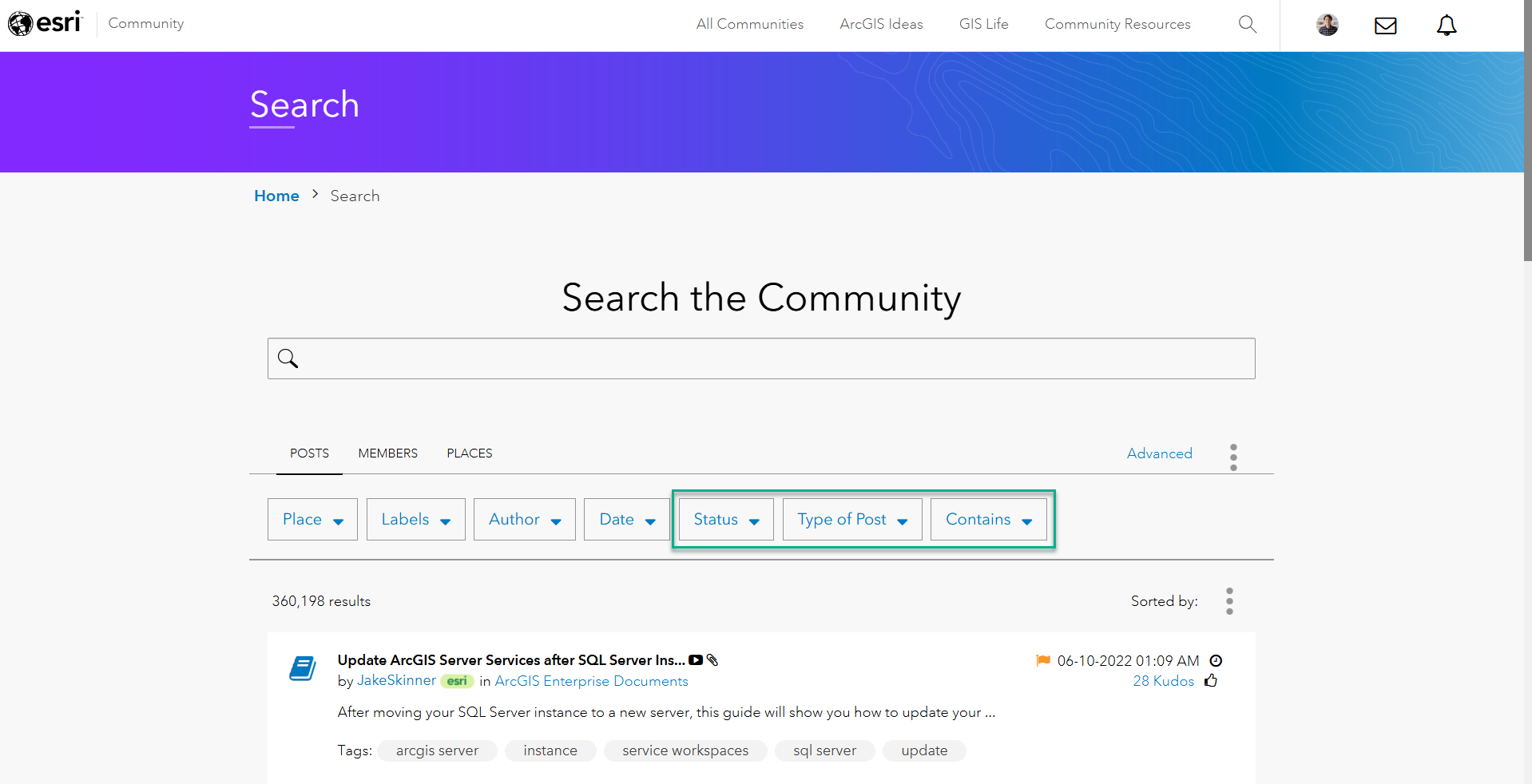
Community Manager, Engagement & Content
- Mark as New
- Bookmark
- Subscribe
- Mute
- Subscribe to RSS Feed
- Permalink
@VenkataKondepati, Esri Community search is hierarchical so that if a search takes place from the Home Page it includes all areas of Esri Community that the individual searching has permission to see, whereas searching from a specific Place or Board narrows the results to content found just contained in that area. Have you tried using the search dashboard to filter the results you're seeing, by chance?
What you'd want to do in this situation is go to the Esri Community Home Page and launch a search (you can either input a keyword / phrase or leave it blank) which will open the search dashboard. Then you can use available filters to home in on what type of content you're looking for. Hope this helps!
Community Manager, Engagement & Content
- Mark as New
- Bookmark
- Subscribe
- Mute
- Subscribe to RSS Feed
- Permalink
Hi @JesseCloutier,
Thanks for the response and details. Now, I understand that we need to some value to get to filter options.
This is okay as a workaround solution, but it is not self-explanatory.
Regards,
Venkat
Venkat
Follow me on: LinkedIn
If this response helps or is the solution to your post, please consider marking it as a solution
