Turn on suggestions
Auto-suggest helps you quickly narrow down your search results by suggesting possible matches as you type.
Cancel
- Home
- :
- All Communities
- :
- Products
- :
- ArcPad (Retired)
- :
- ArcPad Questions
- :
- Re: Coordinate Systems and Projections for Trimble...
Options
- Subscribe to RSS Feed
- Mark Topic as New
- Mark Topic as Read
- Float this Topic for Current User
- Bookmark
- Subscribe
- Mute
- Printer Friendly Page
Coordinate Systems and Projections for Trimble GPS Correct and ArcPad - What works?
Subscribe
2004
1
08-25-2012 05:18 AM

08-25-2012
05:18 AM
- Mark as New
- Bookmark
- Subscribe
- Mute
- Subscribe to RSS Feed
- Permalink
I have been given differing opinions on what projection/coordinate system to use in data to be checked out to ArcPad in order for it to run well with Trimble Hardware (GPS PRO 6T Receiver) and Trimble GPS Correct software. I am currently checking out both vector and raster features to ArcPad with usually at least one or more editable point features.
Does it make a difference if you are doing post processing or not? Does all the data have to be checked out in the same projection/coordinate system?
I have had issues with not being able to check-in data from the field - transaction log isn't showing up. Still trying to figure out why.
I am running ArcGIS Desktop 10.1, ArcPad 10 with the latest patch (10.0.04) and the most recent version of Trimble GPS Correct.
Any advice?
Does it make a difference if you are doing post processing or not? Does all the data have to be checked out in the same projection/coordinate system?
I have had issues with not being able to check-in data from the field - transaction log isn't showing up. Still trying to figure out why.
I am running ArcGIS Desktop 10.1, ArcPad 10 with the latest patch (10.0.04) and the most recent version of Trimble GPS Correct.
Any advice?
1 Reply


08-27-2012
05:20 AM
- Mark as New
- Bookmark
- Subscribe
- Mute
- Subscribe to RSS Feed
- Permalink
Hello Dick,
Yes, all data in your MXD must be in the same spatial reference prior to performing check out to ArcPad. ArcPad ONLY SUPPORTS on-the-fly projection and datum conversion from the GPS input datum to the projection and datum of the current map. If you are using Trimble GPScorrect and GPS Analyst extensions, then the only difference is you will need to use personal geodatabases. If you will be using related tables in your ArcPad project then the layers and their related tables must be in the same geodatabase in order to be checked out for editing in ArcPad.
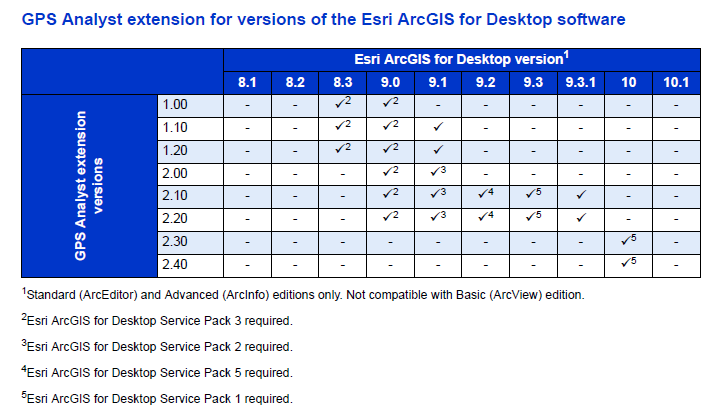
I think the challenge you have encountered is from upgrading to ArcGIS Desktop 10.1 as Trimble hasn't yet released a version of GPS Analyst that supports the ArcGIS 10.1 application. If you require post-processing of your GPS data, then you need to remain at ArcGIS Desktop 10 until a supported version of GPS Analyst is announced by Trimble. Please refer to Trimble website and Software Comatability Matrix (pg 15) for more information.
[ATTACH=CONFIG]17248[/ATTACH]
Regards,
Denise
Yes, all data in your MXD must be in the same spatial reference prior to performing check out to ArcPad. ArcPad ONLY SUPPORTS on-the-fly projection and datum conversion from the GPS input datum to the projection and datum of the current map. If you are using Trimble GPScorrect and GPS Analyst extensions, then the only difference is you will need to use personal geodatabases. If you will be using related tables in your ArcPad project then the layers and their related tables must be in the same geodatabase in order to be checked out for editing in ArcPad.
I think the challenge you have encountered is from upgrading to ArcGIS Desktop 10.1 as Trimble hasn't yet released a version of GPS Analyst that supports the ArcGIS 10.1 application. If you require post-processing of your GPS data, then you need to remain at ArcGIS Desktop 10 until a supported version of GPS Analyst is announced by Trimble. Please refer to Trimble website and Software Comatability Matrix (pg 15) for more information.
[ATTACH=CONFIG]17248[/ATTACH]
Regards,
Denise