Turn on suggestions
Auto-suggest helps you quickly narrow down your search results by suggesting possible matches as you type.
Cancel
- Home
- :
- All Communities
- :
- Products
- :
- ArcPad (Retired)
- :
- ArcPad Questions
- :
- Re: Check out personal geodatabase to ArcPad
Options
- Subscribe to RSS Feed
- Mark Topic as New
- Mark Topic as Read
- Float this Topic for Current User
- Bookmark
- Printer Friendly Page
Check out personal geodatabase to ArcPad
3449
1
06-14-2011 09:43 PM

06-14-2011
09:43 PM
- Mark as New
- Bookmark
- Subscribe to RSS Feed
- Permalink
Hello, I am trying to replicate the "Riverside" sample that comes with the ArcPad application. I ran it on my desktop and it has the functionality that I need for a project I'm working on. I am having problems though, in setting up a geodatabase with related tables, that can then be checked out to arcpad with associated MDB,AXF, Access database files, etc. I have worked out how to use the GetDataForArcpad tool to create a project for ArcPad, but when I do, I only get the ArcPad Map file,shapefiles, APL, DBF and VBS files. Does anyone know of a example that works through the process of creating a personal geodatabase with SQL references and AXF file creation, to checking it out to ArcPad?? I'm not really a programmer, but would dearly love some help.
1 Reply

12-20-2011
06:02 AM
- Mark as New
- Bookmark
- Subscribe to RSS Feed
- Permalink
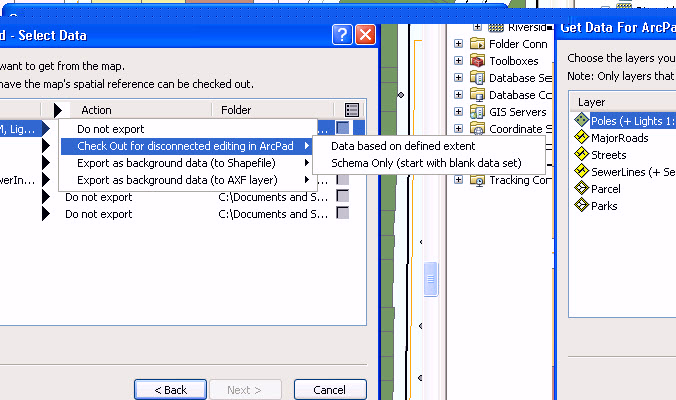
With checking out your personal geodatabase from ArcMap for ArcPad. Are you using the Action, Check out for disconnect editing. With this option selected for the data, you will be able to have all the appropriate files created. Then when you open the .apm within ArcPad your related tables will reflect, once you capture a new feature.