- Home
- :
- All Communities
- :
- Products
- :
- ArcGIS Survey123
- :
- ArcGIS Survey123 Questions
- :
- Object detection deep learning model in Survey123
- Subscribe to RSS Feed
- Mark Topic as New
- Mark Topic as Read
- Float this Topic for Current User
- Bookmark
- Subscribe
- Mute
- Printer Friendly Page
Object detection deep learning model in Survey123

- Mark as New
- Bookmark
- Subscribe
- Mute
- Subscribe to RSS Feed
- Permalink
Hi,
We developed a Survery123 smart form for field data collection and planning to train a deep learning model to identify features in an image using the Survey123 smart camera functionality.
The article referenced here (https://developers.arcgis.com/python/samples/train-a-tensorflow-lite-model-for-identifying-plant-spe...) explains training a single-label classification model. Our use case requires to build an object detection/multi-label classifier to be integrated with Survey123 application.
Does Survey123 support object detection and multi-classification models as well?
Thanks in advance,
Anusha


- Mark as New
- Bookmark
- Subscribe
- Mute
- Subscribe to RSS Feed
- Permalink
@AnushaGTI Please check our Survey123 Early Adopter Documentation. You can use an object detection TensorFlow Lite models with the Beta build of Survey123. This is scheduled for General Release in June 2023. Below is a screenshot from our Early Adopter doc:
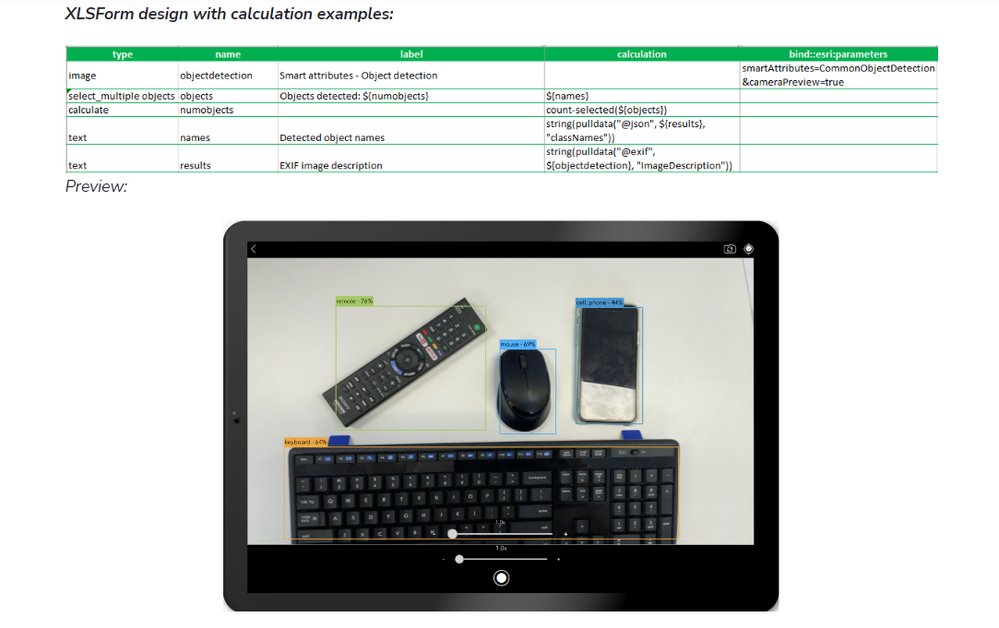
Note: At the moment, we do not provide ArcGIS tools to train object detection models for Survey123, but you can do it outside of ArcGIS. There is on-going work directed to help you train your own object detection model using ArcGIS tools (tentatively June 2023). If you want to start your work right away, please post questions in the Early Adopter Forum.
- Mark as New
- Bookmark
- Subscribe
- Mute
- Subscribe to RSS Feed
- Permalink
@IsmaelChivite Thanks for your reply.
Based on your comment on training the models outside of ArcGIS, what kind of libraries/packages are supported for integrating back into Survey123? (Tensorflow Lite, PyTorch, etc). Also, do the model files need to be in a specific format to be integrated back with Survey123 for inferencing (.dlpk vs .tflite/.pt)?
Thank you,
Anusha


- Mark as New
- Bookmark
- Subscribe
- Mute
- Subscribe to RSS Feed
- Permalink
Hi @AnushaGTI
Survey123 Smart assistants is now available with Survey123 June 2023 release (v3.18), and you can find related documentation here: ArcGIS Survey123 Smart assistants reference.
TensorFlow Lite model (.tflite) is the only model format that can be consumed by Survey123, you can find more information in the Models section.
Thank you,
Borui

- Mark as New
- Bookmark
- Subscribe
- Mute
- Subscribe to RSS Feed
- Permalink
I am curious to where we are at with this technology now in Survey123.
I was interested in using the Optical Character Recognition deep learning model, provided by ArcGIS Living Atlas <https://www.arcgis.com/home/item.html?id=8b56ed53e34b4304a5b8b826a7512ab0>, to extract simple text values from images of receipts (like the total amount and the item description) and populate those values to specific questions within the survey.
Is there any information that could assist me with implementing this?

- Mark as New
- Bookmark
- Subscribe
- Mute
- Subscribe to RSS Feed
- Permalink
There is a great tutorial for using the Common Object Detection deep learning model in Survey123 here: https://doc.arcgis.com/en/survey123/desktop/create-surveys/smart-assistants-prep.htm .
I learned a lot from this and I hope it helps you too.
I wanted to use the same workflow outlined by this tutorial for other deep learning models like Optical Character Recognition (same as you); however, I have had no luck with Optical Character Recognition. My guess is that when you download the Optical Character Recognition model through Survey123 Connect, it does not include the tflite extension, which is necessisary to get the object identification to work.
So until ESRI groups the tflite package in with the download for other dlpk's I don't know what to do.
Hope this helps a bit.
- Mark as New
- Bookmark
- Subscribe
- Mute
- Subscribe to RSS Feed
- Permalink
Hi @LukeSwanson17 and @KellyJanus1
Thank you for your question. Unfortunately, Survey123 has specific requirements for deep learning models and currently only supports models built with TensorFlow Lite (.tflite format). The Optical Character Recognition (OCR) model you mentioned was developed using PyTorch, which is not compatible with Survey123 at this time.
We appreciate your interest in these advanced technologies and will certainly consider incorporating OCR functionality into Survey123 in a future update.

- Mark as New
- Bookmark
- Subscribe
- Mute
- Subscribe to RSS Feed
- Permalink
Hi @BoruiZhu
Thank you for the clarification regarding TensorFlow Lite support.
Are there any updates on additional deep learning models that are compatible with Survey123? Also, do you anticipate broader model compatibility in the next-generation Survey123?
Thanks in advance for any updates you can share.
- Mark as New
- Bookmark
- Subscribe
- Mute
- Subscribe to RSS Feed
- Permalink
- Make your Survey123 forms smarter with AI-powered image, text, and audio analysis
- Survey123 assistant (preview)
