- Home
- :
- All Communities
- :
- Products
- :
- ArcGIS Pro
- :
- ArcGIS Pro Questions
- :
- Re: Windows Save Dialog popup searching instead of...
- Subscribe to RSS Feed
- Mark Topic as New
- Mark Topic as Read
- Float this Topic for Current User
- Bookmark
- Subscribe
- Mute
- Printer Friendly Page
Windows Save Dialog popup searching instead of saving file name - "Network Error: Cannot access..."

- Mark as New
- Bookmark
- Subscribe
- Mute
- Subscribe to RSS Feed
- Permalink
I’m seeking assistance with a persistent issue I’m encountering when attempting to export my work. When I started to experience the bug last week I was using ArcPro 3.5.3. I have since updated to version 3.6.3.
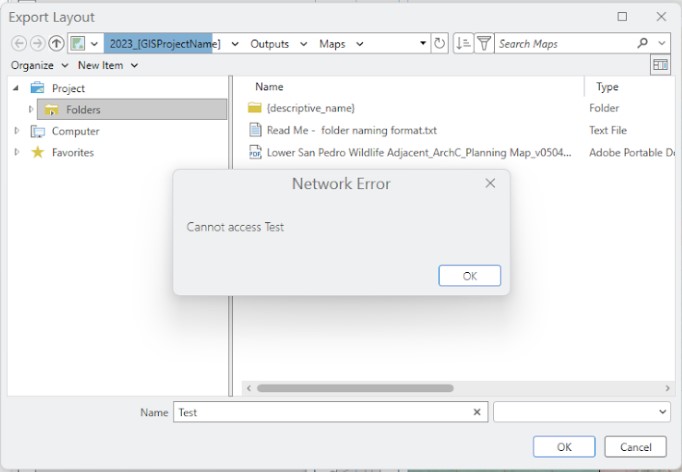
Every time I attempt to export (whether it’s a Layout to PDF or exporting data like a Shapefile), I am unable to rename the output file in the standard Windows Save/Export Layout dialog.
Specifically, the text box where I would typically type the new file name is functioning as a Search Box instead of a name entry field. When I type the desired name and press Enter, the program attempts to "search" for that name within the directory rather than assigning it to the new file. I receive a network error that says "Cannot access ['searched' file name]".
I can successfully export by copying and pasting the file location from File Explorer to the Export Layout "Name" field, although this is inconvenient.
I tried clearing the display cache and updating to version 3.6.3 (as stated above), but neither were helpful.
Solved! Go to Solution.
Accepted Solutions
- Mark as New
- Bookmark
- Subscribe
- Mute
- Subscribe to RSS Feed
- Permalink
Due to my company's policy, we are not able to uninstall Windows updates.
Luckily, after uninstalling and reinstalling ArcGIS Pro the problem was solved.


- Mark as New
- Bookmark
- Subscribe
- Mute
- Subscribe to RSS Feed
- Permalink
try saving/reading data from folders without spaces or other forms of punctuation (brackets, dashes etc).
letters, underscores and numbers are generally fine
... sort of retired...
- Mark as New
- Bookmark
- Subscribe
- Mute
- Subscribe to RSS Feed
- Permalink
I have tried this, this did not help.


- Mark as New
- Bookmark
- Subscribe
- Mute
- Subscribe to RSS Feed
- Permalink
This may be related to Microsoft Windows updates (notably KB5083769 and KB5082417 released in April 2026) introduce changes to file handling and SMB-related operations. Try uninstalling both of the forementioned Windows updates by going to your Systems->Windows Updates->Update History and click Uninstall Updates. Locate KB5083769 and/or KB5082417 and uninstall the updates. Restart your PC and try again. Hopefully this addresses this issue.

- Mark as New
- Bookmark
- Subscribe
- Mute
- Subscribe to RSS Feed
- Permalink
Those same patches broke UNC paths. now most areas require complete server names in the path. For example, prior to these KBs \\myserver\myfiles would work but now you need to do \\myserver.mydomain.loc\myfiles to avoid DNS errors. This can impact any area where you may store an UNC path (e.g., in a web.config file).
- Mark as New
- Bookmark
- Subscribe
- Mute
- Subscribe to RSS Feed
- Permalink
Due to my company's policy, we are not able to uninstall Windows updates.
Luckily, after uninstalling and reinstalling ArcGIS Pro the problem was solved.

- Mark as New
- Bookmark
- Subscribe
- Mute
- Subscribe to RSS Feed
- Permalink
Has anyone found a solution for this yet? Did the uninstalling of those Windows updates solve the issue?
Cheers, Mike
