- Home
- :
- All Communities
- :
- Products
- :
- ArcGIS Pro
- :
- ArcGIS Pro Questions
- :
- Re: Sort items in Contents Pane
- Subscribe to RSS Feed
- Mark Topic as New
- Mark Topic as Read
- Float this Topic for Current User
- Bookmark
- Printer Friendly Page
Sort items in Contents Pane


- Mark as New
- Bookmark
- Subscribe to RSS Feed
- Permalink
Using ArcGIS Pro 2.7:
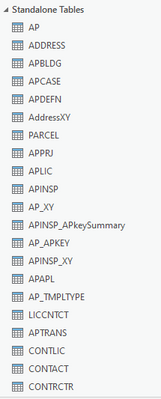
Is there a way to sort the items in the contents pane alphabetically? I have a stack of tables I'd like to order that way:


- Mark as New
- Bookmark
- Subscribe to RSS Feed
- Permalink
I think the short answer is no. If you right click on the map node in the TOC (what I would be calling a data frame in ArcMap) you can reorder layers by name/type, there is no equivalent for standalone tables. I did discover whilst looking into this question you can drag 'n' drop tables into a preferred order, but it would be nice to see a reorder option for tables too.
- Mark as New
- Bookmark
- Subscribe to RSS Feed
- Permalink
Drag and drop is an option...

- Mark as New
- Bookmark
- Subscribe to RSS Feed
- Permalink
four rules to a successful gis career
Pick something you want to do
- left-click
- right-click
- double-click
- if you don't see what you need you are clicking on the wrong thing or the wrong way.
For example... unorder layers in a table of contents, order them
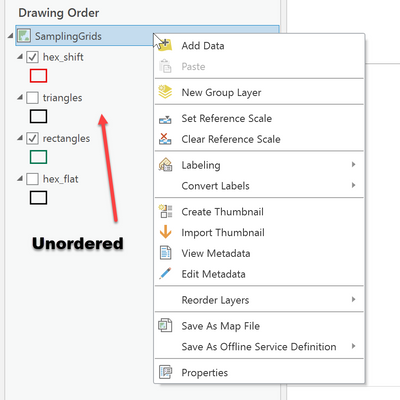
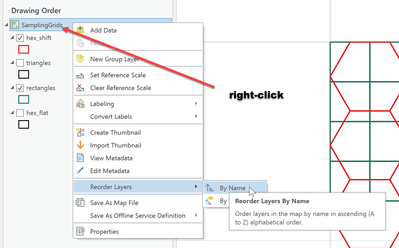
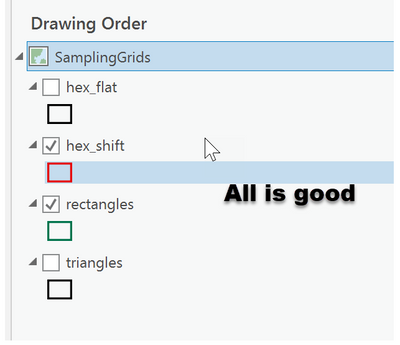
might work for other things... or not
... sort of retired...
- Mark as New
- Bookmark
- Subscribe to RSS Feed
- Permalink
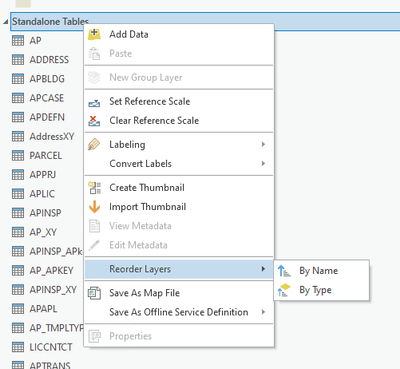
Rats; thought did it, but didn't. When I right click on Standalone Tables it gives me the choice to reorder layers and that's what it does, but not tables....
- Mark as New
- Bookmark
- Subscribe to RSS Feed
- Permalink
hence the....
might work for other things... or not
... sort of retired...
- Mark as New
- Bookmark
- Subscribe to RSS Feed
- Permalink
You forgot to mention to spin around, touch your toes and shout goooo esri! ... or not 😀

- Mark as New
- Bookmark
- Subscribe to RSS Feed
- Permalink
Yes, using arcpy. See my post here, or the code below.
# get active map in current project
p = arcpy.mp.ArcGISProject("CURRENT")
m = p.activeMap

# sort table names
sortedtables = sorted([t.name for t in m.listTables()])

# create new group
g = m.createGroupLayer("Sorted Tables")

# for each table, add to group and remove the original
for x in sortedtables:
    t = m.listTables(x)[0]
    m.addTableToGroup(g,t)
    m.removeTable(t)