- Home
- :
- All Communities
- :
- Products
- :
- ArcGIS Pro
- :
- ArcGIS Pro Questions
- :
- Multispectral Raster Alignment
- Subscribe to RSS Feed
- Mark Topic as New
- Mark Topic as Read
- Float this Topic for Current User
- Bookmark
- Subscribe
- Mute
- Printer Friendly Page

- Mark as New
- Bookmark
- Subscribe
- Mute
- Subscribe to RSS Feed
- Permalink
I'm trying to create some multi-spectral mosaic images using single band images taken on a MicaSense RedEdge-P camera in the lab. I created an empty mosaic but after adding the 6 band rasters (blue,green,red,red edge,nir,panchrom) it came out as a greyscale image with half of the image cut off (image1). I then repeated this process but did not include the panchrom band raster and the image looks like the bands are misaligned (image2). I tried georeferencing them to each other but no success. Is there a way to fix this?

image1
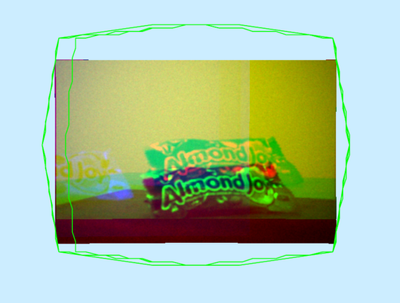
image 2


- Mark as New
- Bookmark
- Subscribe
- Mute
- Subscribe to RSS Feed
- Permalink
This usually happens because the RedEdge-P bands aren’t being treated as one multispectral “scene”—they’re getting added as separate single-band rasters (often with slightly different footprints/pixel sizes), which can display as grayscale, clip unexpectedly, or look misregistered.
Try this (best option for MicaSense RedEdge/RedEdge-P)
- Create/keep your mosaic dataset.
- Add the imagery using the RedEdge raster type (instead of adding each band manually):
- Imagery tab > Add Rasters (or Add Rasters To Mosaic Dataset)
- Raster Type = RedEdge
- Input Data = the folder with the band TIFFs (typically *_1.tif … *_5.tif)
- Choose a processing template like Multispectral or All bands
This raster type is designed to group the single-band files into one multispectral raster item so the bands align correctly in the mosaic dataset.
Reference: Aerial imagery raster types (RedEdge)
- Mark as New
- Bookmark
- Subscribe
- Mute
- Subscribe to RSS Feed
- Permalink
I had tried this and it didnt work unfortunately. i was able to discuss with another coworker to find out that the camera was not geotagging and had no heights recorded. we had to debug/optimize a python code from MicaSense to fix it
