- Home
- :
- All Communities
- :
- Products
- :
- ArcGIS Pro
- :
- ArcGIS Pro Questions
- :
- Importing symbology from ArcMap: Polygon with addi...
- Subscribe to RSS Feed
- Mark Topic as New
- Mark Topic as Read
- Float this Topic for Current User
- Bookmark
- Printer Friendly Page
Importing symbology from ArcMap: Polygon with additional symbols ("x" along line

- Mark as New
- Bookmark
- Subscribe to RSS Feed
- Permalink
I have imported a map from ArcMap. There, some polygons have the following symbology:
TOC:

Legend (200%):
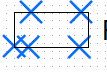
In Pro, they look like this:
TOC:

Legend (200%):

In the legend, the patch is scaled down to accomodate the "x", and the "x" are extremely small. This is how it looks in comparison with a different polygon feature class:
ArcMap:
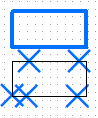
ArcGIS Pro:

Keep in mind, this is at 200% - you can hardly see the "x" anymore! Is there any way to change the way it is displayed in the legend?

- Mark as New
- Bookmark
- Subscribe to RSS Feed
- Permalink
No idea if this will fix your issue, but there is a checkbox in the Legends settings called "Scale to fit patch size" that could affect your output. You can find it in the Legend Properties under Legend Items > Show properties... Sizing:
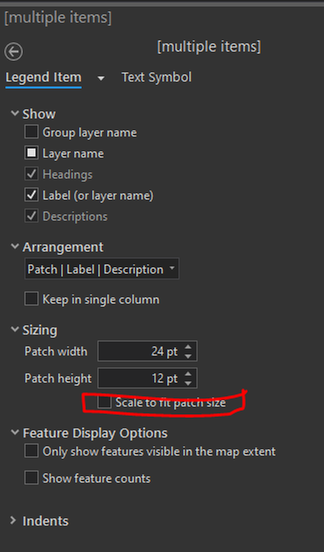
Maybe checking or unchecking that box for your polygon layers will have an impact?
- Mark as New
- Bookmark
- Subscribe to RSS Feed
- Permalink
Unfortunately, this did not change the appearance in the legend at all.
What helped in some maps, though weirdly not in all of them, was to uncheck the "Respect frame" box under Symbology.
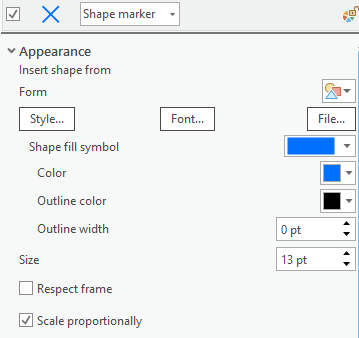
However, this produced differing results, so not a good solution in the end.
- Mark as New
- Bookmark
- Subscribe to RSS Feed
- Permalink
"Scale to fit patch size" seems to only appear in the menu with point layers?
