- Home
- :
- All Communities
- :
- Products
- :
- ArcGIS Pro
- :
- ArcGIS Pro Questions
- :
- Re: Cannot remove a layer from a group in TOC in P...
- Subscribe to RSS Feed
- Mark Topic as New
- Mark Topic as Read
- Float this Topic for Current User
- Bookmark
- Subscribe
- Mute
- Printer Friendly Page
Cannot remove a layer from a group in TOC in Pro


- Mark as New
- Bookmark
- Subscribe
- Mute
- Subscribe to RSS Feed
- Permalink
Anyone else noticed a bug with Pro 2.9.1 whereby you cannot remove layers from a group layer after copying an APRX project?
Im getting this issue with a large map of layers. I can't remove layers from the group as the Remove option is greyed out.
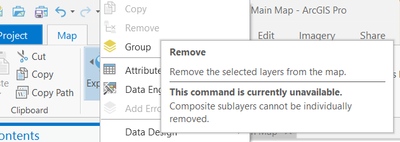
...saying "composite sub-layers cannot be individually removed"?!
The workaround is to remove the whole group layer, then "undo" the remove. After this, i can remove layers from the group, but this breaks links to tables in the layout.
Anyone else seen this?
David
..Maps with no limits..

- Mark as New
- Bookmark
- Subscribe
- Mute
- Subscribe to RSS Feed
- Permalink
Did you ever get this figured out? I'm using Pro 3.1 and have same issue and can't find anything useful online about it. I can get with Esri tech support, but thought I'd ask you first 🙂
And by figured it out...I mean without having to do the work around you discussed.

- Mark as New
- Bookmark
- Subscribe
- Mute
- Subscribe to RSS Feed
- Permalink
I ran into this as well in 3.7, with ungrouped layers. It was the map that was copied rather than the project, none of the map layers were grouped, and all of them had 'Remove' greyed out in the right-click menu.
I was able to remove them by grouping them and then removing the group layer. Perhaps if you try ungrouping/grouping the layers you will then be able to remove them.
