- Home
- :
- All Communities
- :
- Products
- :
- ArcGIS Pro
- :
- ArcGIS Pro Questions
- :
- Re: ArcGIS Pro - Unable to drag vertices when edit...
- Subscribe to RSS Feed
- Mark Topic as New
- Mark Topic as Read
- Float this Topic for Current User
- Bookmark
- Subscribe
- Mute
- Printer Friendly Page
ArcGIS Pro - Unable to drag vertices when editing

- Mark as New
- Bookmark
- Subscribe
- Mute
- Subscribe to RSS Feed
- Permalink
I'm probably missing something extremely obvious here, but I just can't figure out how to drag vertices using the editor tool in AGIS Pro.
Here's what I have done:
- Click on the Edit Tab
- Click on the Modify Button
- Click on Vertices under the Reshape group in the Modify Features sidebar.
Clicking and dragging on vertices has no effect.. Also, adding vertices works, but I am unable to re-position them.
Like I said, its probably something obvious but I just can't figure it out and its incredibly frustrating. Thanks! 
Solved! Go to Solution.


- Mark as New
- Bookmark
- Subscribe
- Mute
- Subscribe to RSS Feed
- Permalink
Hi Gregg,
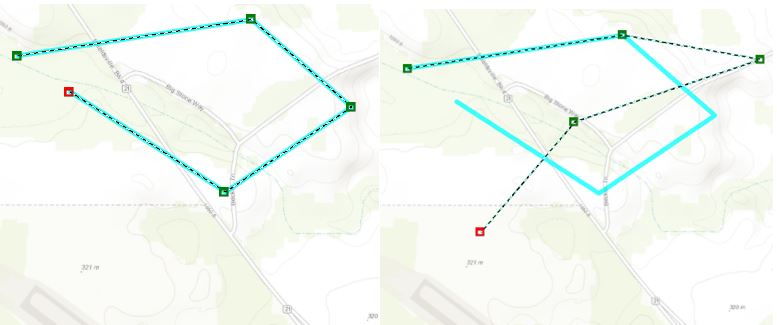
I was able to open your test project and drag vertices.
Rob
- Mark as New
- Bookmark
- Subscribe
- Mute
- Subscribe to RSS Feed
- Permalink
Hi Robert, thanks for trying that out. Is there any special step to enable dragging on the vertices that I'm missing?
- Mark as New
- Bookmark
- Subscribe
- Mute
- Subscribe to RSS Feed
- Permalink
Robert Burke is the problem I am experiencing perhaps related to license level?
We only have a Basic license for ArcGIS.

- Mark as New
- Bookmark
- Subscribe
- Mute
- Subscribe to RSS Feed
- Permalink
Hi Gregg,
Did you ever get this resolved? I'm having the same problem (not being able to move vertices). I can add new ones, delete old ones, but cannot move an existing. I'm kind of wondering if it's a licensing issue.
- Mark as New
- Bookmark
- Subscribe
- Mute
- Subscribe to RSS Feed
- Permalink
So...after clicking around and trying different things...it worked by selecting the point, then HOLDING BOTH MOUSE BUTTONS and dragging the point. Kind of a strange way to enable moving of vertices, but the more I've used it, the more I like it (you avoid accidentally moving a node when you click on it to select it).
- Mark as New
- Bookmark
- Subscribe
- Mute
- Subscribe to RSS Feed
- Permalink
Oh! I hadn't seen this sorry!. But thanks so much for the answer. It does work to edit now using both buttons...but I have to wonder why esri isn't more clear on this behavior! I had just been using ArcMap for editing, but am willing to give ArcGIS Pro another shot now.

- Mark as New
- Bookmark
- Subscribe
- Mute
- Subscribe to RSS Feed
- Permalink
So A bit late to this thread, but i had the same/similar issue (vertices could not be moved freely, they were bound by something) the solution of using both mouse buttons did not work for me.
My solution was to reshape the particular feature using only the straight line tool, then i was able to freely move the vertices to the correct spot.
I beleive the feature had been drawn with one of the curve tools and so had to keep certain things the same to keep the curve accurate

- « Previous
-
- 1
- 2
- Next »
- « Previous
-
- 1
- 2
- Next »