- Home
- :
- All Communities
- :
- Products
- :
- ArcGIS Pro
- :
- ArcGIS Pro Questions
- :
- ArcGIS Pro Table Frame content fitting strategy is...
- Subscribe to RSS Feed
- Mark Topic as New
- Mark Topic as Read
- Float this Topic for Current User
- Bookmark
- Printer Friendly Page
ArcGIS Pro Table Frame content fitting strategy issue

- Mark as New
- Bookmark
- Subscribe to RSS Feed
- Permalink
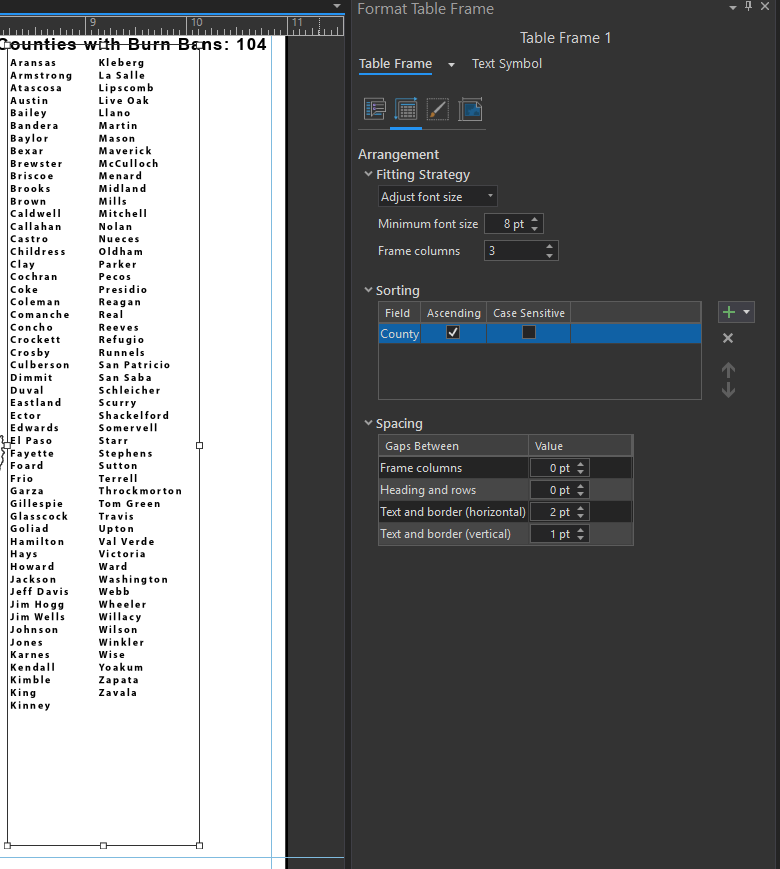
In the below snapshot, we can see that without the first column being totally completed till the end (see empty space below), the contents are being thrown to the second column for writing the new values. I have used all the fitting strategies namely Adjust font size, Adjust frame columns and Adjust Frame columns and font-size, but neither of them worked. The frame columns are set to 3 because we have considered the maximum possible columns needed to fit 254 counties based on the data refresh.
Can anyone suggest the right strategy to use so that it does not go to second column unless the first is totally finished?

- Mark as New
- Bookmark
- Subscribe to RSS Feed
- Permalink
This is also important to me. I need to add tables to my layout to track document history and form a standardized engineering title block.

- « Previous
-
- 1
- 2
- Next »
- « Previous
-
- 1
- 2
- Next »