- Home
- :
- All Communities
- :
- Products
- :
- ArcGIS Pro
- :
- ArcGIS Pro Ideas
- :
- Vertical Center for a Rectangle text element in a ...
- Subscribe to RSS Feed
- Mark as New
- Mark as Read
- Bookmark
- Follow this Idea
- Printer Friendly Page
Vertical Center for a Rectangle text element in a layout for a "Title"

- Mark as New
- Bookmark
- Subscribe
- Mute
- Subscribe to RSS Feed
- Permalink
Add the ability to a Vertical Center a Rectangle text element in a layout.
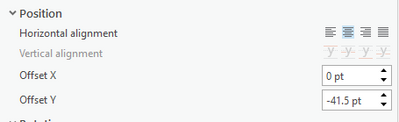
Currently the Vertical alignment is disabled (BUG-000121263), it seems the eyeballing the Offset Y is currently the only option to try and Vertically Center text.
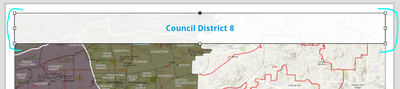
My goal is recreating the following layout. Having the Vertical alignment would allow a second line to added in seconds, instead of trying to readjust the Offset Y. Border and background added to Rectangle text element
- « Previous
-
- 1
- 2
- 3
- Next »

This issue has been so frustrating. Adding Y offsets, or manually adjusting the position of the rectangle text leads to text in layouts not automatically centered. This is problematic when adding text to layouts that have varying lines of text that need to be vertically centered in a fixed position. When using Python to populate an elements such as titles in multiple layouts, manual workarounds to not work. Even when manual workarounds make the appearance of centered text it is often not perfectly centered. Very hard to look at figures created that are not perfect, it looks unprofessional. This is further complicated by the text buffers that are built into the rectangle text elements and not adjustable like in ArcMap.
WIth these two factors, text is impossible to exactly and automatically align with other layout elements. We make hundreds of figures to to support environmental reporting and seeing these imperfections make me cringe. This was not an issue in arcmap. I hope that we can unlock these capabilities in the next patch or release!


This bug is now listed as "Non Reproducible". That's probably because they are trying it with 'Straight Text' (where it works correctly) not for 'Rectangle Text' where it does't work at all.

🤦🏼:male_sign:

no rect txt vertical alignment in 2026. Over three years riding the ESRI failtrain - back to ArcMap for this one

Agreed @GISDataTasPorts , @wayfaringrob
and @JosephRigley ... that is why my students use other software to create layouts.
And, again, why can't we comment, upvote or even like other comments to show support? GISDataTasPorts is likely 100% correct!

Still running into this bug fyi

@GregoryLund2 I had a good laugh today imagining AI agents trying to work through the Pro glitchfest, that's going to be fun, sorta

It's interesting that on a rectangle text element in a layout, which still has the vertical alignment disabled, the information given for it says "This command is currently unavailable. When labeling, vertical alignment is set by the label engine". But there should be no label engine involved in a text element in a layout, right?

You must be a registered user to add a comment. If you've already registered, sign in. Otherwise, register and sign in.