- Home
- :
- All Communities
- :
- Products
- :
- ArcGIS Pro
- :
- ArcGIS Pro Ideas
- :
- Vertical Center for a Rectangle text element in a ...
- Subscribe to RSS Feed
- Mark as New
- Mark as Read
- Bookmark
- Follow this Idea
- Printer Friendly Page
Vertical Center for a Rectangle text element in a layout for a "Title"
- Mark as New
- Bookmark
- Subscribe
- Mute
- Subscribe to RSS Feed
- Permalink
Add the ability to a Vertical Center a Rectangle text element in a layout.
Currently the Vertical alignment is disabled (BUG-000121263), it seems the eyeballing the Offset Y is currently the only option to try and Vertically Center text.
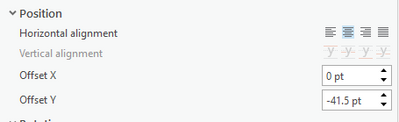
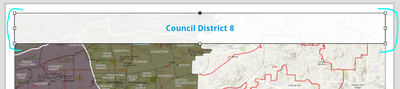
My goal is recreating the following layout. Having the Vertical alignment would allow a second line to added in seconds, instead of trying to readjust the Offset Y. Border and background added to Rectangle text element
- « Previous
-
- 1
- 2
- 3
- Next »


Hello!
This idea is being moved to In Product Plan. As development gets underway, the team wants to make sure they understand your needs and build the right solution. If you have a minute to answer these questions, it would be really useful.
1. What exact vertical alignment options are you looking for?
2. Is there another software or standard you are comparing the Pro experience to for vertical text alignment?
3. What kind of text elements (straight, rectangle, circle, etc) are you trying to vertically align?

I'll note that the buttons in the UI already exist, they're just not functional.
1. Top, Center and Bottom (The options that are currently available but grayed out in the Pro interface).
2. Any MS Office Product (Word, Excel, PowerPoint). PowerPoint being most similar as it is also "text in shape" based.
3. Primarily text box elements, but whatever you can additionally support would be great. What elements in Pro have those buttons in the UI that don't work?

- Top, Bottom, and Center are a must. X/Y offset should continue to work alongside alignment options, mostly to fine-tune Top/Bottom padding.
- MS Office, particularly PowerPoint. Adobe Illustrator as well.
- This is most needed to reduce friction creating standard straight/rectangular text boxes, but also helpful when customizing legends. Other shapes like ellipses are a bonus.
Reviewing the screenshot at the beginning of this thread, it appears that there is also a button for a “justified” alignment option.

Thank god!!! It's about dang time!!!
One thing I would be mindful of as you all implement this @AubriOtis is how spacing after paragraphs as well as line spacing affects alignment. In MS Office products for example, most default text styles like Normal include some space after each paragraph (6-12pts). Of course, you can reduce this, and often need to when working with the final line of text in a text box, because vertically centering the text (often called "middle" in software) places it a little higher optically than you'd expect it, because it's also centering that extra invisible space after the paragraph or line.
It's been a minute since I made a layout in ArcGIS Pro so I am not remembering off the top of my head how that is handled but if could be smart enough to ignore any space after paragraph that would be one solution.
You must be a registered user to add a comment. If you've already registered, sign in. Otherwise, register and sign in.