- Home
- :
- All Communities
- :
- Products
- :
- ArcGIS Pro
- :
- ArcGIS Pro Ideas
- :
- Show selection as simple line or point
- Subscribe to RSS Feed
- Mark as New
- Mark as Read
- Bookmark
- Printer Friendly Page

- Mark as New
- Bookmark
- Subscribe to RSS Feed
- Permalink
In ArcGIS Desktop, the selection of a line or point feature appeared as the basic object - line or point - regardless of its symbology.
In ArcGIS Pro, the selection matches the symbology.
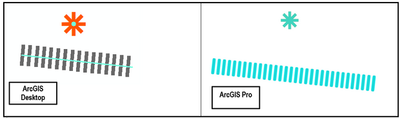
The new way is interesting, but not always practical.
> Please make possible to choose the old way which the selection appears, as a simple line or point, regardless of its symbology.
(the present idea follows this question : https://community.esri.com/t5/arcgis-pro-questions/select-invisible-features/m-p/1154385/highlight/t...)

I would like an option added to Arcgis Pro where the highlight color of selected features would highlight the actual geometry of the feature and not the symbology of the feature like it currently does.
It would basically work like it does in arcmap, if you select a point the selection highlight color would show a small dot on the location of the point and not take into account what the symbology of the point is. The same should apply to line and polygon features.



We added an option for this (for lines and polygons in 2D views) in Pro 3.6. It's available on the Selection tab of the Project - Options dialog. Hope this helps!
Thanks, Nathan.
You must be a registered user to add a comment. If you've already registered, sign in. Otherwise, register and sign in.