- Home
- :
- All Communities
- :
- Products
- :
- ArcGIS Pro
- :
- ArcGIS Pro Ideas
- :
- Pro: Auto Labeling Area and border Length during e...
- Subscribe to RSS Feed
- Mark as New
- Mark as Read
- Bookmark
- Printer Friendly Page
Pro: Auto Labeling Area and border Length during editing a polygon


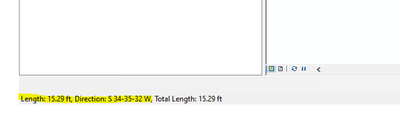
I would like to see the option to have a little window showing the total lenght of polyline that I am drawing and that I can know when to stop, when it shows , for example, that I have drawn 300 meters of total segments and that I will need to stop at 300 meters.
It's a functionality that was available in ArcMap: (see attached)
Thank you,
-Daniel.

The current segment Length and Direction information is also important.

This would be very helpful within the Traverse tools as well. Very often legal descriptions read i.e. "Thence following the centerline of the stream 1000 ft". Right now we have no way to tell how far we've gone as we trace the stream.



In ArcMap there was an incredibly useful display in the lower left of the window that showed the area, length, width, and direction of a rectangle while it was being drawn via "Create Features" in the Editor Toolbar. This display no longer exists in ArcPro and we'd like it back. My team creates Derivative products from Lidar and Imagery that often have minimum size thresholds, and this dynamic display was so useful for us while capturing. It allowed on the fly decision making as to whether a feature was large enough to capture.
It doesn't translate well in a screenshot, but here is what it looks like when I've done the first two clicks to create the rectangle but before the third click to finish it. The display at the bottom tells me I can skip this building as it does not meet my minimum square foot threshold.


That would be so useful!


I can see this being beneficial for Traverse tool as well. https://community.esri.com/t5/arcgis-parcel-fabric-ideas/calculated-area-should-account-for-linestri...

While creating / digitalizing a new polyline, it would be helpful to see the total length of the line. Using "constraints" it's possible see the length of the segment, but not the total line. In ArcMap, the total length is shown on the statusbar.


I do a calculation attribute rule to autoupdate a Length_ft field on insert and update, and use that to label the field in the map so I can see it without having the table or the construct features toolbar open. I use an additional label expression to add " ft" to the value for the label.
You must be a registered user to add a comment. If you've already registered, sign in. Otherwise, register and sign in.