- Home
- :
- All Communities
- :
- Products
- :
- ArcGIS Pro
- :
- ArcGIS Pro Ideas
- :
- Organizing of Maps within a Project
- Subscribe to RSS Feed
- Mark as New
- Mark as Read
- Bookmark
- Follow this Idea
- Printer Friendly Page
Organizing of Maps within a Project

- Mark as New
- Bookmark
- Subscribe
- Mute
- Subscribe to RSS Feed
- Permalink
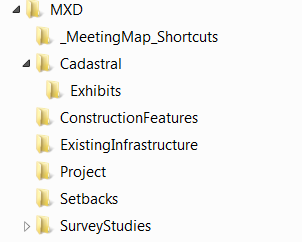
Providing a feature in the Project Contents to allow a user to organize their Maps would create more room for ArcPro implementation within a teams workflow structure. This could be a similar platform to Window Explorer where a user as the ability to create folders as well as see the last time a map was modified. Subsequently, a dynamic text referencing the map location within multiple folder would be of great use as well.
Fingers Crossed!
PS - My team's current ArcMap workflow contains multiple .mxd files within tiered folder locations for each development project with a .mxd document path file reference in the layout. Our workflow transition from ArcMap to ArcPro would be almost full strength should the map organization become better in ArcPro.
- « Previous
-
- 1
- …
- 4
- 5
- 6
- Next »

Agreed! That functionality would be super useful for both maps and layouts. Currently I rely on naming conventions to 'group' maps and layouts, but this can lead to a very long list for a project with lots of mapping requirements. The ability to create subfolders would be great!

My peers and i were so confused when switching to pro that such a simple but big quality of life improvment was not implemented from the start, but to see it took 4 years to consider it and has been put into the backlog for over 3 years now...

Yes, like the idea of folders in Catalog quite a bit. These would be folders that are used within the project. I can see most benefor for Maps and Layouts.

There must be grouping for maps and layouts in the catalog pane
I had over 70 maps and 150 layouts across 11 areas, and it would have been very helpful if I could group them. Grouping would make it much easier to organize maps and layouts, similar to how layers are organized in the Contents pane. It could also be extended to databases and notebooks when working with large volumes.



This is a good idea, I too would like to be able to group maps into a "folder" under the Maps node in the Catalog Pane. As a use case scenario I am mapping the output of a tool called Tuflow. I have multiple rasters for different scenarios. It would help with organising the many maps I need to create which become map frames in a layout. Grouping them in some way would be very helpful.

In big and complex projects that involve the production of many maps and layouts, it would be much easier to manage if there was an option to group together a few maps or layouts in the catalog pane (just like in the contents pane). Such a feature will allow the arrangement of the projects' products based on the different subjects that compose it


Hi everyone,
I’ve been working on a small custom ArcGIS Pro add-in to help organize maps and layouts more efficiently. The tool currently supports organizing maps and layouts (I haven’t implemented support for notebooks, toolboxes, or databases yet).
With this add-in, users can:
- Group maps and layouts into folders as they prefer
- Keep maps and layouts in the same folder
- Safely remove folders without deleting the actual items — when a folder is deleted, the contents move up one level instead of being removed
I’d like to share this add-in with others, but I’m not sure what the best approach is. In Autodesk there’s an add-in store, but for ArcGIS it seems like publishing to the official add-in gallery requires membership.
Does anyone know:
- The best way to distribute an ArcGIS Pro add-in to a wider audience?
- Whether there are free/public ways to share it (e.g. GitHub, internal distribution, etc.)?
Any guidance would be appreciated!
Thanks 🙂


I often have 10+ maps tied to one project and when changes are made to those maps, I have to archive the previous versions--usually by giving a revision number. Our company policy is to keep all revisions (government's way of records management) and those maps/layouts start piling up. I could start a new project for each revision, but then I end up with many disjointed projects that are all connected. It would be very helpful to be able to add subfolders within the Maps and Layout folders so I can organize and archive them in a meaningful way.
You must be a registered user to add a comment. If you've already registered, sign in. Otherwise, register and sign in.