- Home
- :
- All Communities
- :
- Products
- :
- ArcGIS Pro
- :
- ArcGIS Pro Ideas
- :
- Make it possible not to calculate statistics or py...
- Subscribe to RSS Feed
- Mark as New
- Mark as Read
- Bookmark
- Printer Friendly Page
Make it possible not to calculate statistics or pyramids in geoprocessing

- Mark as New
- Bookmark
- Subscribe to RSS Feed
- Permalink
I noticed that statistics and pyramids always get calculated in geoprocessing, even though I have chosen never to calculate pyramids in the overall options. Therefore, I would suggest to reintroduce the option to opt out of calculating statistics and pyramids in the raster storage settings of the geoprocessing environments. In the screenshot I marked the options in the ArcMap environment settings.


What tool are you using?
When I look at the Environments for Copy Raster https://pro.arcgis.com/en/pro-app/latest/tool-reference/data-management/copy-raster.htm#GUID-31745B4...
I see that it has the Pyramid and Raster Statistics options.
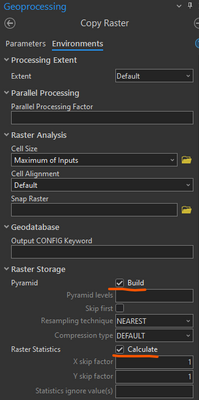
Where are you not seeing these options?
I would suggest to add it to all geoprocessing tools that produce raster. That would probably be most of the spatial analyst, Image analyst, 3D analyst tools. I noticed that it is missing in the Raster Calculator, Natural Neighbour, Aggregate or Focal statistics. I just checked Copy Raster; that looks exactly like your screenshot and how I would like it to have in the other tools.
Thank you for the details @CordulaGöke
After looking into this further, I see the comparison you are making. However, it is important to understand that in ArcMap, all the Environment settings are displayed as available all the time for all tools, even if the tool does not honor that setting. From the examples you provided, if we take Raster Calculator you do see the Raster Storage options in the Environment Settings. But examine what Environment settings are honored by the tool (https://desktop.arcgis.com/en/arcmap/latest/tools/spatial-analyst-toolbox/raster-calculator.htm#GUID...) and you'll see that those are ignored.
The difference with Pro geoprocessing tools is that environment settings that are not honored by a tool are not displayed as options (so that you aren't needlessly setting something that will simply be ignored). I'll check with the appropriate teams to make sure that this idea is still valid, and we have it Open again for other community members to vote on. I just wanted to provide this explanation to shift the mindset that this is an equivalency issue with ArcMap. It isn't. It would be an enhancement in Pro to provide these options.
We also will want to update the title to reflect that the request is to have Spatial Analyst/3D Analyst/Image Analyst tools that output a raster honor Raster Storage environment settings.
EDIT: But if the intent of the original idea is to NOT build pyramids or calculate statistics for output rasters from the tools you mention, I believe that that is already the case.
Thanks for the detailed explanation @KoryKramer. I used a lot of raster tools before I posted the idea. I just remember that I saw the message "calculating statistics or pyramids" for a layer that is just an interim result for me. If calculation of pyramids/statistics is completely turned of that is what I prefer.
Thanks @CordulaGöke Then you already have what you need because pyramids and statistics are not valid environment settings for these tools in ArcMap nor in ArcGIS Pro.
@שלומיחזאם and @DaniellaSollitt since you voted for this idea, can you please provide details about what functionality you are looking for? I'm marking this Already Offered at this time. If what you are asking for is to allow the setting of Pyramids and Statistics in output rasters for Spatial Analyst tools, it would be best to open a new idea with that specific request and your use cases.
Thanks, all!


Hello @KoryKramer .
I think, this was very good Idea - and unfortunately, I can not find other one to give kudo. 😕
In ArcMap there was plenty possibilities set geoprocessing centrally. Among it there was possiblity to turn off generation of pyramids centrally when working with Geoprocessing.
In ArcGIS Pro, you have to switch to "local Environments" in each tool and turn off Pyramids again and again evry time you use it. (And almost evry time I forgot to do it, because it is "hidden in the second page".)
=> Please, add the possiblity "(not) generate Pyramids / (not) generate Statistics" in the central settings (Project / Options / Geoprocessing). Or better, prepare such "central setting" to set, which calculation of Pyramids to do evrytime I use any tool in Geoprocessing. (Nearest / Bilinear / ... In ArcMap, this was possible.)
I´d be happy if you would connect this my comment to some other Idea, which is active for kudos today.
Thank you 🙂
Are the build pyramid and calculate statistics settings insufficient for you?

Yes - Unbfortunately this doesn't affect settings in Geoprocessing.
Some of the Geoprocessing tools have its own settings in "Environment" - and this doesn't work with these ArcGIS Pro settings, which you show in the picture.
My settings in this section are:

But when working with rasters in Geoprocessing, it makes the "default" - automatic build of Pyramids "Nearest neighbour". And you have to set it in the Environments section of each one tool you are working with.
(And because in ArcMap I was used to take the Environment section as "don't touch it" in evry tool, now I never check this settings when using Geoprocessing.)
There was this "central setting" (your picture) in ArcMap too. But there was an other "central setting for Geoprocessing", where you were able to set some parameters for all the tools you were running from Geoprocessing section.
And I'm missing it so much now.
This is what I mean:

Right click in the empty place of ArcToolbox - Environments.
...central settings for plenty of parameters used for all the ArcToolbox tools.
(Unfortunately, as I remember, there are more settings in todays ArcGIS Pro Geoprocessing tools, which heve different behaviour when you use it. Some offer for example pyramids (or other) settings and some not. Some use central settings of ArcGIS Pro or are not building pyramids at all. And you have to use separate tool after creating the product.
Other hand, when I use some raster as source for other calculations or to send it to someone else, I don't want to create pyramids at all. But "build Nearest neighbour pyramids" is now the default of some tools and it takes the time (/storrage place) to wait till finish the creation of unwanted pyramids/statistics.)
Thank you 🙂
@DavidVelhartický thanks for adding details. I have not looked into details recently, but with what you write, it seems not to be solved at all. We could consider creating a new idea, if the status does not get changed, with detailing better, what we are missing from the start.
You must be a registered user to add a comment. If you've already registered, sign in. Otherwise, register and sign in.