- Home
- :
- All Communities
- :
- Products
- :
- ArcGIS Pro
- :
- ArcGIS Pro Ideas
- :
- Implement a 'Select Previous' command
- Subscribe to RSS Feed
- Mark as New
- Mark as Read
- Bookmark
- Printer Friendly Page

- Mark as New
- Bookmark
- Subscribe to RSS Feed
- Permalink
Many times while editing you might accidently clear a complicated selection set. The idea is to develop a 'Select Previous' command that will restore the most recent selection set to being active.

Many times I have selected several polylines to move or perform another action, only to click outside of the selected entities and have to re-select all over again. With the "Previous Selection" one click and I have all of my previous selected entities to perform my "action"



I guess the interactive part of the request makes it different from other previous requests such as https://community.esri.com/ideas/1857.
But the easiest thing to do for now is to Make Layer From Selected Features. Name the selection layers appropriately and they can be toggled on/off from the Contents pane.
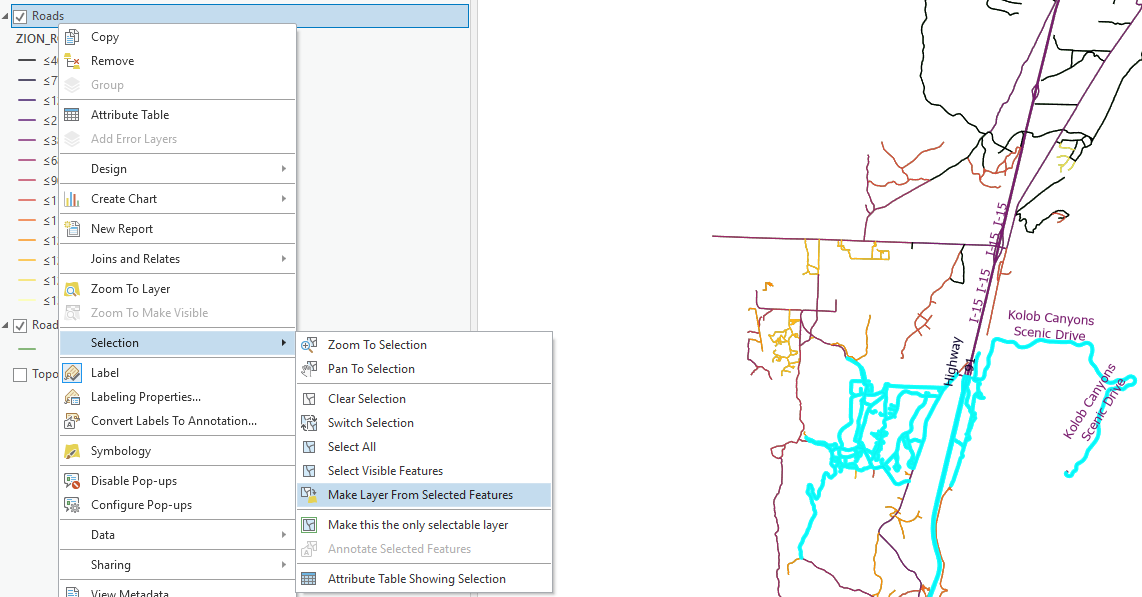
Cory,
Is there any way we can request an enhancement to this to allow users to scroll thru the history of what was selected in the dataset during our edit session, it helps to sometimes go back and reselect 300 objects you previously spent time selecting without reselecting them again or creating so many subsets of the original data.
Your help on this is greatly appreciated.
This idea is that request. But if you want to contact support you can submit an enhancement request through that channel.

Hi,
Upping this post. A selection history would be a fantastic tool. It would give a welcome solution to the very easy misclick that unselects dozains of individual features you spent half an hour to select one by one.

It would be so nice to have a keyboard shortcut to select "last selected" again. Frequently I zoom out, select a bunch of lines, zoom in, adjust the group of lines by rotating/moving and in the process I end up unselecting the lines. Then I have to zoom out, select them all again, and zoom back in to continue adjusting. I always remember using AutoCad years ago and how simple it was to just hit L when you need to select everything you previously had selected.
You must be a registered user to add a comment. If you've already registered, sign in. Otherwise, register and sign in.